When running web scraping tasks, managing social media accounts, operating eCommerce stores, or handling multi-account automation, proxies are an essential part of the infrastructure. However, many users encounter the same frustrating issue in real-world use cases: the local network works perfectly fine, but once a proxy is enabled, loading speeds become noticeably slower, with lag or even connection timeouts.
Many people instinctively assume the proxy provider is at fault. In reality, slow proxy performance is often caused by a combination of network physics, routing logic, and configuration issues.
In this article, we’ll break down the 5 core reasons why proxies slow down your connection and share practical ways to improve proxy performance effectively.
I. Why Does Proxy Speed Matter?
For everyday users, proxy speed directly impacts the browsing experience. Whether pages load smoothly, downloads complete quickly, or streaming platforms and geo-restricted services work properly all depends on having a stable and fast connection. Once speed drops, the overall experience suffers immediately.
For businesses, speed becomes even more critical. A high-performance proxy is often the foundation for the following operations:
- Web Scraping & Data Collection:
Faster connections allow more requests to be processed within the same timeframe, improving crawler efficiency and overall data throughput. - Search Engine Rank Tracking:
Low latency ensures search results are collected in real time, reducing delays and improving data accuracy. - Ad Verification & Brand Protection:
Fast response times make it easier to monitor ad placements and landing pages at scale while quickly identifying anomalies. - eCommerce Automation:
From competitor price monitoring and stock tracking to automated purchasing workflows, all automation systems rely on stable and fast proxies. If the connection slows down, the entire workflow may fail or become delayed.
Before optimizing, run a quick test with our diagnostic tool. Quick Access:
II. Key Factors That Affect Proxy Speed
1. Server Location
The closer the proxy server is to both you and the target website, the lower the latency. Long-distance routing across multiple networks naturally increases response times.
2. Bandwidth & Infrastructure
The provider’s bandwidth capacity, server hardware, and peering relationships with major ISPs all determine how much traffic the network can handle efficiently. Better infrastructure usually means more stable speeds.
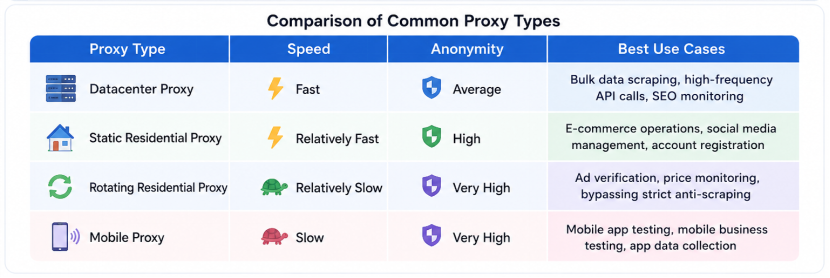
3. Proxy Type
Datacenter proxies generally offer faster response times and are ideal for high-frequency requests. Residential and mobile proxies are usually slightly slower but provide better anonymity and lower ban rates, making them more suitable for sensitive operations.
4. Concurrency & Rate Limits
Most proxy services impose limits on concurrent connections or request frequency. Sending too many requests in a short period can trigger throttling or queueing mechanisms, significantly increasing latency.
5. Local ISP & Network Quality
Your local internet provider also plays a major role. Poor routing quality, packet loss, or unstable local networks can affect performance even if the proxy itself is fast.
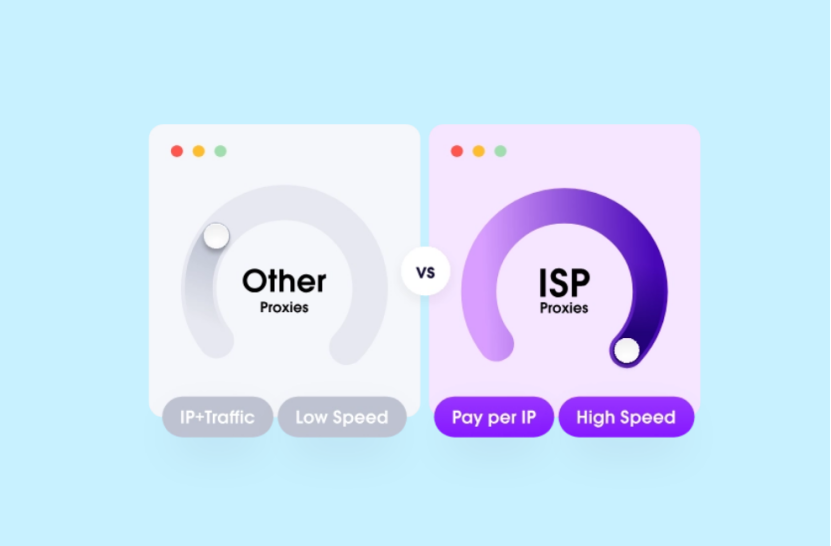
III. Common Reasons Why Proxies Become Slow
1. Server Overload
This is especially common with cheap or shared proxies. When too many users share the same server, CPU and memory resources become overloaded, causing response times to spike.
2. Poor Routing
If the provider’s network architecture is poorly optimized, traffic may take inefficient paths through multiple transit networks, unnecessarily increasing physical transmission distance and latency.
3. Limited Bandwidth
Free proxies and low-capacity servers often come with strict bandwidth limitations. Once multi-threaded scraping or heavy data transfers begin, bandwidth throttling quickly kicks in.
4. High Concurrency Causing Timeouts
Sending too many requests simultaneously can overload the proxy server and also trigger rate limiting on the target website. Some sites intentionally delay responses when they detect aggressive traffic patterns.
5. Unstable Infrastructure
Some low-quality providers rely on unreliable ISP connections without proper redundancy. This often leads to packet loss, unstable performance, and sudden slowdowns.
IV. Proxy Performance & Speed Optimization Guide
Before diving into optimization, we recommend using the 👉IPFoxy Network Diagnostic Tool to run a one-click check on your current IP geo-location, bandwidth speed (download & upload), and node latency. You can then optimize your strategy based on the actual results.
1. Choose the Right Proxy Type
Different proxy types prioritize different things. Datacenter proxies provide low latency and fast speeds, making them ideal for large-scale scraping and high-frequency requests. Residential proxies are slightly slower but offer better stealth and lower ban risks.
For tasks where speed matters more than detection risk, datacenter proxies are usually the best choice. For workflows requiring stability and lower ban rates, residential proxies offer a more balanced solution.
2. Optimize Proxy Network Settings
To help users handle complex cross-border networking scenarios, IPFoxy provides several advanced proxy optimization features.
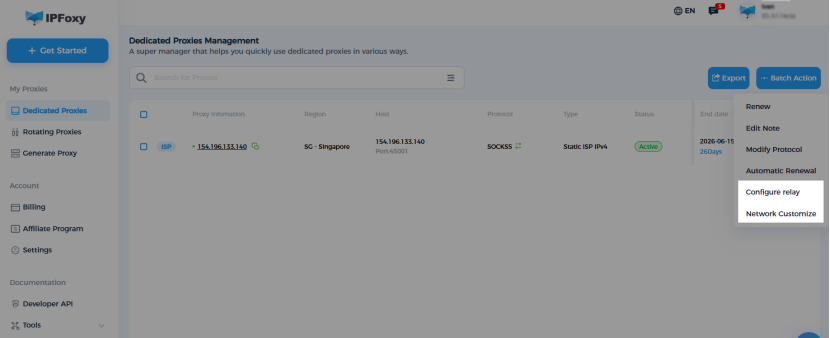
- Proxy Relay Acceleration: For certain regions such as Southeast Asia, IPFoxy supports relay acceleration for local IPs. Traffic is first routed through a low-latency relay node before reaching the target proxy, reducing lag caused by inefficient international routing.Available for Static Proxies when your local IP is in: VN, KH, TH, MY, ID, MM, PH, or LA. Navigation Path:Proxy Management → Batch Operations → Configure Relay Routes
- Custom Bandwidth:IPFoxy allows users to customize bandwidth allocation and select optimized network routes based on their business traffic requirements, improving performance across different scenarios.
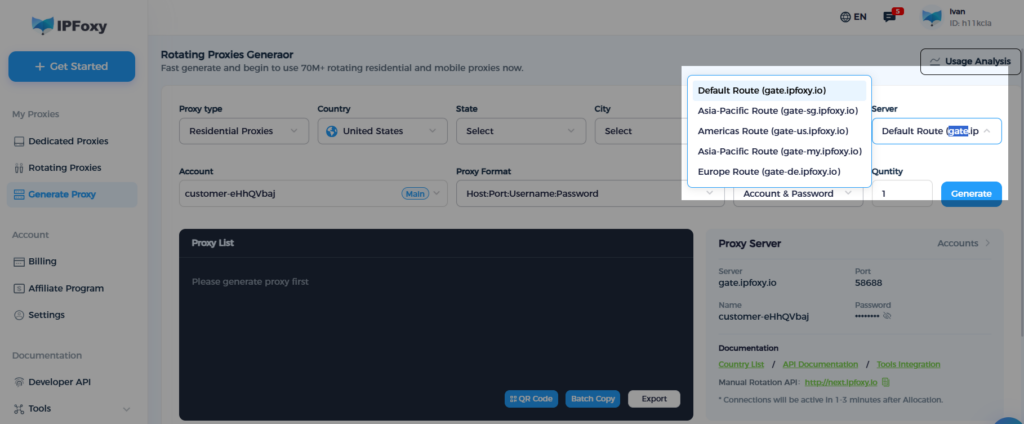
- Smart Routing Optimization: Auto-match the optimal paths for Rotating Proxies based on real-time gateway node speed tests.
Cheap shared proxies and public proxies are one of the biggest causes of slow speeds. Your connection quality can easily be affected by traffic from other users.
For enterprise automation or high-demand operations, dedicated static residential or datacenter proxies are strongly recommended. Exclusive bandwidth and cleaner network routes help eliminate congestion issues from the source.
4. Choose a Provider With Global Coverage
A reliable provider should route your traffic efficiently rather than forcing it through unnecessary detours. By choosing a provider with broad international coverage (such as IPFoxy supporting 200+ countries and regions), you can follow the “nearest-node principle” to reduce cross-region latency.
5. Optimize Concurrency Settings
Sending too many requests at once can overload the proxy server and trigger anti-bot rate limits on target websites. Adjust concurrency levels, retry intervals, and IP rotation frequency carefully to balance speed and stability.
Sometimes “slower and steadier” performs better in the long run than aggressively pushing maximum request volume.
V. FAQ
Some latency is completely normal because traffic must pass through an additional server. However, excessively high latency usually indicates poor routing or low-quality proxy nodes.
Datacenter proxies generally provide the fastest speeds thanks to high-bandwidth infrastructure and direct routing. Residential and mobile proxies are usually slower but offer better reliability and lower detection risk.
Try accessing two different websites simultaneously. If both are slow, the issue is likely with the proxy. If only one website is slow, that specific site may be rate-limiting or blocking your proxy traffic.
VI. Conclusion
Slow proxy speeds are usually caused by multiple factors working together. Server distance, bandwidth limitations, proxy type selection, concurrency settings, and even local network quality can all affect overall performance.
By understanding these factors and optimizing your setup accordingly, you can significantly improve proxy stability, reduce latency, and build a smoother automation workflow.