In the 2026 ticketing market, speed is everything.
Whether it’s Taylor Swift’s global tour or the NBA Finals, tickets on Ticketmaster are often sold out within milliseconds of release. For ordinary users, this may feel like a game of luck. But for professional ticket resellers, it is a battle of technology, network architecture, and anti-detection strategies.
As Ticketmaster continues to upgrade its anti-bot systems in 2026—introducing stricter WAF protections and evolving Queue-it algorithms—the era of relying on “fast clicks” or multiple browser tabs is over.
This guide breaks down the technical stack behind professional ticket reselling and explains how proxy infrastructure plays a critical role in achieving high success rates.
I. What are Ticketmaster Proxies?
Ticketmaster’s risk control system (especially under Live Nation) no longer simply checks IPs, but builds a multi-dimensional “trust profile.” The role of proxies is mainly reflected in the following aspects:
1. Multi-account anti-detect
Many professional ticket resellers operate dozens of Ticketmaster accounts at the same time. Their real challenge is not “how to grab tickets,” but “how to manage accounts without being linked.”
Ticketmaster determines whether multiple accounts belong to the same user through browser fingerprints and IP information. Once accounts are linked, it may lead to “soft bans” (such as being unable to join presales or getting stuck in queues indefinitely).
The role of proxies:
- Assign a dedicated, bound IP to each Ticketmaster account together with a fingerprint browser
- Achieve a “1 account + 1 fingerprint + 1 dedicated IP” isolation mechanism, completely eliminating linkage risks
2. Avoid 403 errors and queue restrictions
During high-demand periods, if you encounter errors like “Pardon the Interruption” or 403 Forbidden, it means your IP has been blocked by Ticketmaster’s WAF.
Datacenter IPs are almost instantly flagged in Ticketmaster’s ASN database, while shared proxies are often contaminated—once one user triggers risk control, the entire IP range may be affected.
The role of proxies:
- In this scenario, residential proxies should be used
- These IPs belong to real ISPs (such as AT&T, Comcast) and have high trust levels
- They make requests appear as normal residential users, helping bypass rate limits and even improving queue priority
3. Supporting automation scripts
For professional ticketing studios, automation scripts are essential. However, Ticketmaster’s system can easily detect high-frequency API requests.
At this point, automation requires a high-concurrency proxy pool. By configuring proxy lists, scripts can initiate independent purchase requests through hundreds of residential IPs simultaneously. Traffic-based pricing also provides cost advantages in large-scale concurrency scenarios.
Automation scripts must support sticky sessions, meaning the IP remains unchanged throughout the entire process (from entering the queue to adding items to the cart). If the IP changes mid-process, the system will detect an abnormal network change and terminate the transaction.
4. Regional and geo strategies
Ticketmaster operates across different domains (such as .com, .uk, .ca), and many presales have strict geo-restrictions, for example:
- US IPs are required for certain presales
- UK IPs may be required for specific artist presales
Proxy providers offer globally targeted residential IPs, allowing you to select exit IPs from specific cities to meet regional ticketing requirements.
II. How Ticket Resellers Configure Proxies for High Success Rates
Depending on different scenarios, resellers typically use proxies in the following way: static residential IPs during account preparation for stability, and rotating residential IP pools during ticket drops for high concurrency.
Different stages require different proxy strategies:
- Account farming phase → Static residential IPs
- Ticket drop phase → Rotating residential proxies
1. Multi-Account Management & Warm-Up
Ticketmaster is highly sensitive to a “consistent login environment.” If an account frequently changes IPs or its IP location does not match registration data, it will easily trigger CAPTCHA or even lead to bans.
Before ticket drops, resellers need to register multiple accounts, complete Verified Fan registration, and build account trust. At this stage, stability and independence are the core requirements. Many professional teams choose static residential ISP proxies (such as those provided by IPFoxy) and integrate them with fingerprint browsers.
Why choose static residential IPs?
- Native ISP trust: appears as a real residential user
- Long-term stability: IP remains unchanged, building consistent behavior history
- Physical isolation: each account is bound to a dedicated IP, preventing linkage
Use cases: account registration, daily login simulation, maintaining cookies, adding payment information
Configuration steps:
- Obtain proxy: choose IPs from the same country/city as the target event and collect proxy port, protocol, and credentials
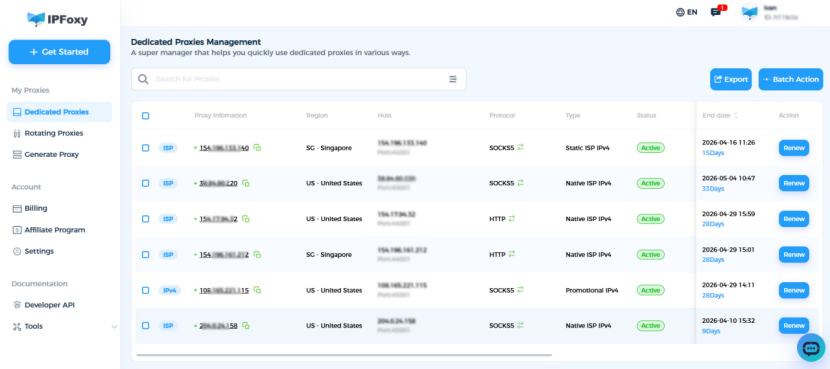
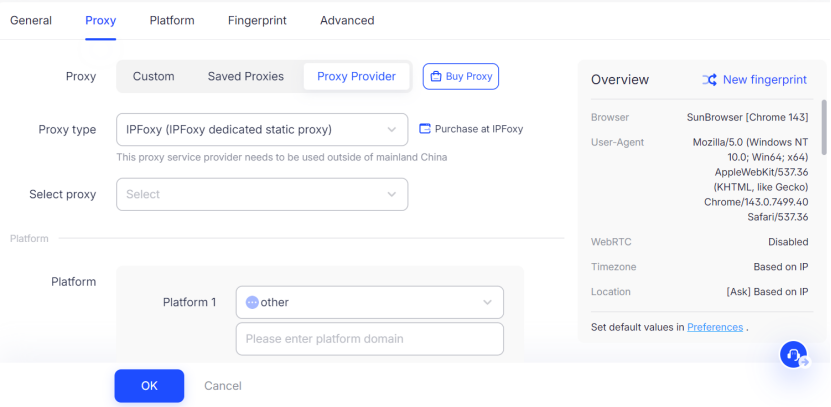
- Configure Antidect browser: use tools like AdsPower, Multilogin, or GoLogin, and assign each account a separate browser profile with a static proxy
- Account warm-up: start 1–2 weeks before ticket release, log in regularly, browse events, and simulate normal user behavior
- Usage on drop day: do not switch IPs during the queue; each static IP should bind to 1–2 accounts only
2. Automated ticket purchasing
When tickets go live, thousands of users flood the system simultaneously. At this point, manual clicking is no longer sufficient. Resellers must rely on scripts (bots) to run hundreds or thousands of tasks concurrently. The key requirement here is high concurrency and IP rotation, so rotating residential proxies are used.
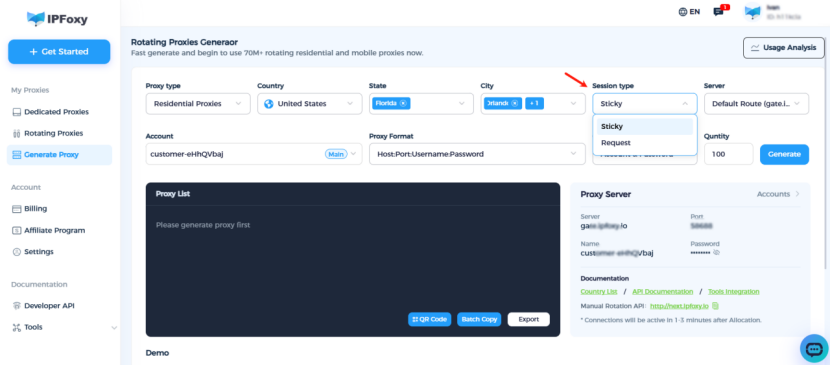
Why choose rotating residential IPs?
- Massive IP pool: tens of millions of real residential IPs support high concurrency
- Intelligent rotation: flagged IPs are replaced automatically
- Geo targeting: match the event location (e.g., Los Angeles, New York, London) to reduce latency
Use cases: flash sales, queue passing, inventory monitoring
Configuration guide:
Step 1: Basic proxy connection (Python)
import urllib.request
proxy = urllib.request.ProxyHandler({
    'https': 'username:password@gate-us-ipfoxy.io:58688',
    'http': 'username:password@gate-us-ipfoxy.io:58688',

})
opener = urllib.request.build_opener(proxy)
urllib.request.install_opener(opener)
content = urllib.request.urlopen('http://www.ip-api.com/json').read()
print(content)
Step 2: Script framework
import requests
import threading
proxy_pool = [

    'http://user:pass@gateway.ipfoxy.com:port1',
    'http://user:pass@gateway.ipfoxy.com:port2',

]

def grab_ticket(proxy, event_id):
    proxies = {'http': proxy, 'https': proxy}
    try:
        response = requests.post(
            'https://www.ticketmaster.com/api/cart/add',
            proxies=proxies,
            timeout=10
        )
        if response.status_code == 200:
            print(f"Success: {proxy}")
            return True
    except:
        print(f"Failed: {proxy}")
return False
Step 3: Set request frequency
import random, time
time.sleep(random.uniform(0.5, 2.0))
Step 4: Retry and rotation
def grab_with_retry(event_id, max_retries=3):
    for _ in range(max_retries):
        proxy = get_new_proxy()
        if grab_ticket(proxy, event_id):
            return True
        time.sleep(1)
return False
III. Ticketmaster FAQ
A1: This usually means your IP has been blocked.
Switch to a new residential IP
Avoid datacenter proxies
Clear cache and cookies
Change DNS (8.8.8.8 / 1.1.1.1)
A2: Technically unlimited, but not recommended.
Ticketmaster monitors multiple accounts under the same IP. Best practice: 1 IP = 1–2 accounts.
A3: It depends on account volume and proxy quality.
1 account = 1 IP
Limit requests to 1–2 per second per IP
Scale via more threads, not higher frequency
Conclusion
In the 2026 Ticketmaster ticketing battle, relying on luck is no longer enough. For professional teams, the underlying network infrastructure determines success.
A high-anonymity, low-latency residential proxy setup is essential. Choosing the right proxy strategy for each stage is the key to standing out in a millisecond-level competition.