












Facebook has long been one of the most important traffic channels for e‑commerce and social media marketing. As one of the largest social media platforms in the world, businesses can use Facebook to run ads, increase brand exposure and product traffic, search and filter target users, communicate directly with audiences, and attract potential customers.
However, Facebook has very strict account security management and a highly developed risk‑control system. If an account is operated improperly, it can easily trigger the platform’s risk detection system, leading to restrictions or even permanent bans.
For beginners, learning how to properly warm up a Facebook account is an essential skill. This article explains the 2026 Facebook account warm‑up process, including anti‑ban logic, step‑by‑step account aging strategies, and practical operation tips to help new accounts pass the early trust phase and achieve long‑term stable operation.
I. Common Reasons Why Facebook Accounts Get Banned
- Insufficient profile authenticity
Unlike many anonymous social platforms, Facebook requires users to provide real identity information. The following situations may be recognized as fake accounts:
- Using celebrity photos as profile pictures
- The name and profile photo clearly do not match
- Profile details appear randomly generated
- Frequently modifying personal information in a short period of time
If an account is identified as suspicious, Facebook may request identity verification, such as uploading a selfie or identification document. If verification is not completed in time, the account may be disabled.
Practical tip: When registering, try to use reasonable personal information and gradually complete the profile during the warm‑up process instead of filling everything out at once.
- Abnormal registration environment
Facebook checks the device, IP address, and network environment used during account registration. If these factors appear abnormal, the account may be marked as high risk.
Examples include:
- Using public proxies or IPs shared by many users
- Registration IP location not matching the phone number or email region
- Using virtual machines or frequently changing devices
- Performing many actions immediately after registration
This problem is especially common when accounts are created in batches.
- Aggressive behavior from new accounts
New Facebook accounts have very low trust levels during the early stage, often referred to as the “new account observation period.” The following behaviors may cause the system to classify the account as a marketing or bot account:
- Adding a large number of friends
- Joining many groups at once
- Sending bulk messages
- Posting advertising content immediately
Practical tip: In the early stage, focus on browsing content, liking posts, and performing simple interactions to gradually build account trust.
- Multi‑account environment associations
When identifying accounts, Facebook analyzes several technical signals, including:
- IP address
- Browser fingerprint such as device information and cookies
These signals help determine whether multiple accounts are connected. Many users manage several accounts on the same device and network to save costs, but this often triggers Facebook’s anti‑abuse system.
Practical tip: If you operate multiple Facebook accounts, try to separate devices and network environments so each account runs in an independent environment.
- Content triggering platform moderation
Facebook also applies strict content review. Common risk factors include:
- Promotion of restricted or sensitive products
- Overly promotional or click‑bait content
- Repeated posting of identical content
- Excessive external links
If content receives multiple user reports, the account may also face restrictions.
II. Facebook Account Warm‑Up Process: Daily Operation Guide
A newly registered Facebook account usually stays in the platform’s observation period for the first 1–14 days. During this time, the goal is to gradually increase the account’s trust level.
The core principle is simple: simulate how a normal user slowly becomes familiar with the platform.
Day 1: Registration and basic browsing
After completing account registration, perform several basic steps:
- Verify email or phone number
- Upload a profile picture using a real photo
- Search keywords and browse posts
Operational detail: No need to interact frequently. Simply browse content and stay online for about 15–20 minutes. After that, log out and avoid additional actions that day.
Day 2: Maintain a stable login environment and start light interactions
When logging in on the second day, use the same device and network environment as the registration process. Frequently changing devices or IPs may cause Facebook to suspect account compromise.
- You can begin simple interactions:
- Follow several relevant pages
- Like industry‑related posts
- Add one or two friends
Operational detail: Do not send many friend requests at once. Leave several seconds between actions to make the behavior appear natural. Total usage time can increase to around 15–30 minutes.
Day 3: Gradually complete the profile
On the third day, start filling in more profile information:
- Add a short bio
- Add location or interest tags
- After updating the profile, continue browsing content and explore other Facebook features:
- Watch recommended videos
- Browse public pages
- Explore built‑in games
These actions resemble normal user behavior and help the system recognize the account as genuine.
Operational detail: Complete profile information step by step rather than all at once. You may also leave short comments on posts with simple and natural opinions.
Day 4: Explore interest groups
Start joining groups related to your interests or industry. After joining a group, browse posts and discussions before participating actively.
You may also add about five to ten friends who share similar interests.
Operational detail: Avoid joining too many groups in one day. One or two groups per day is recommended.
Day 5 to Day 7: Build activity
During this stage, focus on maintaining natural account activity.
- Possible actions include:
- Continuing to add friends
- Joining new groups
- Interacting with group members
- Posting simple updates such as photos, daily thoughts, or professional insights
Operational detail: Avoid posting advertisements or strong promotional content at this stage.
Day 8 to Day 14: Enter the stable phase
After about two weeks of normal activity, the account usually passes the observation period. If no security checks or restrictions appear during this time, the account’s trust level is generally established.
- At this stage, you can begin:
- Creating a public page
- Joining more professional groups
- Publishing more specialized content
Operational detail: If the account is used for marketing or promotion, you may gradually introduce promotional content but still control the posting frequency.
III. Practical Facebook Account Warm‑Up Tips
Long‑term stable operation requires more than following a simple process. Network environment, device management, and user behavior all play important roles.
- Network environment
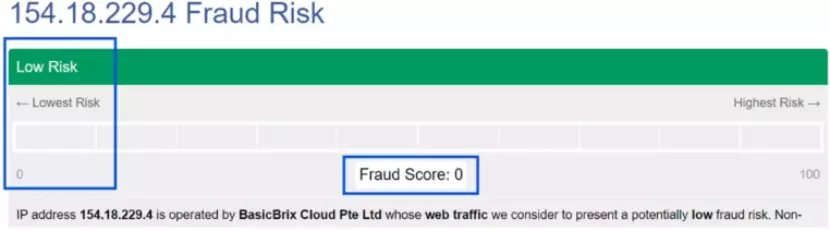
In Facebook account operations, IP quality directly affects account stability, especially during the early stage. Public proxy networks or low‑quality IPs often have high risk scores in platform databases and may trigger restrictions quickly.
Using a stable residential proxy helps the system recognize the account as a normal user, allowing the account to pass the early trust phase more smoothly.
Practical tip: Choose residential proxy resources with high purity and low fraud scores. For example, static residential proxy services such as IPFoxy generally provide clean IP sources and stable environments suitable for long‑term social media account operation.
- Use platform features to increase authenticity
To make the account appear more like a real user, try exploring different Facebook features.
For example, browsing local events, checking marketplace listings, or adding location tags when posting. These activities generate diverse platform usage records and help increase account credibility.
- Control operation frequency
Facebook continuously analyzes user behavior patterns such as browsing time, liking intervals, and comment frequency. If an account performs a large number of actions in a very short time, the system may assume automated behavior.
- High‑risk patterns include:
- Liking dozens of posts within minutes
- Sending many friend requests quickly
To reduce risk, keep actions natural. Browse content for a while before interacting and leave a few seconds between actions.
IV. Frequently Asked Questions
This may happen due to abnormal registration information, excessive actions immediately after account creation, or an unstable network environment that triggers the platform’s risk detection system.
Stop sending friend requests for a few days and focus on browsing, liking, and commenting. After the restriction is lifted, gradually resume normal interactions.
Some restrictions can be resolved through identity verification or appeals. However, accounts that repeatedly trigger risk detection may be more difficult to recover.
Conclusion
Facebook remains one of the most important traffic channels for e‑commerce and social media marketing. However, because the platform applies strict risk‑control rules, new accounts can easily face restrictions if operated improperly.
By understanding common ban reasons, simulating natural user behavior, controlling action frequency, and maintaining a stable network environment, new accounts can successfully pass the early trust phase and achieve long‑term stable operation.

