












In marketing and private customer acquisition scenarios, Telegram has become an increasingly important traffic channel for many teams. Compared with traditional social media platforms, Telegram offers higher user activity and a more flexible communication environment.
However, many beginners encounter the same problem when using Telegram: their accounts get restricted or banned shortly after registration. Therefore, learning how to warm up an account properly is the first step to ensuring smooth Telegram operations. This article explains the complete method for beginners, including the logic behind account warm-up, practical steps, and techniques to reduce the risk of bans.
I. Why Telegram Accounts Must Be Warmed Up
Launching business activities immediately after registering a new account can easily trigger Telegram’s strict risk control system, leading to several issues:
- Low account survival rate: Telegram is highly sensitive to spam behavior. New accounts start with almost zero trust. If they perform high-frequency greetings or join multiple groups quickly, the system may identify them as automated marketing accounts and permanently ban them.
- Low message delivery rate: Messages sent by low-trust accounts may be automatically marked as potential spam. They can be folded, hidden, or fail to trigger notifications for recipients.
- Low customer conversion rate: Accounts with empty profiles and no interaction history often appear suspicious to users. Even if messages are delivered, reply rates are usually low.
II. Telegram Account Warm-Up in Practice: 7-Day Quick SOP
Day 1: Register the account and complete the profile
After registration, complete basic profile information such as avatar, username, and bio. Join one or two public channels or interest groups and simply browse the content. Do not post advertisements. The goal is to establish initial login and browsing activity.
Practical tip: use a realistic avatar and fill in the profile information in a way that resembles a normal user.
Day 2: Increase browsing activity
Continue browsing channels and group content. You can:
- read messages
- click links
- follow new channels
Practical tip: join one or two additional groups and occasionally share a simple opinion, but avoid frequent posting.
Day 3: Start light interaction
After two or three days of use, you can begin basic interactions:
- reply to messages in groups
- chat with one or two contacts
Practical tip: keep conversations natural. Ask questions to encourage interaction, but avoid promotional or marketing content.
Days 4–5: Gradually increase activity
At this stage you can increase activity slightly:
- browse more channels
- participate in group discussions
- maintain conversations with contacts
Practical tip: it is recommended to join no more than two or three groups per day.
Day 6: Test account functions
On the sixth day, you can explore more features:
- add more contacts
- send messages normally
- participate in group chats
If no restrictions appear, the account is generally considered stable.
Day 7: Enter the operational stage
After about one week of warming up, the account usually gains a certain level of trust. At this stage you can gradually begin:
- posting content
- adding new contacts
- starting light promotion
Practical tip: even though marketing activities can begin at this stage, keep the frequency moderate and avoid sudden large-scale promotion that could trigger risk detection or user reports.
III. Advanced Telegram Warm-Up: How to Reduce the Risk of Account Bans
- Use a stable network environment
In Telegram’s risk control system, network stability is extremely important. If an account frequently changes IP addresses or uses heavily shared proxy networks, it may be identified as abnormal. Many users rely on public proxies or shared proxy services, which often have the following issues:
- multiple users sharing the same IP address
- frequent location changes and unstable network traces
- complex historical usage, possibly linked to large-scale registrations or marketing activity
For accounts intended for long-term operation, using a residential proxy such as IPFoyx is generally a safer option. This type of proxy is closer to a typical household network environment, with stable addresses and natural geographic attribution. It better matches the usage patterns of normal users and can improve account stability.
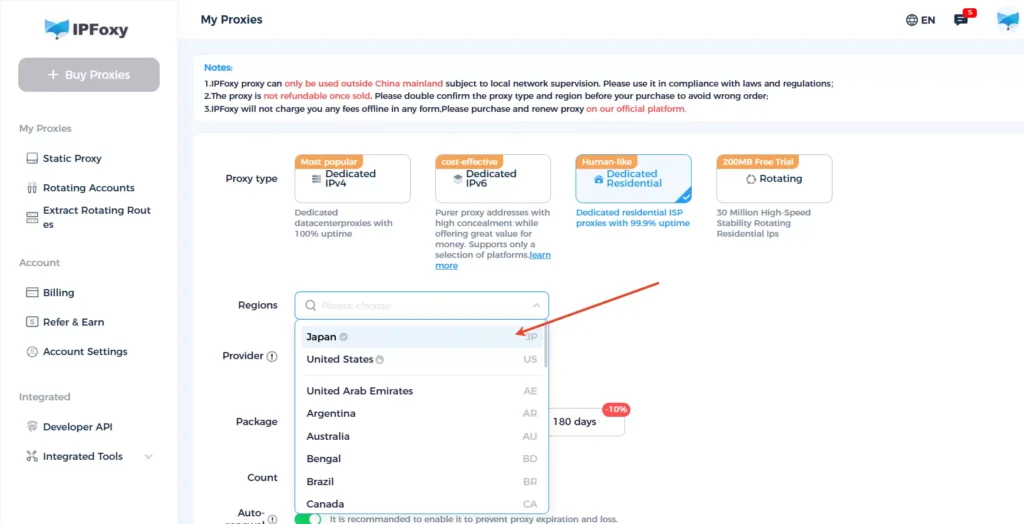
Such proxies can also be used with cloud phones, iOS or Android devices, and browser environments to improve the success rate of account warm-up.
- Use a real phone number for registration whenever possible
Accounts registered with virtual numbers or heavily used verification services may be restricted or banned shortly after creation. High-risk numbers often include:
- numbers from SMS verification platforms
- VoIP virtual numbers
- numbers previously used for multiple Telegram registrations
To improve account stability, it is recommended to use real SIM card numbers or long-term personal numbers that can pass Telegram’s verification mechanisms more reliably.
- Avoid sending identical messages in bulk or mass messaging strangers
Telegram has strict anti-spam measures. If an account sends identical messages to many users in a short time, it can quickly be recognized as spam. This is especially risky for new accounts. Sending promotional links or advertisements immediately after registration almost always triggers risk detection.
- Control early-stage account behavior
Immediately syncing contacts, joining many groups, messaging strangers, or posting links right after registration can trigger early risk checks. For new accounts, slow growth is more effective. The first three to seven days of quiet and natural interaction are critical. Avoid the following behaviors:
- joining groups in bulk
- initiating conversations with large numbers of strangers
- sending a high volume of messages in a short time
- frequently adding new contacts
Simulating the activity rhythm of real users significantly reduces the chance of being flagged.
- Do not focus only on the number of accounts
Some teams register thousands of accounts but fail to build real activity such as content updates, channel subscriptions, or two-way conversations. These accounts may be marked as inactive or low-quality accounts in the system. Even if they are not banned, their messages may have extremely low visibility and limited operational value.
During the warm-up stage, it is helpful to maintain basic social activity such as chatting with contacts, replying to messages, or participating in group discussions.
IV. Telegram FAQ
It is generally recommended to warm up the account for five to seven days. During this period, maintain normal activities such as chatting, browsing channels, and joining a few groups. After the account establishes a stable activity record, promotional actions can gradually begin.
This usually occurs when a user logs in repeatedly, requests verification codes frequently, or performs too many operations in a short time. The system temporarily limits actions, and you need to wait before trying again.
If message restrictions occur, stop mass messaging or aggressive actions temporarily. Continue normal chatting and browsing behavior. In many cases, the restriction is automatically lifted within 24 hours to several days.
Conclusion
The core purpose of Telegram account warm-up is to gradually build a real and stable usage history within the platform’s risk control system. By maintaining a clean network environment, realistic usage behavior, and natural social interaction, accounts can gain higher trust levels and reduce the risk of bans. Following a gradual warm-up process and maintaining healthy usage habits can help accounts operate stably in the long term, improving message reach and customer acquisition efficiency.

