












For e-commerce sellers and content creators on TikTok, one topic is almost unavoidable: the account matrix. Running multiple accounts means more exposure opportunities, a higher chance of creating viral content, and greater potential for traffic monetization.
However, the reality is often frustrating: accounts get banned right after registration, videos receive zero views, or even the device gets “blacklisted,” making it impossible to register again. This article breaks down the entire process of building a TikTok account matrix and helps you avoid the common mistakes that almost always lead to bans.
I. Running Multiple TikTok Accounts on One Device: Is It Allowed?
1.Why run multiple TikTok accounts?
- Higher efficiency in testing viral content: Multiple accounts can post similar content at the same time to see which video gains traction, reducing trial-and-error time.
- Coverage of niche categories: Different accounts can focus on different niches to attract specific audiences.
- Reduce account fluctuation risk: If one account experiences traffic decline or restrictions, other accounts can still maintain traffic flow.
- Scale product promotion: Multiple accounts can attach the same product link, multiplying exposure and increasing the chance of conversions.
2.Does TikTok allow multiple accounts?
TikTok does not prohibit one person from operating multiple accounts. However, what is clearly restricted is “behavioral association.” This refers to the platform identifying multiple accounts as being controlled by the same person through technical analysis, especially when used for mass reposting, fake engagement, or aggressive marketing.
If detected, penalties may range from traffic suppression to permanent bans. TikTok usually identifies associated accounts through the following signals:
- Device fingerprint association: Device fingerprint information is collected by the platform and can easily be detected.
- IP address association: Multiple accounts sharing the same IP can be flagged as a marketing account network.
- Similar operational behavior: Accounts registered at the same time, posting similar content, or interacting in similar patterns increase the chance of triggering risk controls.
- Environment conflicts: Inconsistencies between timezone, language, location settings, and the IP location may trigger platform security alerts.
II. Three Core Elements for Building a TikTok Account Matrix
A successful TikTok account matrix must be built on proper isolation across three key dimensions.
1.Hardware isolation
Currently, there are two main solutions for managing multiple TikTok accounts: cloud phones and Anti-detect browsers. Each has its own suitable scenarios.
- Cloud phones: Cloud phones are virtual smartphones running in the cloud. They allow multiple virtual phone instances on one device and are suitable for operators who mainly work on the mobile app and need to simulate real smartphone behavior.
- Anti-detect browser: An Anti-detect browser can create multiple simulated browser environments on a single device, making the platform treat each browser window as an independent device. This is suitable for web-based operations that require large numbers of environments and integration with automation tools.
2.Network isolation
- Independent IPs: Each account must use a separate IP address to prevent account association.
- IP purity: Avoid public or free proxies. These IPs are often shared by many users and may already be marked as high-risk by platforms.
- IP location: Accounts should use IPs that match their target region, and ideally the IP location should be as precise as the city level to better simulate real users.
3.Operational isolation
- Differentiated account profiles: Avoid identical avatars, usernames, bios, or linked social accounts.
- Staggered posting schedules: Avoid posting identical content simultaneously across all accounts.
- Natural behavior patterns: Simulate real user activity patterns and interaction habits to avoid robotic operations.
III. Practical Steps to Build a TikTok Multi‑Account Matrix
The following workflow is based on the common setup of cloud phones or Anti-detect browsers combined with clean IP resources.
Step 1: Environment preparation
- Cloud phone approach: Create multiple cloud phone instances and configure each instance with its own timezone and language settings.
- Anti-detect browser approach: Create multiple browser profiles and randomly generate or customize the device fingerprint parameters for each environment.
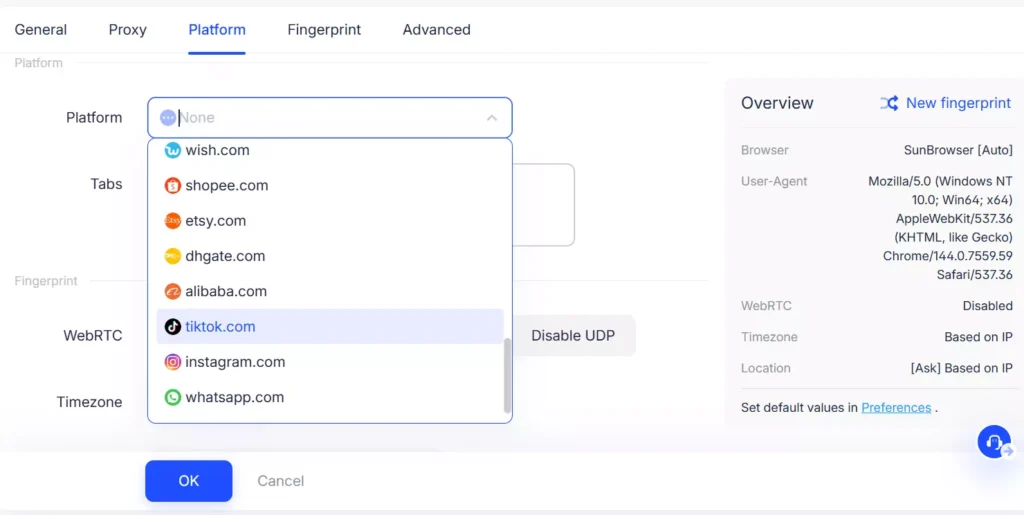
Step 2: Configure dedicated proxies
Besides device isolation, IP isolation is also critical.
- It is recommended to use local residential IPs that better simulate real user network environments.
- Ensure that the IP location matches the account’s operating region to reduce risk control triggers and avoid being detected as a virtual account.
Based on market feedback, IPFoxy dedicated static residential proxies often perform well in TikTok account matrix scenarios due to their high purity, exclusivity, and real native IP characteristics. In TikTok marketing studio environments, this often results in higher account survival rates.
1.When configuring dedicated static residential proxy IPs, select the proxy country or region first.
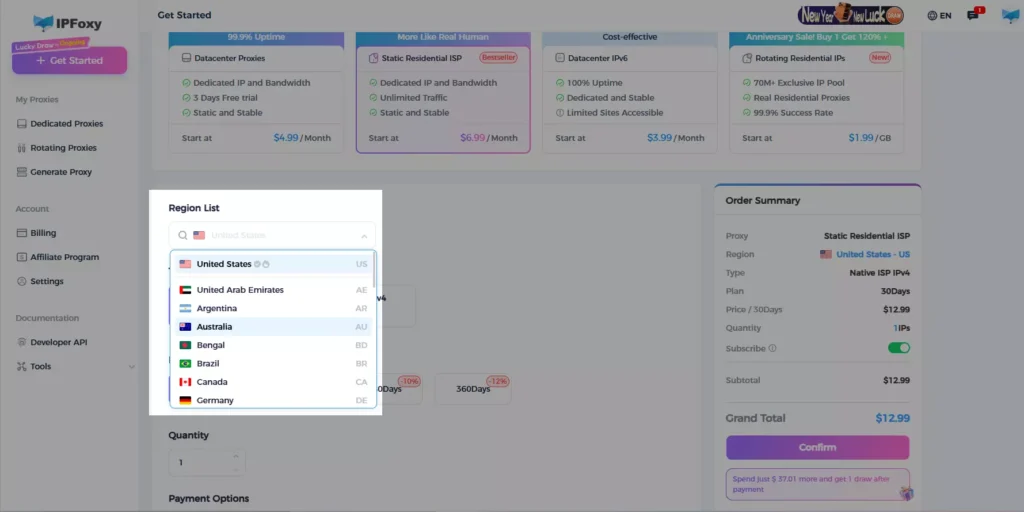
2.Proxy configuration
As mentioned earlier, proxies are usually configured together with multi-account isolation tools such as cloud phones or Anti-detect browsers.
On the IPFoxy “Static Proxy Management” page, you can view proxy configuration details including IP address, port number, username, and password.
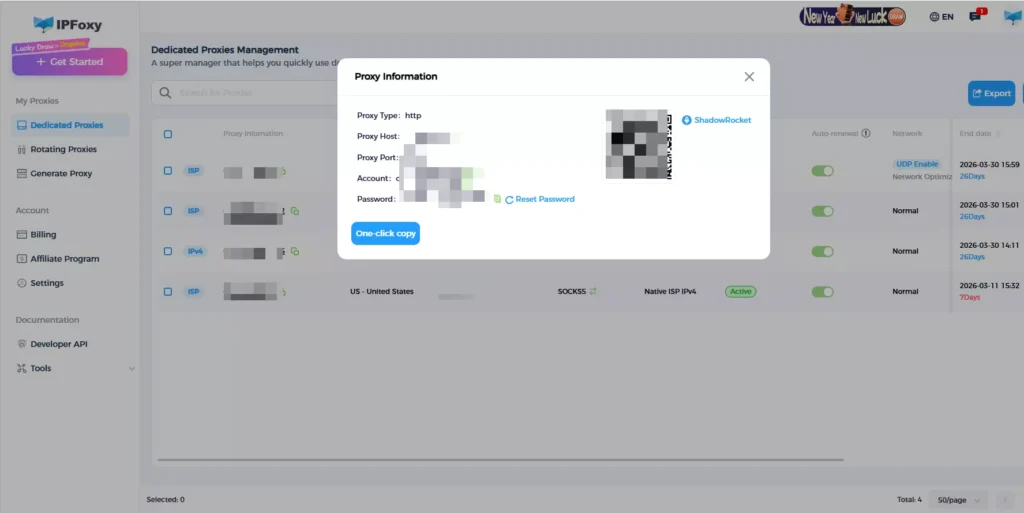
- Cloud phone configuration: Enter the IP, port, and other proxy information provided by IPFoxy in the proxy settings.
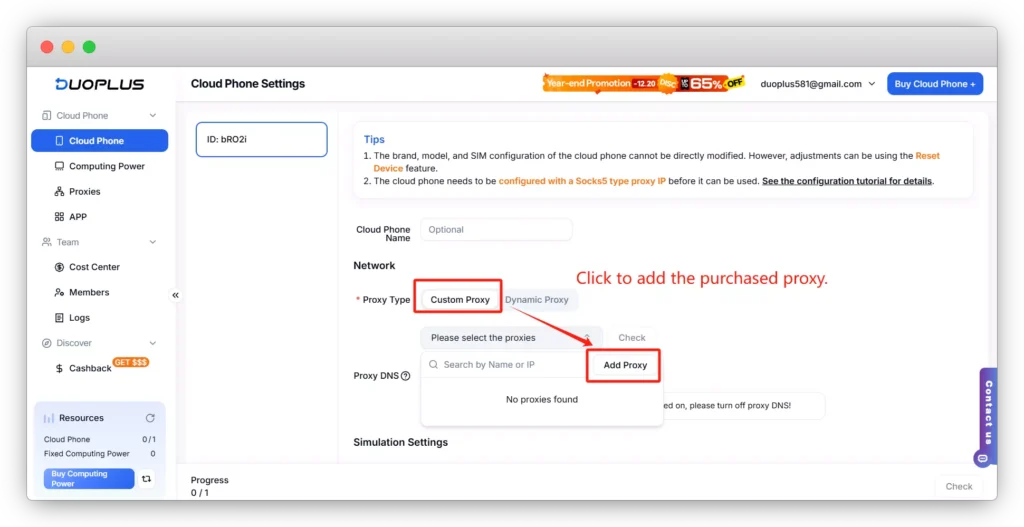
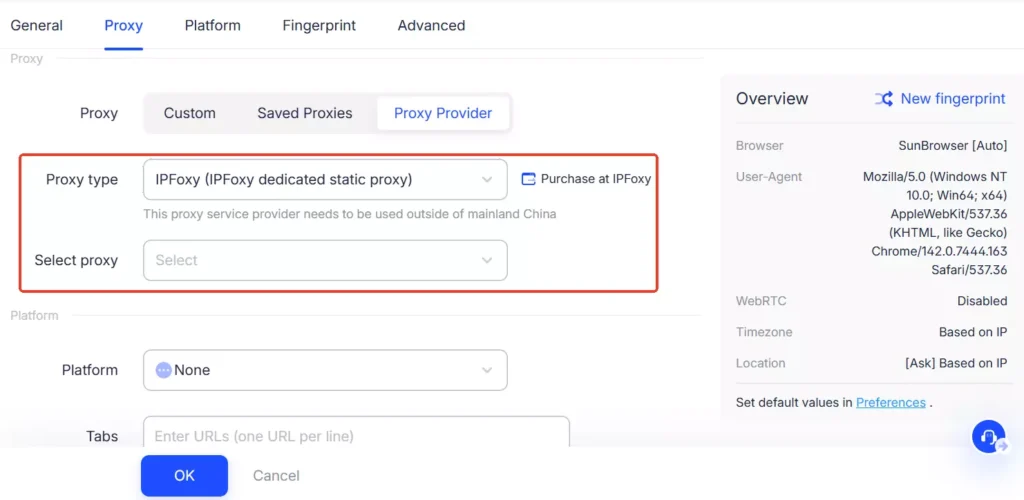
- Anti-detect browser configuration: IPFoxy supports seamless integration with many common Anti-detect browsers. You can quickly configure it under the “proxy information” section.
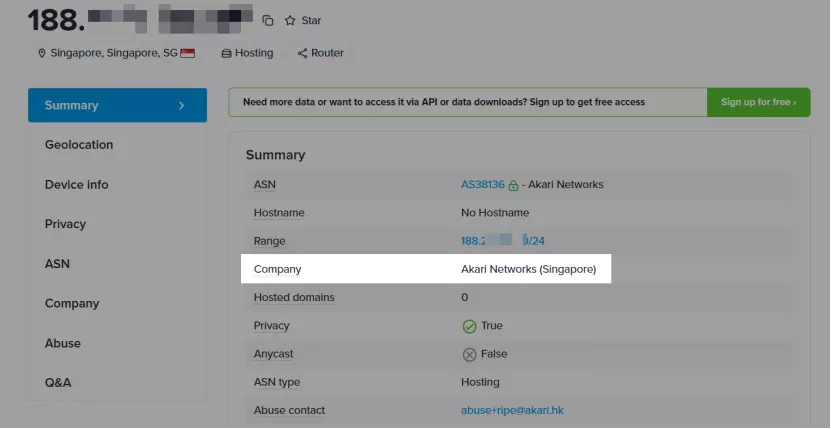
3.After the proxy is configured, use an IP detection website to confirm that the IP location matches the target market.
Step 3: Account registration and warm‑up
Log in to multiple TikTok accounts one by one in the configured multi-account environment. Use an email address or phone number to register the accounts. Keep the IP stable during the entire registration process and avoid switching networks.
After registration, enter a 7–14 day warm‑up period.
- Watch videos, like posts, and leave comments daily to simulate real user behavior.
- Do not rush to publish content. Allow the system to first recognize the account as a normal user.
- Maintain independent warm‑up activity for each account and avoid frequently switching between accounts on the same device.
Step 4: Content management
- Content materials can be reused, but it is better to perform slight re-editing to avoid complete duplication.
- Make sure posting times are staggered.
IV. Common Mistakes and Precautions in TikTok Multi‑Account Management
Mistake: Free proxy IPs can be used for account matrices
Precaution: Free proxies are usually public IPs and are easily blacklisted by platforms. It is better to use professional proxy services to ensure clean and dedicated IP resources.
Mistake: A fixed IP address is always safe
Precaution: Real users occasionally switch networks. An IP that never changes may also appear abnormal. It is better to keep the IP relatively stable and choose an IP from the same country or city if replacement is necessary.
Mistake: Managing all accounts in one centralized setup
Precaution: If all accounts are managed from the same device or network, a single abnormal signal may affect the entire account matrix. It is recommended to distribute accounts across different devices, IPs, and environments to reduce overall risk.
V. Conclusion
Running multiple TikTok accounts is not simply about increasing quantity. It is a systematic operation that requires structured management.
A successful TikTok account matrix relies on three core factors: hardware isolation, clean IP resources, and natural user behavior patterns.
With the right strategy, TikTok matrix operations can remain stable and healthy, allowing every account to contribute to traffic growth and monetization while avoiding the common issue of accounts getting banned immediately after registration.

