












In the process of expanding business operations and e-commerce, a real U.S. phone number is often a necessity. Unlike virtual numbers (VOIP) that are prone to risk control, Tello has become the go-to choice in 2026 for many users looking to establish a presence abroad, thanks to its low cost and reliable network. This article will provide you with the latest Tello registration tutorial, helping you avoid anti-ban pitfalls, successfully retain your number, and secure your U.S. number.
I. What is Tello and How is it Useful?
Tello is a U.S. mobile virtual network operator (MVNO) known for its flexibility. It allows users to customize their plans and supports eSIM, meaning activation can be done without a physical SIM card.
The main uses for registering Tello and getting a real U.S. phone number include:
- Bank/Platform Verification: Tello numbers can receive verification codes from banks and platforms like Amazon and eBay, ensuring smooth account verification.
- Global Roaming & Wi-Fi Calling: Connect to Wi-Fi and enable Wi-Fi Calling to receive calls and SMS for free, making communication with international clients more convenient.
- E-commerce Customer Support & Operations: If your business targets the U.S. market, having a local U.S. number boosts account credibility. It can be used for two-step verification and setting up a customer service hotline on your e-commerce platform.

II. 2026 Tello Registration Guide
Tello has recently tightened its risk control policies, and many users have encountered “order cancellations.” Here’s how to avoid that:
Step 1: Preparation
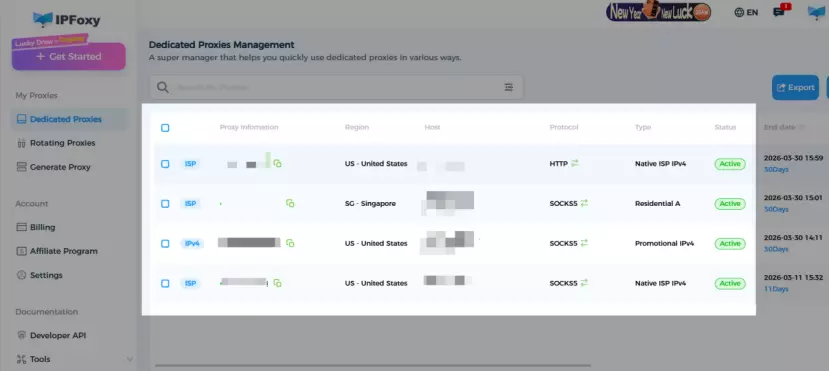
- Network Setup: Tello is highly sensitive to proxy IPs and high-risk VPN nodes, making them likely to be blocked. It’s best to use a dedicated static residential proxy.
How to Get It: You can get reliable proxy services from global providers. We’ve tested IPFoxy with good results, offering dedicated static residential proxies. Configure them with Shadowrocket on your phone for a clean, reliable local environment.
- Device Compatibility: Ensure your phone supports eSIM. If not, you can use a compliant IMEI generator to create a corresponding phone number.
Step 2: Register an Account
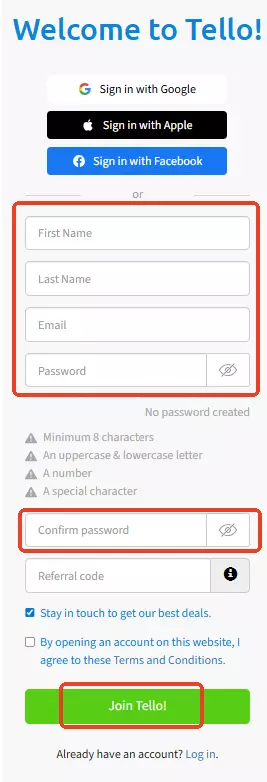
- Go to Tello’s official website and navigate to the registration page.
- Register using your email and password. Avoid using third-party logins like Google or Apple to prevent triggering risk control mechanisms.
- Use a Promo Code: If you have an invite code, use it during registration to receive a $10 bonus for both parties.
- Enter your name, email, and password, then click “Join Tello!” to complete the registration.
Step 3: Select Your Plan
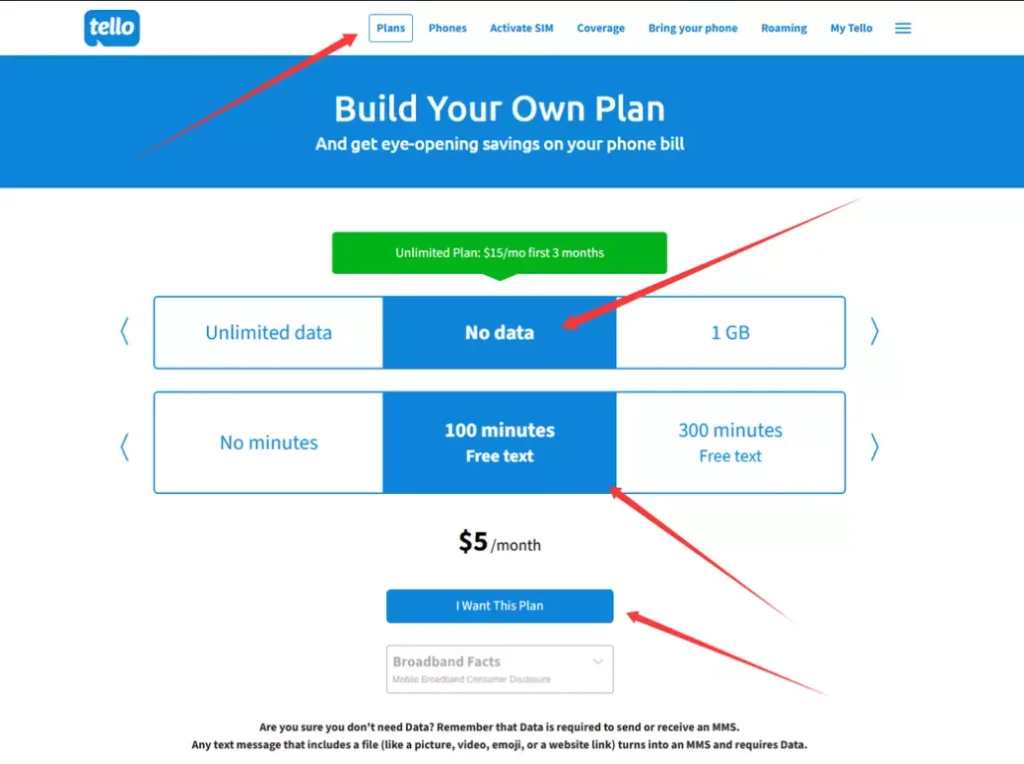
- After logging in, go to the “Plans” page and select “Build Your Own Plan.”
- Choose the “No data” and “100 minutes” options—avoid data plans as data is only available within the U.S. Once the price shows $5, click “I want this plan.”
Step 4: Enter Information & Payment
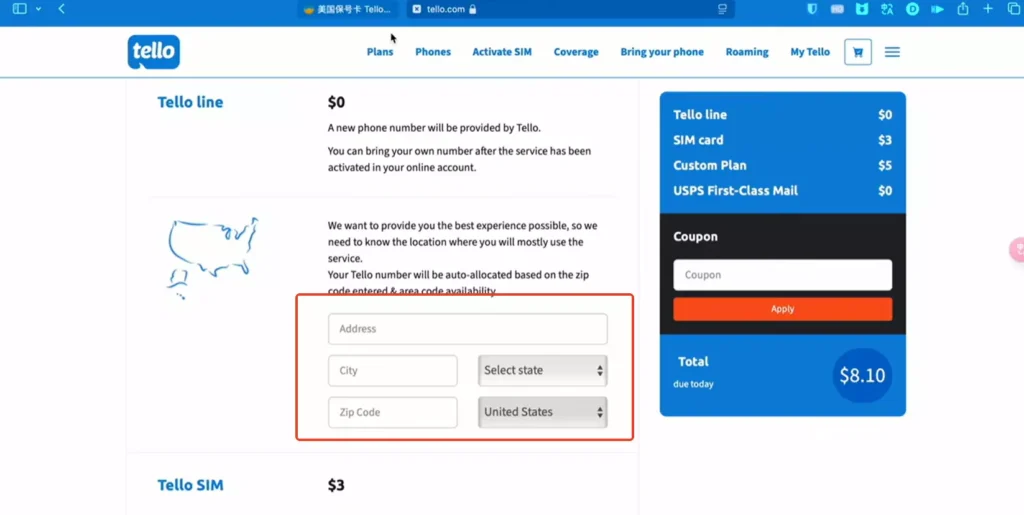
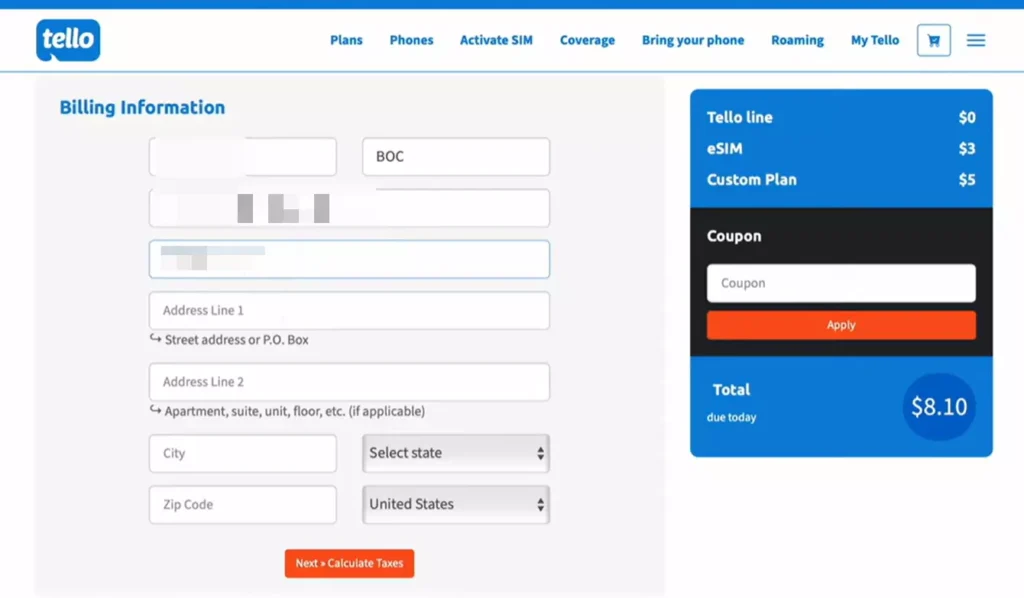
- Enter an Address to Choose a Number: Provide a real U.S. address to select the desired area code.
- Device Compatibility Check: Enter your IMEI number to ensure compatibility.
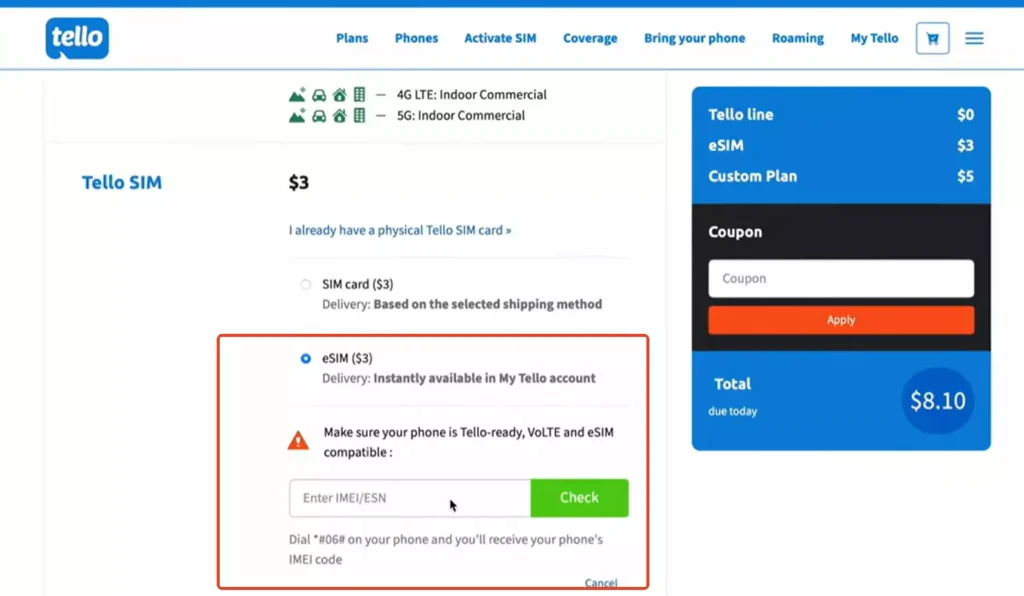
- Billing Address: Make sure to provide a real address; using a fake one increases the chances of cancellation.
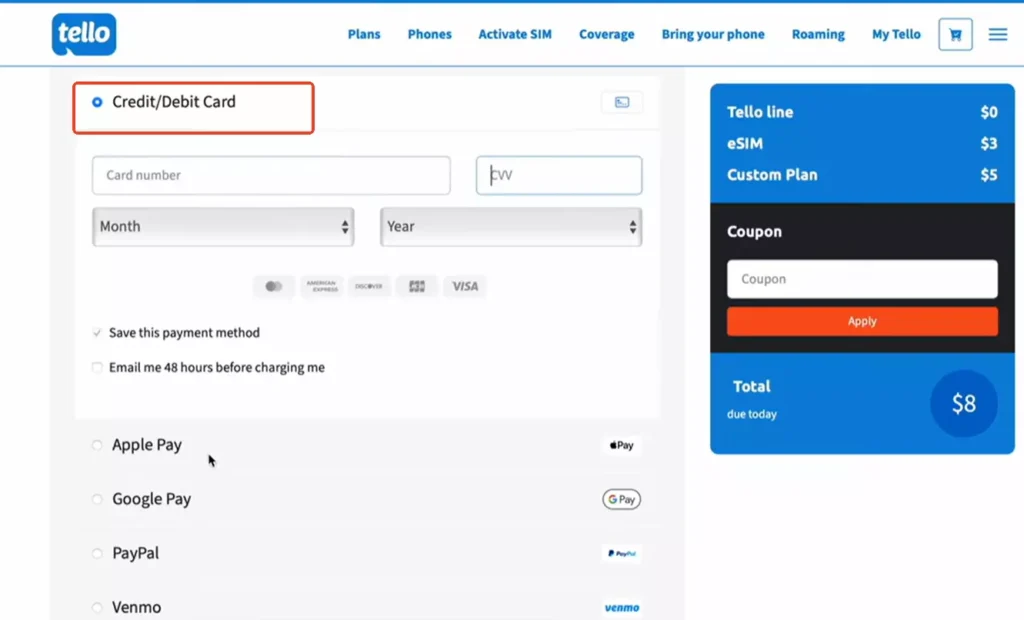
- Payment Methods: Tello accepts Visa/Mastercard credit cards issued in your country, PayPal linked with UnionPay cards, etc.
Step 5: Activate eSIM & Setup
- After payment, go to “My SIM” to view your eSIM QR code.
- Scan the QR code with your phone to download the eSIM configuration.
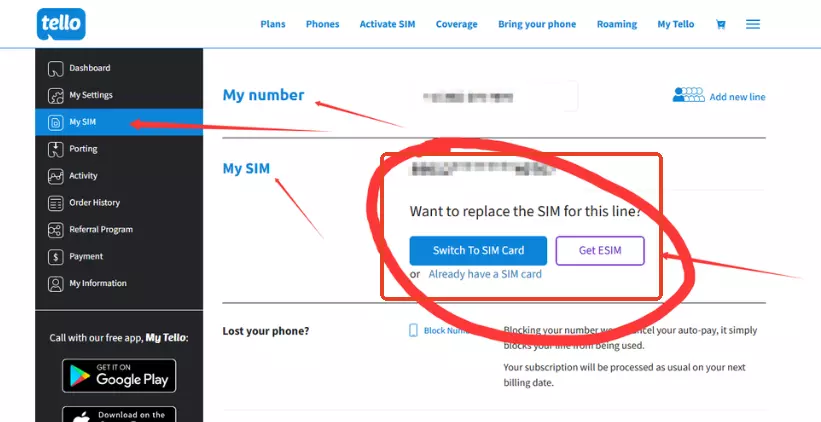
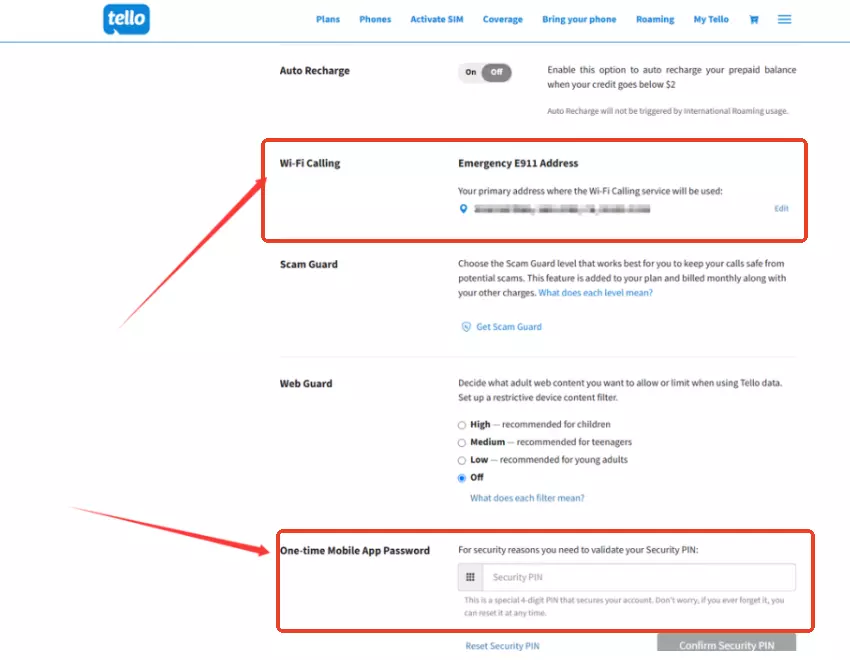
- Set Up Wi-Fi Calling: In the “My Settings” section, find E911 Address. Even if you’re outside the U.S., provide a real U.S. address to activate Wi-Fi Calling.
- Set up a PIN code and save your settings.
III. Tello Anti-ban & Number Retention Tips
To use Tello successfully, understanding its risk control mechanisms is essential:
1.Environmental Risk Control:
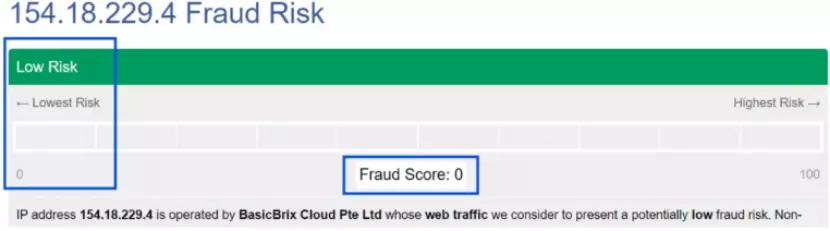
High-risk behaviors: After registration, it’s safe to disable proxies for everyday use. Many users report cancellations due to using networks identified as “proxies.” Airport networks with high IP fraud scores are commonly flagged. Before using, it’s advised to self-test.
For instance, IPFoxy’s static residential IP has low fraud scores and good performance in risk control checks, reducing the likelihood of getting banned.
2.Payment Risk Control:
Consistency of Billing Address: Tello strictly matches the billing address with the issuing country. Providing a real address helps demonstrate you’re a legitimate user.
3.One Account per Number:
Avoid registering multiple accounts from one device or IP. Tello monitors this closely, and mass registration can lead to account bans.
4.Account Maintenance:
To keep your phone connected, you can add a $20 “Pay As You Go” balance for international roaming.
Wi-Fi Calling: Using Wi-Fi Calling for calls and texts keeps you from using balance or incurring fees.
5.How to Retain Tello Number After Returning to Your Home Country?
Porting the Number: Before returning, port your number to another U.S. carrier for just $5/month to keep your number active.
Core Setting – Wi-Fi Calling: Make sure Wi-Fi Calling is enabled before returning. With Wi-Fi, you can receive texts and calls for free. If you use domestic cellular networks without Wi-Fi, international roaming charges may apply.
Login Regularly: Log in every 1-2 months to keep your account active. Avoid being flagged as an inactive account.
No Need to Change Plans: As long as you don’t cancel, the $5 plan will auto-renew each month.
IV. FAQ
A: No. As long as Wi-Fi Calling is activated, you can use the phone’s native dialer and messaging app.
A: Yes, Tello supports number portability. You can transfer your number to another U.S. carrier by following the porting process.
A: Tello offers flexible plan changes. You can modify your plan at any time, whether you want more data or adjust your calling minutes.
Summary
With this tutorial, you now have the full steps for registering and configuring your Tello U.S. phone number. This guide will help you successfully complete the registration and grow your business in 2026.

