












Creating on YouTube often looks like a story of traffic and monetization, but the risks behind the platform are easy to overlook—especially channel termination caused by “associated accounts.” You may simply be operating multiple channels or using the same device and network, yet the system can suddenly identify them as related to a violating account and terminate them all at once.
For professional creators, this means not only losing content, subscribers, and revenue instantly, but also seeing years of operational work disappear overnight. This article will walk you through the YouTube associated channel mechanism, the most common triggers, and practical prevention strategies so your channels can stay safer during daily operations.
I. 9 Common Triggers That Cause YouTube Channel Association
1.Same AdSense account
This is one of the most common triggers for channel association. If multiple channels are linked to the same Google AdSense account and one channel is terminated due to copyright violations, policy violations, or scams, the other channels may also be flagged as associated.
The following situations carry higher risk:
- Shared AdSense accounts
- AdSense used to collect payments for others
- Purchased or rented AdSense accounts
2.Identical registration information
When registering YouTube accounts, using the same phone number, backup email, or recovery email can all be treated as potential association signals by the system.
3.Shared channel management permissions
If channels share backend access, such as:
- The same admin account
- The same editor account
Or if you join the backend management of another channel, then once one channel violates policies and gets terminated, all related admin accounts may also be affected.
4.Logging into multiple channels on the same device
YouTube records device-related data such as:
- Device ID
- Browser fingerprint
- Login history
If a device previously logged into a terminated channel and later logs into a new channel, the new channel may also be identified as associated.
5.Same IP or network environment
If multiple channels consistently use the same network environment, such as:
- The same public IP
- The same home network
- The same proxy node
The system may determine that the channels belong to the same operator. When the number of accounts increases and synchronized operations appear, the risk rises significantly.
6.Using second-hand devices
This is often overlooked. If you purchase a used phone or computer that was previously used to log into a violating channel, the new channel may still be identified as associated.
7.Using the same third-party tools
When using automation tools such as auto-upload tools, analytics tools, or auto-comment tools, if those tools have been widely used by violating channels, the system may identify associations through API behavior patterns.
8.Google account ecosystem association
Normally, a single Google account can create and manage multiple channels. If that Google account violates policies or is terminated, all related channels may also be affected.
9.Same content or video sources
If multiple channels show the following patterns:
- Uploading the same videos
- Using the same materials
- Using identical editing templates
The system may identify them as a channel matrix. If one channel violates policies, the others may be closely reviewed as well.
II. What Is the Core Logic Behind YouTube Channel Association?
Within the YouTube ecosystem, the essence of channel association is that the platform treats the operator behind the accounts as the entity being penalized. If one channel is terminated due to serious violations, YouTube may also terminate other channels identified as associated with it. This is often referred to as a “linked termination.”
The core purpose is to prevent violating users from bypassing bans through new or backup channels.
If only a single channel were terminated, violators could easily:
- Create a new channel and continue operating
- Upload content through a friend’s or family member’s channel
- Build a multi-channel matrix to avoid penalties
To prevent this, YouTube extends penalties to the entire operating entity. The system does not simply evaluate individual channels but attempts to determine who is operating them behind the scenes.
Once channels are identified as associated, appeals become extremely difficult. Even if other channels fully comply with policies, they may still be terminated together, making recovery very challenging.
III. Solutions and Practical Tips to Prevent YouTube Channel Termination
1.What should you do if your YouTube channel is terminated?
Appealing a linked termination is difficult, but the following template can serve as a reference. More importantly, creators should focus on preventing such situations in advance.
Subject: Appeal for Channel Termination Due to Alleged Association
Hello YouTube Support Team,
I recently received a notification that my channel [Your Channel Name / URL] has been terminated due to association with another account that was allegedly in violation of YouTube policies. I would like to submit an appeal for review.
I would like to clarify the following facts:
- I am the sole owner of this channel and have not shared access with any other user.
- I have never received any strikes, copyright claims, or policy violations on this channel.
- I have not operated, managed, or controlled any other channel that was terminated.
- All content on this channel is original or complies fully with YouTube’s fair use and copyright policies.
Given the above, I believe my channel was mistakenly identified as “associated” with another terminated account.
I greatly appreciate your time and support. I am committed to complying with YouTube’s guidelines and maintaining a safe and original content environment.
Thank you for your attention, and I look forward to your response.
2.How to prevent YouTube channel association termination?
(1) Environment isolation
1.1 Device isolation
Device environment is one of the key signals used to determine channel association. A safer approach is to use separate browser profiles or an anti-detect browser to create an independent browser environment for each channel. This ensures that every account appears to come from a different device, reducing the chance of channels being identified as operated by the same person.
1.2 Network isolation
Besides device information, the network environment is another important factor in YouTube’s association detection. When operating multiple channels, avoid using the same IP or shared proxies, as this can also affect organic traffic distribution.
It is recommended that creators managing multiple channels configure a separate residential proxy for each channel environment. Residential proxies allow an IP to remain stable for long periods and appear as a genuine local user network environment, which can help obtain more natural local traffic while reducing association risks and potential content throttling.
If you have not yet configured environment isolation, you can follow this basic setup process:
1.Use residential proxy resources provided by IPFoxy. After testing, they show high IP quality and connection success rates. Register an IPFoxy account, choose residential proxy, select the target region or country, and obtain the proxy configuration details such as port, server address, username, and password.
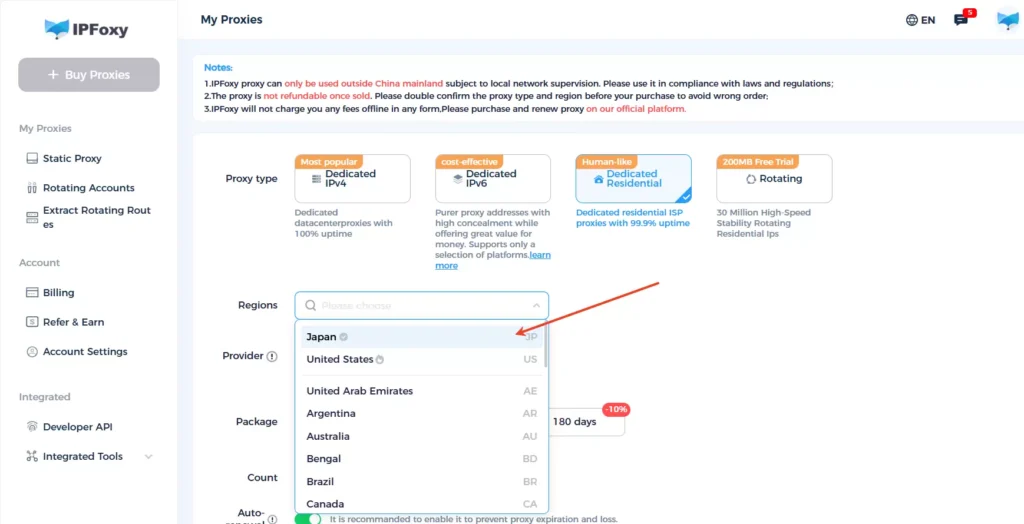
2.Isolate channel environments through an anti-detect browser.
Open your preferred anti-detect browser, configure the proxy information obtained from IPFoxy (proxy port, host, username, password), check the proxy connection, complete the environment setup, and then log into the YouTube channel within the created isolated environment.
(2) Separate management permissions
When managing multiple YouTube channels, avoid managing all of them under the same Google account. If cross-management is necessary, strictly control permissions and only grant the minimum required access. Avoid shared email accounts or admin accounts, and regularly review the authorization list to remove unnecessary access.
(3) Differentiate content and operations
When operating multiple YouTube channels, avoid uploading identical videos or using the same editing templates. Try to differentiate upload schedules, title styles, and thumbnail designs to reduce the likelihood of the system identifying them as a channel matrix. Even for commentary or repurposed content, add original elements such as voiceovers, subtitles, or edited clips.
(4) Use third-party tools cautiously
When using third-party tools to manage YouTube channels, disable automated features such as auto uploads, analytics automation, or auto commenting that may leave traceable API behavior patterns. Avoid tools that have been widely used by violating accounts or shared tool pools. It is recommended to choose reliable tools and keep records of which tools are used for each channel.
IV. Frequently Asked Questions
In most cases, YouTube provides an initial response within 1–2 weeks. If the case requires deeper review or manual verification, the process may take 4–6 weeks. If the termination was truly caused by a system misjudgment and there is no evidence of policy violations, recovery may be possible in theory, but the success rate is not guaranteed. If you have not received a reply after two weeks, you can politely follow up through YouTube support channels. It is also recommended to keep all appeal emails, communication records, and evidence materials for future escalation if necessary.
Many creators report that even channels under different Gmail accounts can be terminated due to system-identified associations. This often relates to shared account ecosystems, AdSense connections, devices, or management permissions. Sometimes if one account is identified as attempting to bypass a termination, other related channels may also be terminated
Why did I receive a notification about “associated account violations” even though I cannot find any related terminated channel?
YouTube does not list associated channels individually. The system determines associations using backend algorithms that analyze multiple signals such as devices, IP addresses, AdSense connections, and login behavior. Even if you cannot identify a terminated channel yourself, the system may still detect certain association patterns. In some cases, this notification may result from a system misjudgment or hidden association signals triggering risk control mechanisms.
Conclusion
This article explains the core logic behind YouTube’s associated channel termination mechanism. YouTube analyzes multiple signals—such as AdSense accounts, devices, IP addresses, registration information, management permissions, and content sources—to determine whether channels belong to the same operator. Once one channel commits serious violations, other associated channels may also be terminated.
Because the success rate of appealing association-based terminations is relatively low, creators should prioritize prevention. Measures such as isolating devices and network environments, separating management permissions, differentiating content strategies, and carefully selecting third-party tools can significantly reduce the risk of channel association.

