In high-demand concert ticket sales, using automation scripts can significantly improve ticket purchasing efficiency. When automated ticket buying fails, many people assume the issue lies in the script itself or that the platform has detected bot activity. In reality, as ticketing platforms continue upgrading their anti-bot systems, the quality of the network environment has become one of the most important factors affecting ticket purchase success rates.
This article explains how ticketing platforms detect abnormal users and how optimizing your network environment and configuring proxies can improve your chances of successfully purchasing concert tickets.
I. How Concert Ticketing Platforms Detect Abnormal Users
In recent years, the concert market has become increasingly competitive, with hundreds of thousands of users competing for tickets at the same time. While demand greatly exceeds supply, stricter platform risk-control systems also make ticket buying more difficult.
Unfortunately, many normal users are mistakenly flagged as scalpers or bots. Before using automation for ticket purchasing, it is important to understand the four main methods platforms use to identify suspicious activity.
1. IP-Based Risk Control
This is one of the core detection methods used by ticketing platforms. Platforms continuously analyze the behavior of each IP address:
- High-frequency requests from the same IP within a short period can trigger rate limits
- Datacenter IPs and VPS IPs are often classified as high risk
- Platforms compare IPs against reputation and blacklist databases shared across multiple services
2. Browser Fingerprinting
Even if the IP changes, platforms can still identify the same device through browser fingerprinting. Fingerprint data may include:
- User-Agent
- Screen resolution
- Time zone
- Installed fonts
- Canvas rendering characteristics
- WebGL parameters
Combined together, these attributes can uniquely identify a device.
3. Behavioral Analysis
AI-based anti-bot systems analyze user behavior patterns, such as:
- Perfectly regular clicking intervals
- Extremely short page dwell times
- Unrealistically straight mouse movements
Behavior that appears “too perfect” is often flagged as automated activity.
4. Multi-Account Association
Platforms track accounts logged in from the same device or IP address. Once suspicious account associations are detected, all related accounts may be restricted simultaneously.

II. Automated Ticket Purchasing: Proxy Setup & Environment Strategy
Once you understand how platforms identify suspicious users, the solution becomes clearer: make your requests appear like those of a normal user.
1. Use Rotating Residential Proxies
This is one of the most effective ways to improve automated ticket purchasing success rates.
Compared with dedicated static proxy solutions, rotating residential proxy services periodically rotate IP addresses. Even if one request fails or an IP becomes restricted, subsequent requests can use fresh IPs, greatly reducing the risk of long-term blocking.
For concert ticket purchasing, selecting proxy nodes geographically close to the ticketing platform’s servers can also reduce latency and speed up requests.
2. Optimize Your Network Environment
Bandwidth and connection quality also matter during ticket sales.
- Use a dedicated home network instead of public Wi-Fi
- Close unnecessary bandwidth-consuming applications
- Reserve network resources for ticket purchasing requests
- Use wired connections when possible to reduce packet loss and instability
3. Isolate Browser Environments
Create independent browser profiles for each ticket account and pair them with separate proxies.
Different accounts should use different browser fingerprints to avoid account association. Many users use an Anti-detect browser for deeper browser environment isolation.
4. Reduce Abnormal Signals
Complete account verification and payment setup in advance to reduce unnecessary actions during checkout.
III. Automated Ticket Purchasing: Proxy Configuration Workflow
As mentioned earlier, the rotation mechanism of rotating residential proxy services allows IP switching after failed requests, reducing the risk of repeated restrictions caused by using the same IP.
For example, IPFoxy Proxies provides millions of real residential IPs sourced from genuine home network users. It supports sticky sessions and automatic IP rotation, helping users avoid restrictions caused by low-trust or repeatedly used IP addresses.
Below is a basic setup workflow using IPFoxy Proxies as an example.
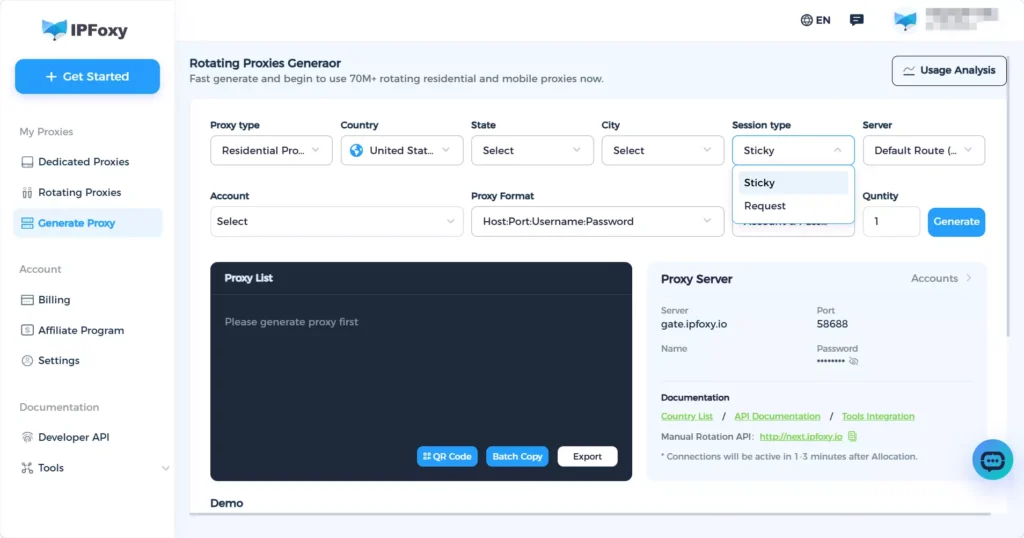
1. Register and Obtain Proxy Credentials
Get a rotating residential proxy from IPFoxy Proxies. Select proxy nodes based on the ticketing platform’s server region, then configure protocol type and session rotation settings to generate your proxy credentials.
2. Configure the Proxy in Your Browser
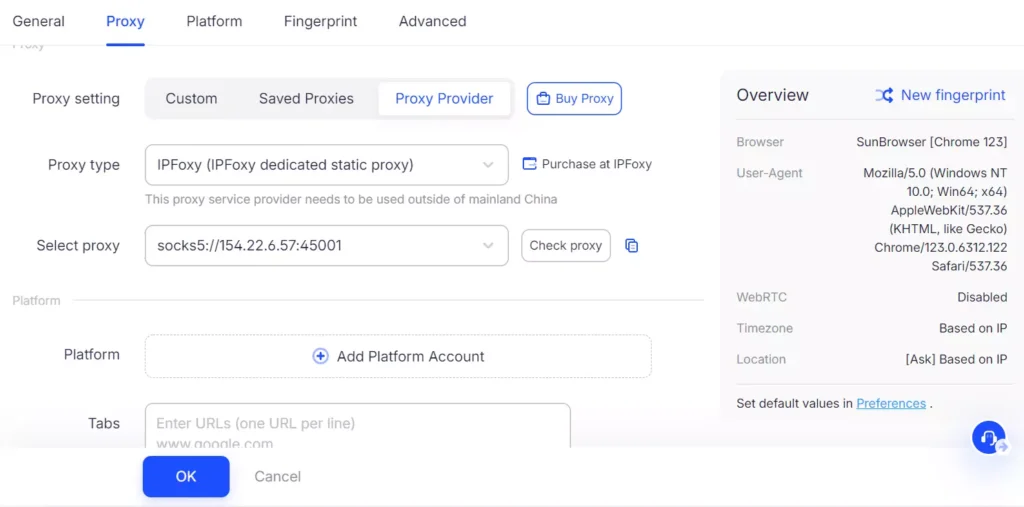
IPFoxy Proxies supports both SOCKS5 and HTTP protocols and can be used with Anti-detect browser tools and automation platforms.
For concert ticket purchasing, using proxies together with an Anti-detect browser is recommended.
3. Verify IP Connectivity and Quality
After configuration, verify that the proxy is active by checking the displayed IP location and testing the IP quality using professional IP detection tools.
4. Test Before the Sale Starts
Log into the ticketing platform in advance and browse normally for several minutes. Confirm that the account does not trigger any abnormal warnings before waiting for ticket sales to begin.
IV. Practical Tips to Improve Concert Ticket Purchase Success Rate
A clean network environment is only the foundation. Combining it with proper strategies can further improve your success rate.
1. Log In Early and Bind Payment Methods
Log into your account at least 30 minutes before ticket sales begin.
Complete:
- Identity verification
- Shipping information
- Payment method binding
Reducing extra actions during checkout can save valuable seconds.
2. Use Multiple Devices Simultaneously
Stay logged in on both the mobile app and desktop browser.
Operate both simultaneously and complete payment on whichever device succeeds first. Mobile apps are often more stable than web pages during peak traffic periods.
3. Choose Low-Latency Proxy Nodes
When using proxies, prioritize nodes close to the ticketing platform’s CDN or server location to reduce latency.
4. Avoid Excessive Refreshing
Open the ticket purchase page in advance and avoid constantly refreshing before the sale begins, as this may trigger rate limits.
Familiarize yourself with the purchasing process beforehand:
- Click purchase
- Select session
- Confirm quantity
- Complete payment
The entire process should ideally take less than 15 seconds.
V. FAQ
A rotating residential proxy uses IP addresses assigned by real residential internet providers, giving the traffic authentic geographic and ISP characteristics.The rotating mechanism regularly changes IPs, reducing the risk of repeated blocking caused by using a single IP address. Since residential IPs are generally considered trustworthy, ticketing platforms are less likely to block them proactively.
Internet speed only affects transmission capacity. Risk-control filtering happens before requests reach the order system.Even with a very fast connection, if your IP is flagged as suspicious, your requests may be filtered before entering the ticket purchase queue.
If several accounts are used on the same device, highly similar browser fingerprints may expose account associations, causing all related accounts to be restricted simultaneously.Browser fingerprints help platforms identify the same user across multiple accounts.
VI. Conclusion
Repeated concert ticket purchase failures are often not caused by slow internet speeds, but by poor network environments.
Modern ticketing platforms evaluate user trustworthiness based on multiple factors, including:
- IP quality
- Browser fingerprints
- Behavioral patterns
- Account associations
Once flagged as suspicious, purchase requests may be blocked before even entering the queue.
By configuring rotating residential proxies, isolating browser environments, using multiple devices, and following proper operational strategies, users can significantly reduce the risk of being incorrectly flagged and improve their chances of successfully purchasing concert tickets.