Amazon data scraping is essential for product research, price monitoring, and competitor analysis. As platform risk control continues to evolve in 2026, traditional scraping methods are no longer stable enough for long-term use.
This guide focuses on practical implementation and walks through the core workflow of Amazon data scraping, including data types, technical challenges, and reliable solutions.
I. Why Scrape Amazon Product Data in Bulk? What Data Can You Collect?
Why scrape Amazon product data in bulk?
Bulk scraping helps you efficiently gather market insights and make data-driven decisions instead of relying on intuition. Compared to manual collection, automated scraping is faster and more suitable for continuous monitoring.
What data can be scraped from Amazon?
Amazon provides a wide range of accessible data, including:
- Product basic data: title, brand, category, ASIN, description, images — used for product analysis and cataloging
- Pricing data: current price, discounts — useful for price tracking and dynamic pricing
- Reviews and ratings: review content, rating scores, review count — used for customer feedback analysis
- Ranking and sales data: Best Seller Rank (BSR), category rankings — helps evaluate product popularity
- Search result data: keyword rankings and result listings — useful for visibility and ad optimization
- Seller and inventory data: seller info, stock status, fulfillment method — supports competitor and supply chain analysis
II. Technical Challenges of Amazon Scraping in 2026
In practice, Amazon scraping is far more complex than simple page extraction. With stronger anti-bot systems, several challenges arise:
1.Strict anti-scraping mechanisms
High-frequency requests, repeated IP usage, or abnormal browsing patterns can easily trigger detection and lead to blocking.
2.Frequent CAPTCHA challenges
CAPTCHA verification is commonly used to detect suspicious traffic, significantly reducing scraping efficiency.
3.IP blocking and rate limiting
Using a single IP or low-quality proxy often results in restricted access.
4.Dynamic page structure
Amazon frequently updates HTML structures and element selectors, requiring constant maintenance of parsing logic.
5.JavaScript-rendered content
Some data loads dynamically via JavaScript, requiring browser automation or rendering tools.
6.Concurrency and request rate control
Balancing speed and safety is difficult—too fast triggers blocking, too slow reduces efficiency.
7.Data cleaning and structuring
Raw scraped data often contains noise or inconsistencies, requiring cleaning and normalization before analysis.
III. How to Scrape Amazon Product Data in Bulk
Amazon scraping is typically built step by step rather than completed in one go. Below is a practical workflow from basic setup to a scalable solution.
Step 1: Define scraping targets
Before starting, clarify:
- Target pages: product pages (ASIN), search results, or category pages
- Key fields: title, price, rating, review count
This directly affects your code structure and efficiency.
Step 2: Implement basic scraping logic
Test whether the page can be fetched and parsed:
import requests
from bs4 import BeautifulSoup

url = "https://www.Amazon.com/dp/B0XXXXXXX"
headers = {
    "User-Agent": "Mozilla/5.0"
}

res = requests.get(url, headers=headers)
soup = BeautifulSoup(res.text, "html.parser")

title = soup.select_one("#productTitle")
print(title.get_text(strip=True) if title else "No Title")
This step helps confirm page structure and data locations.
Step 3: Integrate rotating proxy
When scaling up, using a single IP will quickly trigger blocking. A rotating residential proxy is required.
Instead of maintaining your own proxy pool, it’s recommended to use a mature proxy service to reduce operational overhead. For example, providers like IPFoxy offer a large pool of residential proxy IPs with flexible configuration options such as region, rotation frequency, format, and protocol.
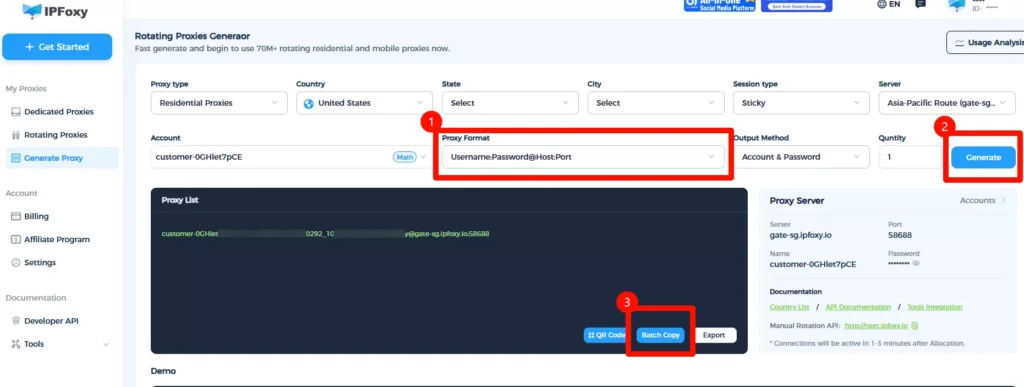
Example (Python proxy setup):
import requests
from requests.auth import HTTPProxyAuth
import urllib.request

if __name__ == '__main__':
    proxy = urllib.request.ProxyHandler({
        'https': 'username:password@gate-us-ipfoxy.io:58688',
        'http': 'username:password@gate-us-ipfoxy.io:58688',
    })
    opener = urllib.request.build_opener(proxy, urllib.request.HTTPHandler)
    urllib.request.install_opener(opener)

    content = urllib.request.urlopen('http://www.ip-api.com/json').read()
    print(content)
After execution, you can verify that the outgoing IP has changed.
Step 4: Enable batch scraping
from concurrent.futures import ThreadPoolExecutor

urls = [
    "https://www.Amazon.com/dp/ASIN1",
    "https://www.Amazon.com/dp/ASIN2"
]

def fetch(url):
    global headers, proxies
    try:
        response = requests.get(url, headers=headers, proxies=proxies, timeout=10)
        return response.status_code
    except Exception as e:
        return f"Error: {e}"

with ThreadPoolExecutor(max_workers=5) as executor:
    results = list(executor.map(fetch, urls))

print(results)
Control concurrency carefully to avoid triggering rate limits.
Step 5: Deploy with Docker
FROM python:3.11-slim

WORKDIR /app
COPY . .

RUN pip install requests beautifulsoup4

CMD ["python", "main.py"]
Run:
docker build -t Amazon-scraper .
docker run Amazon-scraper
Step 6: Structure scraping tasks
{
  "name": "Amazon_product",
  "start_urls": ["https://www.Amazon.com/dp/{asin}"],
  "fields": {
    "title": "#productTitle",
    "price": ".a-offscreen"
  }
}
IV. How to Improve Success Rate and Efficiency
After building the basic pipeline, focus on optimization:
1.Optimize request headers
Simulate real browser behavior:
headers = {
    "User-Agent": "Mozilla/5.0",
    "Accept-Language": "en-US,en;q=0.9",
    "Connection": "keep-alive"
}
2.Use random User-Agents to avoid uniform request patterns.
Control concurrency + add random delays
import time
import random

def fetch(url):
    time.sleep(random.uniform(1, 3))
    try:
        response = requests.get(url, headers=headers, proxies=proxies, timeout=10)
        return response.status_code
    except Exception as e:
        return f"Error: {e}"
This reduces detection risk and improves long-term stability.
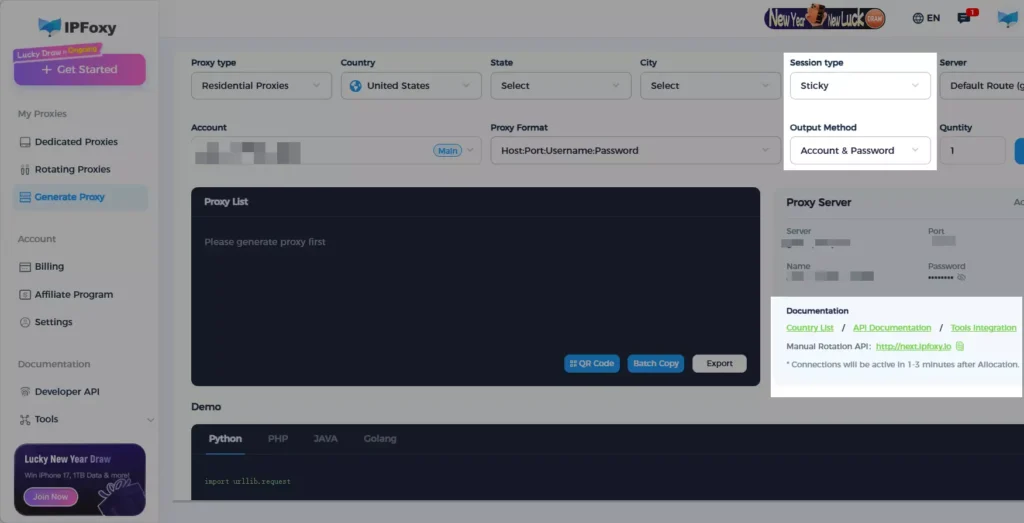
3.Optimize proxy rotation strategy
- Sticky session: maintain the same IP for a period (useful for pagination or reviews scraping)
- Rotating per request: switch IP for each request (ideal for large-scale scraping)
- Manual switching: controlled via API
Combining these modes helps mimic real user behavior.
4.Add retry mechanism
def fetch_with_retry(url, retries=3):
    for i in range(retries):
        try:
            response = requests.get(
                url,
                headers=headers,
                proxies=proxies,
                timeout=10
            )
            if response.status_code == 200:
                return response.text
            elif response.status_code in [403, 503]:
                print(f"Attempt {i+1} failed: {response.status_code}")
                time.sleep(2 ** i)
            else:
                return None
        except Exception as e:
            print(f"Request error: {e}")
            time.sleep(2 ** i)
    return None
This significantly improves task completion rate.
5.Simplify parsing logic
title = soup.select_one("#productTitle")
price = soup.select_one(".a-offscreen")
Extract only necessary fields to improve performance.
V. FAQ
- Do I need an account to scrape Amazon data?
Most product page data is accessible without login, but frequent access may still trigger verification. Proxy and request control are still necessary. - Why do I sometimes get empty or incomplete data?
This usually happens when requests are blocked or content is not fully loaded. Check status codes or retry with a different proxy. - Should I use requests or browser automation?
Use requests for simple pages due to higher speed. For dynamic content or complex structures, use browser automation tools.
VI. Conclusion
The key to Amazon data scraping is balancing stability and efficiency. With proper request strategies, proxy configuration, and concurrency control, you can build a reliable and scalable data collection system.
In real projects, start simple, iterate gradually, and eventually develop a fully automated scraping workflow that can run long-term.