












In ecommerce operations, localized community management, multi-brand matrix strategies, and customer support systems, LINE is no longer just a communication tool. It has become a core private traffic channel for user retention and conversion.
As business expands from a single brand to multiple parallel projects, one account is often not enough. Multi-account management becomes essential.
This article systematically breaks down multi-login methods, environment architecture, network isolation, account warming strategies, and common risk issues—helping you upgrade from “just logging in multiple accounts” to “stable long-term account operation.”
I. How to Run Multiple LINE Accounts?
In multi-account scenarios, many people first think of preparing multiple phones and logging one account per device. While simple, this method becomes inefficient as account numbers grow.
More importantly, physical device separation does not equal true isolation. If multiple devices share the same public IP address, the system still detects batch behavior within the same network environment, and correlation risks remain.
When scaling up, it is not recommended to rely solely on adding more hardware. Below are more scalable solutions.
1.Native Multi-Account Login
If you only need to log in to three accounts simultaneously, LINE’s built-in multi-login feature is sufficient.
Login process:
- Log in to the main account: On mobile → Settings → Device Sync+ → Allow PC login → Scan QR code to log in to Account A.
- Add a second account: On PC, click avatar in the top-left corner → “+ Add Account” → Scan QR code again for Account B.
- Add a third account: Repeat step 2. Three circular avatars will appear for switching.
Platform differences:
Mac: Also supports three accounts via Menu Bar → LINE → Add Account.
Linux: No official client yet. You can run the Windows version through Wine.
2.10+ Accounts or More
When accounts expand to 4–10 or more, native login reaches its limit. At this stage, strategy must shift toward environment isolation and system architecture optimization.
Typical scenarios:
- Multi-brand operations: each brand has independent customer service accounts.
- Multi-region community management: managing groups in different countries and languages.
- Large customer service teams: shift-based account usage.
Below are common solutions.
Method 1: Browser Multi-Login
Browser Multi-Login Setup
1.1 Open Chrome → Click avatar (top right) → Add new user → Create multiple Chrome profiles.
1.2 Configure proxy via extension
Browser isolation does not equal complete isolation. Identical IP addresses may still cause account linking. Therefore, configure different proxy settings for each Chrome environment.
We use residential proxy ISP information from IPFoxy. Based on testing, IPFoxy’s dedicated residential proxies have high IP purity and can be quickly integrated into browsers, making them suitable for multi-account environment binding.
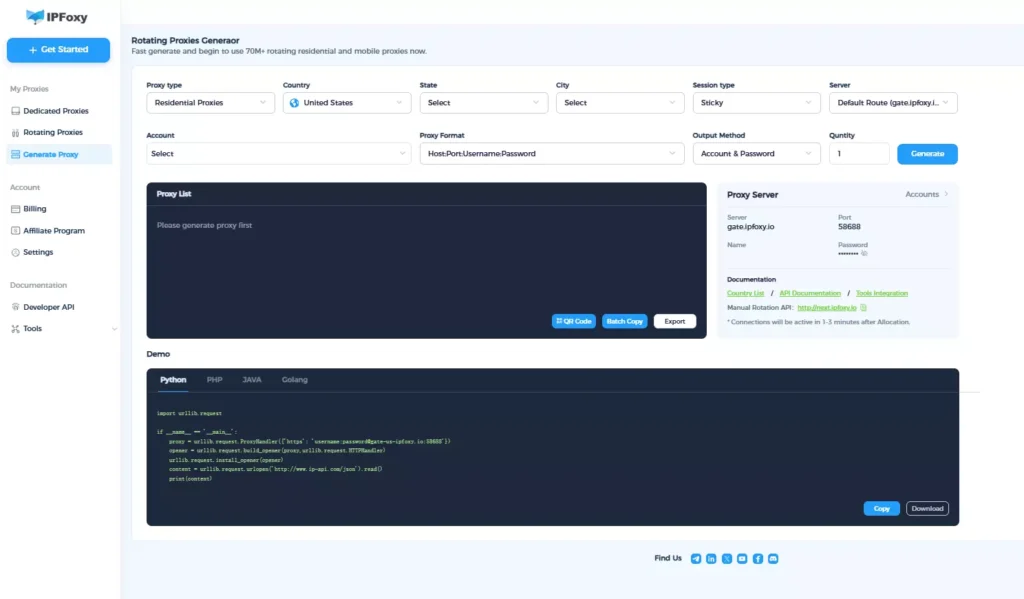
1.3.Configure proxy via extension
Use Proxy SwitchyOmega 3 (ZeroOmega). Enter the proxy protocol, host, port, username, and password provided by IPFoxy to complete configuration.
Create independent browser profiles and log in to different accounts. Each Chrome profile generates independent cache directories and cookies.
Besides Chrome, you can also use: Microsoft Edge,Brave. Each browser can manage different account groups.
Method 2: Anti-Detect Browser Multi-Login
Standard browser multi-login only separates cache and cookies, but underlying device fingerprints remain similar.
An Anti-detect browser creates independent profiles for each account and allows customization of:
- Time zone and language
- Cookies
- Canvas / WebGL fingerprints
- User-Agent
- Operating system version
From a system recognition perspective, each account appears to operate on a different device rather than multiple windows on the same computer.
Setup process:
- Create a new profile in the Anti-detect browser.
- Configure time zone, language, cookies, Canvas/WebGL fingerprint, User-Agent, and OS version.
- Configure independent proxy IP.
Similar to Method 1, assign a dedicated residential proxy to each environment using IPFoxy’s proxy details (host, port, credentials) and test connectivity.
- Bind a fixed account and start using.
Open LINE within the configured environment and register or log in.
Method 3: Android Emulator or Virtual Machine
Steps:
- Install emulator or virtual machine.
- Use multi-instance manager to create instances.
- Install LINE in each instance.
- Log in with different accounts.
Emulators are suitable for mobile ecosystem operations but consume significant resources and are not recommended for large-scale parallel use.
Virtual machines create a full independent operating system environment. They provide system-level isolation but also require high hardware resources, making them more suitable for medium-scale matrices.
II. LINE Multi-Account Warming Strategies
Login and Usage Frequency Control
The core of account warming is simulating natural behavior. Rapid logins, bulk messaging, or high-frequency actions may trigger abnormal detection.
Strategies:
Gradually increase activity: start with low-frequency chats and group interactions.
Control broadcast rhythm: avoid sending messages to many contacts at once.
Batch operations: operate accounts in batches instead of simultaneously.
Environment Isolation
For multi-account operations, network isolation is critical. LINE may analyze IP address, device fingerprint, and login trajectory. Sharing the same public IP or frequently switching devices increases risk.
Recommendations:
Use independent networks and IP addresses per account.
Avoid frequent network switching.
Maintain a simple IP usage log to prevent multiple accounts logging in simultaneously from the same IP.
Daily Account Maintenance
Stay active regularly.
Engage in real interactions instead of only promotional messages.
Monitor abnormal warnings and handle issues promptly.
Bind Phone Number and Email
Ensure each account binds an independent phone number and email for identity verification and reduced suspension risk.
Avoid sharing phone numbers or emails across accounts. If login issues occur, recovery becomes easier.
III. FAQ
Without additional tools, the desktop client typically supports up to three accounts. For more, browser isolation, emulator, virtual machine, or multi-device distribution is required. The larger the account scale, the more important network isolation and environment architecture become.
Avoid synchronized behavior and environment overlap. Do not log in simultaneously, send identical bulk messages, or add contacts in batches at the same time. Stagger operation times and use stable, independent proxy connections.
Normal switching will not delete other account data. However, uninstalling the client, clearing cache, or changing devices without backup may cause data loss. Enable cloud backup and ensure independent phone and email binding.
Conclusion
In ecommerce, community management, and multi-brand matrix strategies, LINE multi-account management has become a core capability rather than an optional feature.
This guide breaks down practical multi-login methods, account warming techniques, and risk control strategies, providing a complete reference framework for businesses and individuals seeking stable long-term multi-account operations.

