












If you are a developer or content creator looking for an AI tool that improves productivity and handles complex tasks, Claude is worth your attention. It can generate high-quality code, analyze long documents, and help build automated AI workflows.
Compared with other AI tools, Claude offers stronger programming capabilities, advanced reasoning, and better task automation. However, many users encounter issues such as account suspension, registration difficulty, or payment failure at the very beginning. If you want stable access, smooth registration, and a successful upgrade to Pro for long-term use, this guide provides a complete step-by-step solution.
I. How to Access Claude? A Detailed Comparison of Three Methods
Many users experience account suspension due to unstable or low-quality network environments that trigger platform risk control mechanisms. To access Claude safely, two key factors must be considered:
- Whether the network environment is stable
- Whether the region meets the official requirements
Below is a practical breakdown of three common access methods, with their advantages and disadvantages.
- Using IPFoxy to Access the Official Claude Website
In restricted regions, accounts are often suspended due to non-compliant IP usage, frequent IP switching, or low-quality shared IP pools. To improve stability, it is recommended to use a high-purity, low-fraud-risk proxy as your infrastructure foundation.
We commonly use IPFoxy to obtain an IP environment closer to a real residential network, reducing the probability of triggering risk control.
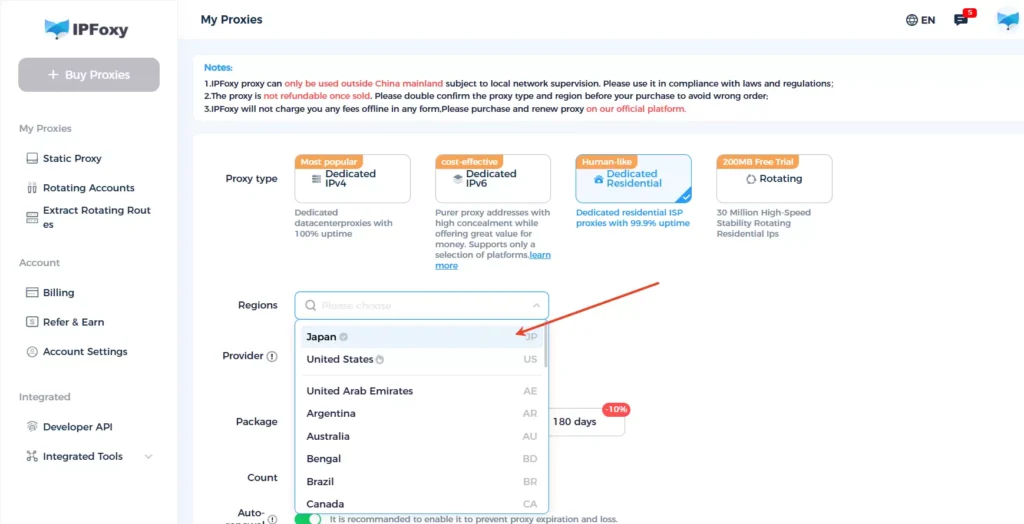
Step 1: Obtain a residential proxy
Log in to your IPFoxy dashboard and select residential proxy in a supported region. A residential proxy is recommended because it appears more authentic and does not change frequently, which aligns better with Claude’s risk control logic.
Step 2: Configure the proxy
After purchase:
- Go to “Proxy Management”
- Retrieve IP address, port, username, and password
- Configure the proxy in your browser or Anti-detect browser
Once configured, your network environment becomes stable and suitable for accessing Claude.
Practical tip: Compared with the web version, Claude Code (desktop application) uses an authentication + API key system. After authorization, as long as the selected node remains consistent, long-term network maintenance is generally unnecessary.
- Using Mirror Websites
If the official website is inaccessible, some mirror platforms provide access to Claude.
Pros and cons comparison:
Disadvantages:
- Potential security risks
- Possible feature limitations
- Delayed updates
- Data privacy concerns
Advantages:
- Higher accessibility
- High uptime
- Localized interface
- Support for local payment methods
Mirror sites are not official platforms, so data privacy and account security cannot be fully guaranteed. They may be suitable for short-term trials but are not recommended for long-term or privacy-sensitive usage.
- API Integration
Accessing Claude 3.5 via API is the most professional method, especially for developers and automation scenarios.
Step 1: Register a developer account
Visit the official website of Anthropic and register a developer account. Confirm whether API access is currently available.
Step 2: Obtain an API Key
After approval, you will receive a dedicated API key. This key serves as your authentication credential and must be included in API requests.
Step 3: Development and testing
Follow the official API documentation to configure requests in your local or server environment and integrate Claude 3.5’s conversation and text generation capabilities.
II. 2026 Updated Guide: How to Register a Claude Account
Preparation Before Registration
Please prepare the following:
- A stable network environment (do not switch nodes during registration)
- A commonly used email (Gmail / Outlook / Proton recommended)
- A phone number capable of receiving SMS verification codes
Step 1: Visit the Official Website and Enter Your Email
- Go to claude.ai
- Enter your email address
- Click “Continue with email”
- Or choose “Continue with Google” if applicable
Step 2: Verify Your Email
- Open your inbox
- Find the verification email from Anthropic
- Copy the verification code
- Paste it into the registration page
- Click “Verify Email Address”
Step 3: Phone Number Verification
After email verification, complete SMS verification:
- Enter your phone number
- Click “Send Verification Code”
- Enter the SMS code
- Click “Verify & Create Account”
After registration, you can use the basic version of Claude. However, usage limits apply, and some advanced features (such as Projects) are restricted. To unlock full functionality, you need to subscribe to Claude Pro.
III. Complete Process for Subscribing to Claude Pro
Step 1: Log In
Visit claude.ai and log in with your registered email.
Step 2: Go to the Upgrade Page
Click “Upgrade to Pro” in your account dashboard.
Step 3: Choose a Subscription Plan
Select one of the following:
- Monthly plan (auto-renewal)
- Annual plan (more cost-effective overall)
Step 4: Enter Payment Information
- Enter your credit card details
- Fill in billing address
- Confirm payment
Once payment is successful, your account will automatically upgrade to Claude Pro.
IV. Frequently Asked Questions
Claude is sensitive to login environments. If you use unstable or frequently changing IP addresses, the system may detect abnormal behavior and suspend the account. The solution is simple: use a clean proxy with low fraud risk, keep the region consistent, and avoid frequent switching.
Based on current usage conditions, full Claude services are not officially available in Hong Kong and Macau. Although these regions can access most international websites directly, Claude has not formally opened full service support there.
At present, many locally issued credit cards may fail during subscription due to payment risk control. Payment success rates are generally higher with internationally supported credit cards.
Conclusion
The core challenges in registering a Claude account mainly involve two aspects: network stability and phone verification. Once the network environment is stable and verification is completed smoothly, the overall registration process is straightforward.
Compared with AI tools that require only an email to get started, Claude has a higher entry threshold. However, this stricter system also ensures a more regulated environment. After successful registration, you can fully experience the high-quality conversation and text generation capabilities developed by Anthropic, delivering real value in programming, writing, and analytical tasks.

