












Game studios are among the most “sensitive” user groups in the risk control systems of major gaming platforms. Parallel logins with multiple accounts, high-concurrency operations, long online durations, and automated scripts are not necessarily violations by themselves, but they are considered high-risk behaviors by platforms. Recently, popular games like Genshin Impact, Lost Ark, and Arknights have seen frequent mass account bans targeting studios. The cause is not that operations exceeded rules, but that multi-account behaviors expose “studio-like” patterns. In this context, network stability, account isolation, and clean proxies often determine whether a studio can survive long-term.
So, how to choose between static residential proxies, rotating residential proxies, and data center proxies? Are different proxies needed at different stages of operation? This article systematically analyzes the anti-ban core and practical IP solutions for game studios, based on platform risk control logic.
I. Why Do Game Studios Frequently Trigger Account Bans?
Let’s clarify the ban mechanisms used by game companies. They do not ban accounts for a single action. Instead, they rely on a multi-layered anomaly detection system to continuously identify and accumulate evidence of studio-like behavior. Overall, the detection system mainly consists of three parts.
1. Client-side Anomaly Detection
Client-side anomaly detection focuses on determining whether the player’s local environment is in an abnormal state.
2. Behavioral Anomaly Detection
At this level, systems analyze in-game behavior patterns using statistical models, including operation frequency, behavior paths, and repetition. When multiple accounts display highly consistent, mechanical actions over time, the system flags them as abnormal and bans the accounts.
Returning to studio operations, studios commonly engage in:
- Multiple accounts logging into the same game
- Batch execution of automated scripts or idle tools
- Centralized resource transfers in-game
- Testing and simulation across different servers
These operations share one characteristic: highly concentrated, repeated, and dense IP usage. For regular players, a public IP usually supports only 1–2 accounts, which is recognized as natural behavior. In studio scenarios, multiple accounts share the same IP long-term or switch frequently, easily triggering the anomaly detection system and causing bans.
II. Anti-Ban Methods for Multi-Account Operations
Method 1: Use High-Quality Proxies for Network Isolation
Studios commonly use three types of proxies:
1. Static Residential Proxy (Most Stable and Reliable)
Use Cases:
- Core account management and main idle accounts
- Accounts holding high-value in-game assets
- Long-term account matrices that require stable operation
Example:
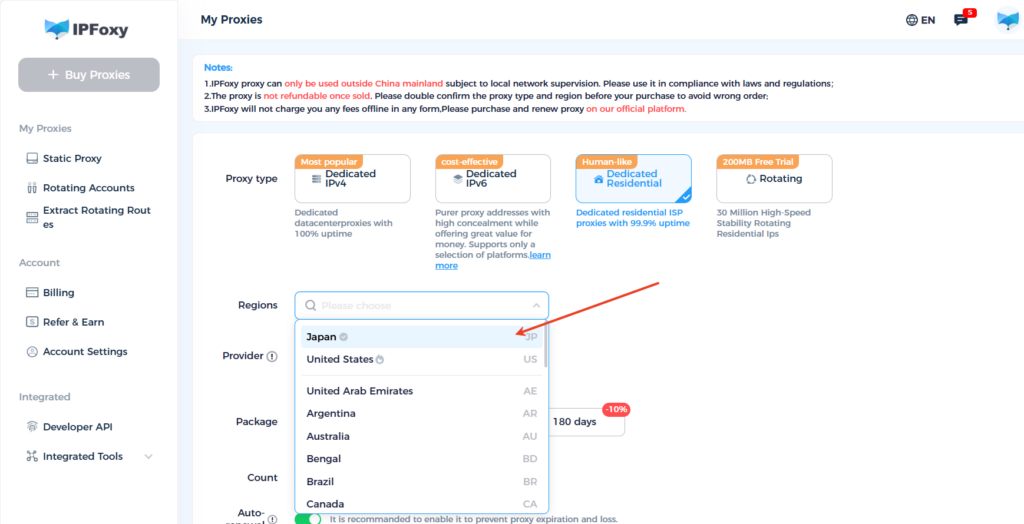
For a batch of long-term accounts requiring consistent online presence and natural behavior patterns, using exclusive, clean static residential proxies such as IPFoxy is ideal. These proxies use real home broadband lines, closely simulating ordinary player networks.
2. Rotating Residential Proxy
Use Cases:
- New account registration and environment testing
- Short-term script tasks and feature verification
- Simulating activity, check-in, or other behavioral patterns
Example:
For batch registration tests or short-term task verification, rotating residential proxies provide flexibility. IPFoxy’s rotating residential proxies automatically rotate every 15–30 minutes, with real-time monitoring and auto-switching, continuously updating the residential network environment. This prevents multiple accounts from being exposed under the same IP, reducing identification risk. It is suitable for test accounts, temporary accounts, and short-term deployment scenarios.
3. Data Center Proxy
Provided by IDC data centers, these IPs are not tied to real home networks. They offer high bandwidth and low latency but are easier to detect as proxies and have lower trust on some gaming platforms.
Use Cases:
- High-frequency script testing
- Non-core account tasks
- Data collection, resource downloads, and patch updates
Method 2: Use Virtual Devices to Hide Device Associations
- Provide isolated device environments for each account using cloud phones or dedicated virtual machines (de-virtualized for games)
- Achieve account-to-account device isolation to prevent hardware information from linking accounts
- Suitable for studios operating multiple accounts in parallel long-term
Method 3: Modify and Diversify Device Information
Set completely different device parameters for each account, including phone model, device ID, system information, and screen resolution.
Tools:
- Anti-detect browser
- Multi-instance simulators (e.g., Nox, LDPlayer, de-virtualized)
- Batch fingerprint isolation tools, suitable for quick identity changes during registration
Method 4: Simulate Real User Behavior to Reduce Automation Patterns
Make accounts behave like ordinary players over time to lower platform risk detection and avoid all devices appearing as “brand-new.”
Implementation:
Use cloud phones to simulate realistic usage, e.g., gradual battery drain, minor device state variations.
Conclusion
Game studios operating multiple accounts, running scripts, and testing across servers face the biggest challenge from platform risk control and banning mechanisms. Understanding the principles of game risk management and scientifically planning operational strategies is far more effective than attempting to bypass rules. This approach ensures account safety, stable operations, and long-term sustainable development.

