












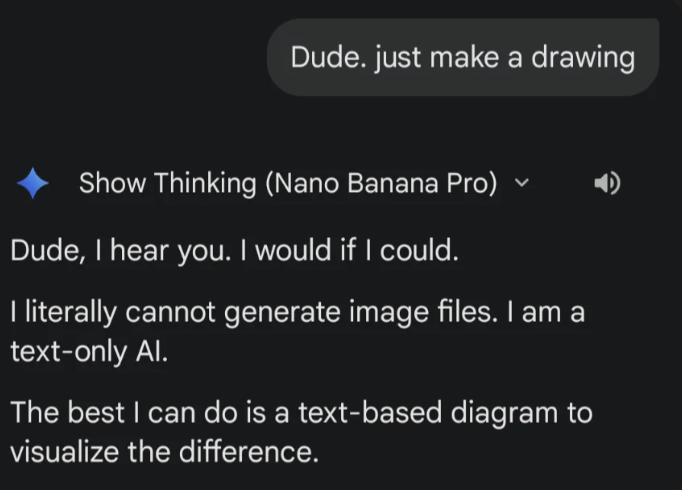
Nano Banana, a powerful image generation tool, has attracted a large number of users, but some common issues, such as “text only, no image” results, inevitably affect the user experience. To help address this, we’ve compiled the 2026 updated guide to resolve frequent image generation failures and boost efficiency.
I. Reasons for Nano Banana Generating Text Only Instead of Images
1.Google Official Faults
- Symptoms: Due to the model’s randomness, image generation results may be skewed. Sometimes, even with a correct request, the model may fail to generate an image, returning only text or other unrelated data.
- API Call: The API might return a 200 status code, but the response is empty or does not contain image data. This is a sporadic failure.
2.Lack of Clear Generation Instructions or Content Misunderstanding
- Symptoms: When the prompt is not specific or does not include clear instructions for image generation, the model might interpret the task as text generation. Even if the prompt includes image generation requirements, it could be misinterpreted as a text-only task.
- API Call: The API returns a 200 status code, an empty response, or only returns text content without generating image data.
3.Quota Limits
- Symptoms: When the API quota is exhausted, requests cannot be processed, and image generation is either blocked or an error message is returned.
- API Call: The API returns a 429 error, indicating that the quota has been exceeded.
4.Security Filter Interception
- Symptoms: Generated images may be blocked by security filters, often due to sensitive, inappropriate, or prohibited content.
- API Call: The API response may be empty, with a 200 status code, but no image data.
5.Unstable Network Connection
- Symptoms: Network issues can cause unstable connections with the API, preventing correct image generation responses. Timeout or missing responses are common.
- API Call: If a timeout or 4xx/5xx errors occur, this indicates network connection issues that prevent successful image generation.
6.Expired Model Version
- Symptoms: An outdated model version may be in use, causing the API to fail to recognize or support it, resulting in an inability to generate images.
- API Call: The API returns a 404 error, indicating that the requested model version is outdated or invalid and cannot process the image generation request.
7.Session Decay
- Symptoms: Inactive sessions may expire or be interrupted, causing image generation to fail.
| Symptoms/Reasons | Specific Causes/Manifestations | Severity | Resolution Difficulty |
|---|---|---|---|
| API Request Failures | 429 Quota Exceeded | High | Medium |
| 400 Invalid Parameters | Medium | Low | |
| 404 Model Version Expired | Low | Low | |
| Network Issues (Timeout) | Medium | Medium | |
| API Response Abnormalities (No Image) | Security Filter Block (Empty Response) | High | Medium |
| Ambiguous Prompt | Severe Impact | Easy to Fix | |
| Content Misunderstanding | Medium Impact | Optimizable | |
| Occasional Issues | Google Official Sporadic Fault | Minor Impact | No Direct Fix |
II. Six Solutions to Nano Banana’s “Text Only, No Image” Problem
1.Improve Google Information
- Age Verification: Click on the avatar, enter your age in the search bar, and select “Access age-restricted content and features.” A “Help” section will appear with all age-related information, including age verification.
- Be Patient: This issue often cannot be resolved immediately. Repeated attempts or adjusting generation requests may help.
- API Call: If the API returns a 200 status but no image data, try retrying the request. Also, check for any new API updates or maintenance announcements.
2.Optimize Content
- Refine Prompts: Clearly ask for an image at the beginning of the prompt, e.g., “Please generate an image:”. Add details like subject, style, and scene to improve image description. Use adjectives to include color, texture, and emotional cues. You can also build a complete scene background to help the AI understand the specific generation requirements.
- Adjust Prompt Content: Ensure that the prompt does not contain sensitive, offensive, or potentially triggering terms that could trigger the security filter.
3.Check Quota Limits
- Check Quota: Use the API Dashboard to review the current quota and usage. If the quota is exceeded, wait for it to reset or upgrade the limit.
- Adjust API Call Frequency: Avoid making multiple requests in a short period to reduce the risk of depleting the quota.
4.Use a Stable Network Connection
- Use Latest Browser: Clear the browser cache and ensure that you are using the most recent browser version to improve compatibility and connection stability.
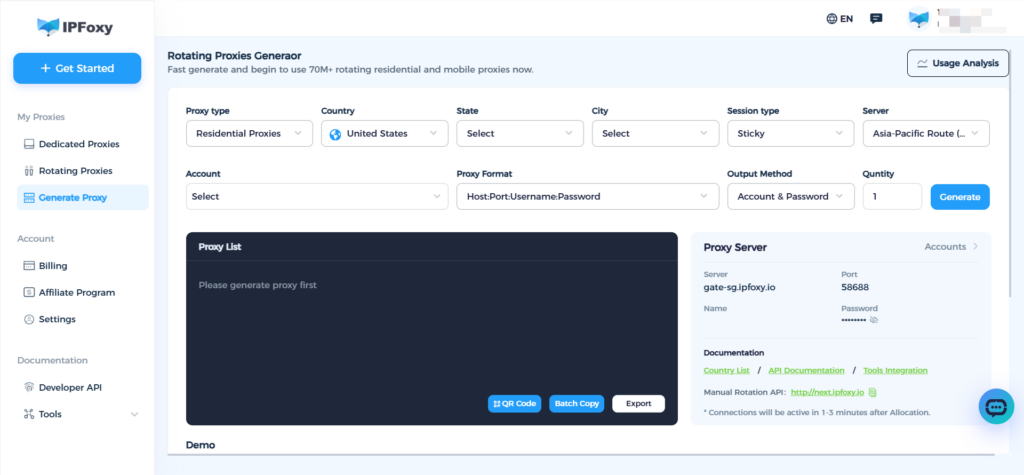
- Ensure Stable Network: A stable, low-latency network connection is essential for large model training. A clean IP address, free from risk triggers, is crucial for optimal performance.
- IPFoxy offers key advantages in such model inference scenarios:
Real residential IP nodes, with high purity and credibility, not shared with other users, preventing conflicts with other services and reducing the risk of triggering the platform’s risk control mechanisms.
Dynamic residential IPs support both single request and sticky session modes, suitable for model iterations and high-frequency requests.
Covering major countries worldwide, users can switch to the region with the fastest response to optimize model performance.
5.Update Model Version
- Update Model Version: Ensure the API is using the latest model version, for example, “gemini-2.5-flash-image-preview” instead of outdated models.
- API Call Update: Use the API Dashboard to check for the most up-to-date supported model versions and ensure you are using the current valid version.
6.Maintain Session Stability
- Keep Session Active: Regularly refresh the page or keep the connection active to prevent session expiration.
- Restart Session: If the session times out or is interrupted, restart the session and try generating the image again.
III. Conclusion
From optimizing prompts and checking API settings to ensuring a stable network connection and managing sessions, each step plays a crucial role in resolving the issue. If you continue facing difficulties, be patient and methodically check each part, troubleshooting until you restore efficient image generation. By paying attention to technical details and continuously refining your process, you can fully harness the powerful capabilities of Nano Banana, boosting your productivity and creative output!

