In 2025, Google officially launched the Gemini Student Offer. Eligible students can complete verification and receive up to 15 months of Google AI Pro for free before January 31, 2026, with a total value of approximately $300.
This means you can use the following services at zero cost:
- Gemini Advanced (2.5 Pro / 3 series models)
- 2TB Google One cloud storage
- NotebookLM Plus
- Deep Research
- Gemini Live real-time voice interaction
However, in practice, many users encounter issues during the application process, especially related to regional restrictions, network environment checks, and verification failures.
This article takes a practical, step-by-step approach to break down the real requirements, the complete 6-step verification process, and the most common failure reasons with corresponding solutions.
I. What Does the Gemini Student Offer Include?
Before applying, it is important to understand the actual value of this student offer.
1. Core Capabilities of Gemini Advanced
The core benefit of the student offer is access to Gemini Advanced (Google AI Pro). Compared with the free version, the main improvements include:
Ultra-long context understanding, supporting up to one million tokens for analyzing entire textbooks or research paper collections
Stronger reasoning abilities, suitable for mathematics, coding, and research tasks
Multimodal understanding, including images, charts, slides, and handwritten notes
Code generation and debugging for major languages such as Python, JavaScript, and Java
2. Additional Benefits Included in the Student Plan
| Benefit | Details | Value / Access |
|---|---|---|
| Cloud Storage | 2TB Google One | $9.99 / month |
| NotebookLM Plus | AI-powered study notes and audio summaries | Paid feature 🔒 |
| Deep Research | Automated research report generation | Advanced-only 🔒 |
| Gemini Live | Real-time voice interaction | Advanced-only 🔒 |
| Canvas | AI collaborative document workspace | Advanced-only 🔒 |
Based on official pricing, the total value of the 15-month offer is approximately $300.
II. Five Mandatory Requirements Before Applying (Key Points for Users in China)
Before starting, check the following requirements carefully to avoid unnecessary setbacks.
1. Must Be at Least 18 Years Old
Google requires users subscribing to Google One AI Premium to be 18 years old or above.
2. A Valid .edu Educational Email Address
Student identity verification is handled by SheerID, and the most critical identifier is an educational email address. The supported scope is now broader than before and is no longer limited to U.S. .edu domains.
Supported domains include:
- .edu
- .edu.cn
- .ac.uk and other educational domains
Educational email addresses from Chinese universities can now pass manual review. At the same time, many third-party services claiming to bypass student verification have appeared online, so users should evaluate them carefully.
3. Google Account Region Must Appear Within the Supported Range
Officially supported regions include the United States, the United Kingdom, Japan, Brazil, and Indonesia.
This is where most users fail. Google determines account region based on several factors:
- IP address used during registration or access
- Network exit country
- Billing address of the payment method
If any of these factors do not match, the system may directly display “This offer is not available in your region.”
4. A Valid Payment Method
Even though no charges will be made, you must still bind a payment method, such as:
Visa or Mastercard
Virtual credit cards (Wise, Revolut, etc.)
5. A Stable and Clean Network Environment
This factor is often overlooked, but in reality, SheerID verification and Google One subscriptions are highly sensitive to IP stability and regional consistency.
Frequent IP changes, shared exits, abused proxy nodes, or shared IP tools used with Gemini may result in:
- “This region is not available” errors
- SheerID verification failure
- Repeated payment rejections
- Gemini account suspension
Based on extensive testing, Google places particular emphasis during student offer verification on whether the IP country is stable, whether there are frequent country or ASN changes, and whether the IP belongs to high-risk shared nodes.
This explains why some users succeed with the same account and the same .edu email simply by switching to a different network.
As a result, some users choose residential proxy services such as those provided by IPFoxy to complete the application process. These services typically offer:
- Coverage in 200+ countries and regions
- Clean, dedicated IPs
- Accurate country targeting without frequent region changes
The ability to maintain the same network exit throughout access, verification, payment binding, and subscription
The core value here is not bypassing restrictions, but reducing the probability of triggering risk controls.
III. Complete the Gemini Student Verification in 6 Steps
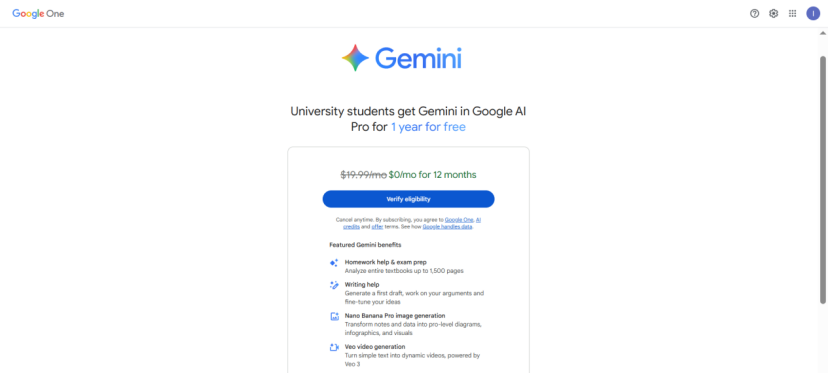
Step 1: Visit the Official Page
https://gemini.google/students
If you see a message stating that the offer is unavailable in your region, first check your network exit country.
Step 2: Log In to Your Personal Google Account
Do not use a school Workspace education account. A standard Gmail account is recommended.
Step 3: Enter Your .edu Email Address
You will receive a SheerID verification email or code. Some users attempt to bypass this step through third-party services. While such methods may work temporarily, the account environment must remain region-consistent, with a low IP risk score and no frequent switching or shared IP usage. Otherwise, even a successfully verified account may later be suspended.
Step 4: Complete SheerID Student Verification
If automatic verification fails for Chinese universities, you can upload documents for manual review, which usually takes 24–48 hours. Accepted documents include:
- Student ID
- Proof of enrollment
- Academic transcript
Step 5: Bind a Payment Method
Recommended order: international card, virtual card, Visa card. The billing address should match the network exit country whenever possible.
Step 6: Confirm Subscription and Activate
Once successful, you will see:
Gemini status upgraded to Advanced
Google One storage upgraded to 2TB
IV. Quick Troubleshooting for Common Failures
Not eligible → In most cases, a region or IP issue
SheerID failure → Upload documents for manual review
Payment failure → Billing address mismatch
Repeated page errors → Unstable IP or risk control triggered
V. What Happens After the 15 Months End?
After the student offer expires, Google automatically reverts the subscription to the standard price of $19.99 per month. Regardless of whether you plan to continue using the service, preparation in advance is essential.
If you still qualify as a student, Google usually prompts you to complete re-verification before expiration. After passing, you can continue enjoying the student offer.
If you do not plan to renew, be sure to manually cancel the subscription before the end of the offer period. After cancellation, you can continue using the service until the current billing cycle ends.
VI. Summary
The Gemini Student Offer is essentially Google’s way of allowing students to unlock its full AI capabilities ahead of time. As long as you meet the basic requirements and maintain consistency across region settings, payment methods, and network environment during the application process, most issues can be avoided.
If you are studying, conducting research, or learning to code, these 15 free months are more than enough to fully leverage Gemini Advanced and truly get your money’s worth.