












In 2026, many users face a frustrating new step when registering a Google account: QR code verification. This system has created challenges for users, particularly those needing to register accounts in bulk or use accounts internationally. Services like Gemini and Google Drive have also become harder to access as a result.
But don’t worry—this article will explain how QR code verification works and share a few ways to bypass it.
I. What is Google’s Latest QR Code Verification?
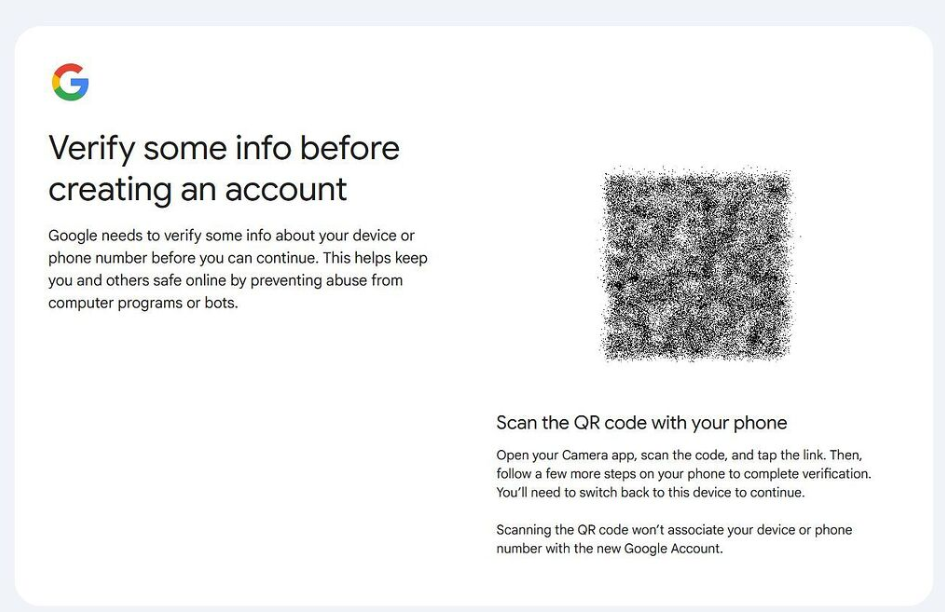
To enhance the security and authenticity of accounts, Google has gradually tightened its account registration and login verification processes. Between 2025 and 2026, Google introduced mandatory QR code verification in certain regions and registration environments, mainly to prevent bot scripts and bulk registration of accounts.
Here’s how it works:
During the registration process, users are prompted with a message: “Scan the QR code with your phone to continue.”
This QR code must be scanned using a personal mobile device through official Google apps (such as Google Search or Gmail), which will then complete the login verification.
This system is designed to ensure that registrants have a genuine mobile device, thereby reducing the creation of fake or automated accounts.
For users who do not have access to a phone capable of receiving verification codes, use emulation environments, or need extra privacy protection, this step has become a significant barrier.
II. How to Bypass Google’s QR Code/Phone Verification?
It’s important to note that Google’s security policies are continually updated, so no method can guarantee a long-term bypass. Below are some currently effective strategies based on real-world tests:
1、Use Pre-Verified Google Accounts
The simplest solution, especially for those who don’t want to handle the registration process themselves, is to buy pre-verified Google accounts. However, be cautious when purchasing, as there are many unreliable services. To avoid pitfalls, some steps must be taken:
After purchasing, to ensure the account remains stable and doesn’t get recovered or locked, follow these steps:
(1) Use in a Separate Environment
It’s best to use a fresh browser or incognito mode. For better security, use an anti-detect browser (such as AdsPower or Multilogin) to create a new browser environment, avoiding interference with cookies and IPs from other accounts.
(2) Complete Account Information and Gradually Update It
- Use the provided auxiliary email to complete the first verification.
- Once logged in, go to account security settings and select “Link other Google services” (e.g., YouTube, Google Drive) to increase account activity.
- Add an auxiliary phone number (preferably an overseas number you can receive messages on).
- Include an address in your profile (you can generate a real street address with an overseas address generator).
- Change the password and recovery email to your own backup email.
- Change the account’s region (in “Country Version” settings, submit a request to change the account’s country). Note: After this change, you’ll need to log in using a dedicated IP from that country for a few days to simulate real user behavior; otherwise, the system may flag it as suspicious.

After completing these steps, the account will be securely linked to you, significantly increasing its stability.
2、Android Emulator + Google Play Registration
In certain Android environments, the registration process is less likely to trigger QR code verification. Compared to abnormal browser environments or highly non-standard registration methods, using an emulation environment that mimics real user behavior is less likely to be flagged as high risk. Here’s how:
(1) Prepare a Clean Proxy IP and Environment
- Use a high-quality, clean proxy IP in the emulator environment. Avoid using public or data center IPs.
- Websites like Scamlystic can check the “risk level” of an IP. The lower the value, the cleaner the IP. Dedicated static residential proxies (such as from IPFoxy) are recommended as they usually have low risk values.
(2) Register in the Emulator
- Log in to Google Play in the emulator, then select “Create a new account.”
- Follow the usual registration process; typically, this won’t prompt QR code verification.
- If phone verification is requested, try using a domestic phone number (in some cases, this may still receive verification codes).
(3) Similar to the first method, add auxiliary email, phone number, and address details to improve account stability.
3、New Phone/Computer Social Media + Gmail Registration
Using a brand-new or factory-reset phone along with the Gmail app is another effective approach:
- Reset a phone to factory settings, or use a cloud phone or anti-detect browser device to ensure the environment is fresh.
- Use a dedicated clean IP.
- Download the Gmail app (note: different Google product registration methods may have varying levels of strictness, but Gmail app registration is generally easier).
- You can also attempt registration via the Chrome browser on your phone, but using the app generally has a higher success rate.
As seen in the above methods, the key across all strategies is the authenticity and exclusivity of the account’s network. Google’s verification system is particularly sensitive to the following factors:
- Mismatch between the registration location and the IP’s country
- Frequent IP, city, or network type changes
- Multiple accounts using the same network environment
- Use of public or high-risk IPs that have been abused before
Thus, when registering and using a Google account, maintaining a long-term, stable, and high-trust network environment consistent with the account’s location is critical. IPFoxy’s residential IPs, available in over 200 global regions, offer clean, stable, and exclusive network resources, significantly reducing the frequency of verification triggers.
III. Conclusion
QR code verification is not a sign of “registration failure,” but rather a security prompt from Google’s risk control system. Google’s account verification process in 2026 has evolved from a one-time registration check to a long-term system that continually assesses account trustworthiness. Rather than looking for short-term workarounds, focusing on creating a real user-like experience—by improving device environment stability, network reliability, and account usage behavior—will help reduce verification frequency and extend account lifespan.

