












When operating an account on X (formerly Twitter), many users encounter a “something’s off but can’t quite say what” situation: the account can log in, post, and comment normally, yet content receives almost no exposure, and tweets don’t appear in topic feeds.
This is usually not a content quality issue, but the account may be Shadowbanned.
Shadowban does not provide explicit notifications like account suspension, but it continuously reduces the account’s recommendation weight in the background. Without understanding the mechanism, many users waste time and account resources repeatedly posting, getting restricted, and switching accounts.
This article systematically explains X’s restriction types, detection methods, recovery strategies, and ways to reduce the chance of being restricted again, based on 2026 testing experience and community discussions.
I. 4 Common Types of X / Twitter Restrictions
Before solving the problem, you must first identify which type of restriction your account is experiencing. Different types require different handling strategies and recovery times.
1、New Account Restriction
Newly registered X accounts usually undergo a default “observation period.” During this time, exposure and recommendation weight are low, and even normal content rarely appears in recommendation feeds or topic pages.
This is not a penalty but a routine mechanism to verify account authenticity and behavior patterns.
Solution:
No need to worry. Posting normally, liking, and commenting will usually lift the restriction automatically in about 7 days.
2、Common Shadowban
This is the type most users actually encounter.
The account appears normal, hashtags work, but tweets are missing from topic pages, searches under “Latest” do not show your posts, and account features remain functional, including interactions and DMs. This is the main type addressed in this guide.
3、Ghostban
Ghostban can be considered an intensified version of Shadowban.
- Tweets are visible only to yourself or mutual followers
- Comments are visible only on your own profile
- No notifications are sent to others
- Tweets cannot appear in general recommendations
Although it sounds severe, the recovery logic is similar to Shadowban, but the recovery period is usually longer.
4、Collapsed / Marked Comments
If your comments are frequently collapsed with a warning like “may contain offensive content,” it indicates the account has been flagged as high-risk.
From experience, even if recovered, such accounts rarely regain their original recommendation weight. Unless it is a strongly linked old account, many operators prefer switching accounts to save time.
Experience shows:
Restoring such accounts is costly; if it’s not an old or high-value account, switching accounts is often more efficient.
II. How to Determine if Your X Account Is Shadowban?
The main challenge of Shadowban is “no notification,” so detection relies on behavior and data changes.
1、Click Counts
If the latest 3–5 posts have significantly lower clicks than historical averages, without seasonal or content quality drops, the system may have reduced your account’s weight.
2、Views / Impressions
A sharp decline in video views or impressions, even with similar engagement content and no violations reported, usually indicates account restriction rather than content issues.
3、Platform-Wide Feedback
If you notice slower growth in likes, retweets, follows, comments, or even stagnation/decline in followers after posting, this is another indicator.
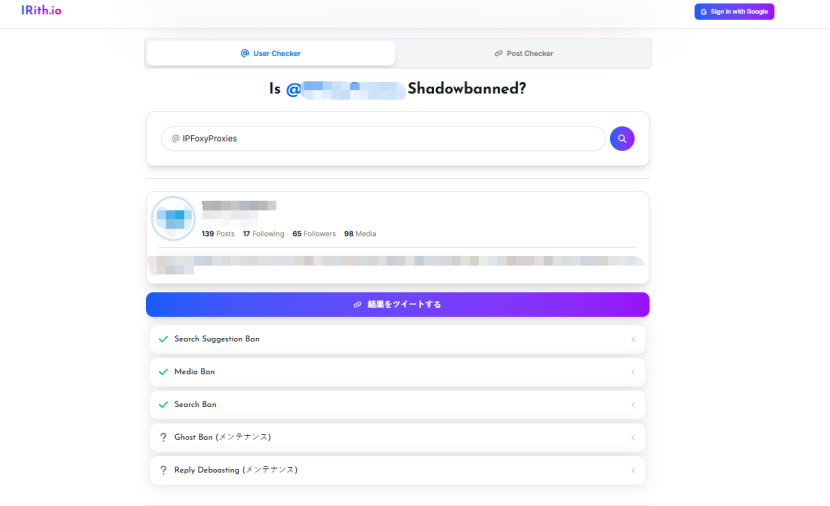
4、Third-Party Detection Tools
Some websites can help detect Shadowban by searching for your content from unrelated accounts. These are reference tools only and should not be fully relied upon.
III. 2026 Tested Methods to Lift X Shadowban
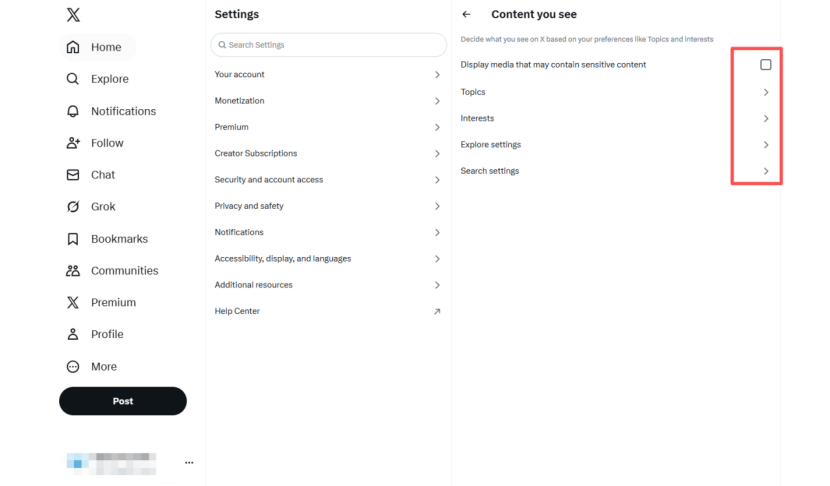
1、Reset System and Sensitive Content Settings
This step resets content grading and recommendation tag weights. Do not use the App; only use the web version (desktop or mobile browser).
Path: Settings → Privacy and Safety
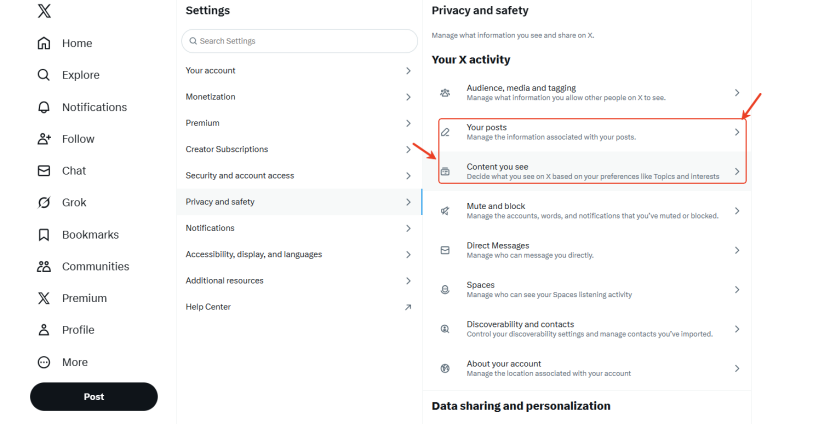
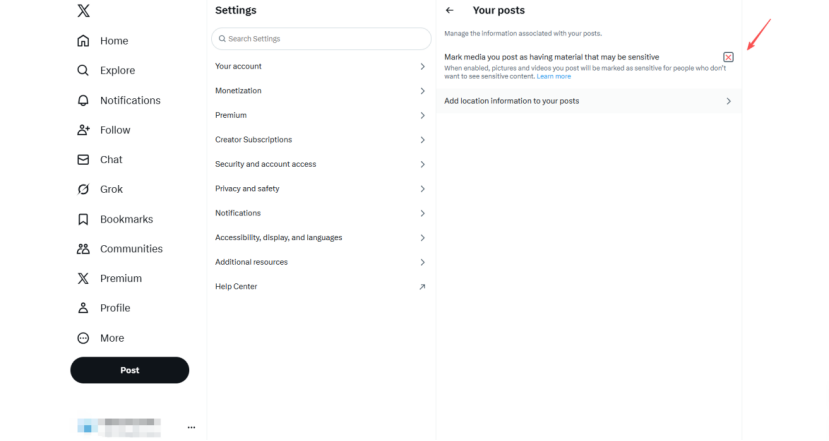
- Open Your posts: uncheck “Mark media you post as containing sensitive material”
- Open Content you see: uncheck “Display media that may contain sensitive content”
- Interests: uncheck all selections
- Search settings: uncheck “Hide sensitive content”
For iOS users, the same can be done via:
- Tap profile → Settings → Privacy and Safety → Search → disable “Hide sensitive content”
2、Account “Cool-Off”
Leave the restricted account unused for a period. Usage includes posting, liking, retweeting, following, and DMs. During this period, use a different account if possible; if not, log in only for browsing.
- Light restriction: 3–7 days
- Moderate: 1–2 weeks
- Severe: 1 month+ (rare cases)
3、Recovery Check
Use a new account unrelated to your restricted account to search relevant keywords, check “Latest,” and see if your content appears. If visible, recovery is complete.
4、Interact with “Normal Unknown Users”
In some cases, commenting on popular posts of unrelated users and receiving normal interactions can trigger the system to reassess the account. This may lead to immediate recovery but is not guaranteed.
IV. Long-Term Solutions to Avoid Being Restricted
Lifting Shadowban is only the first step. Preventing repeated restriction is more important.
1、Control Account Behavior Rhythm
Avoid mass follows/unfollows, likes, comments, or repetitive actions in a short time. Making behavior resemble that of real users reduces risk.
2、Maintain Content Compliance
Frequent switching of content themes or hashtags makes the system uncertain about account focus, affecting recommendation stability.
Avoid inserting external links directly in posts; if necessary, place them in replies.
Do not post threats, harassment, impersonation, or other rule violations, as these may result in account suspension.
3、Stable Account Network
In 2026, login environment stability significantly impacts account weight. Issues like:
- Frequent IP switching
- Shared network among multiple accounts
- Unstable or abused proxy IPs
can trigger repeated Shadowban even if content is compliant.
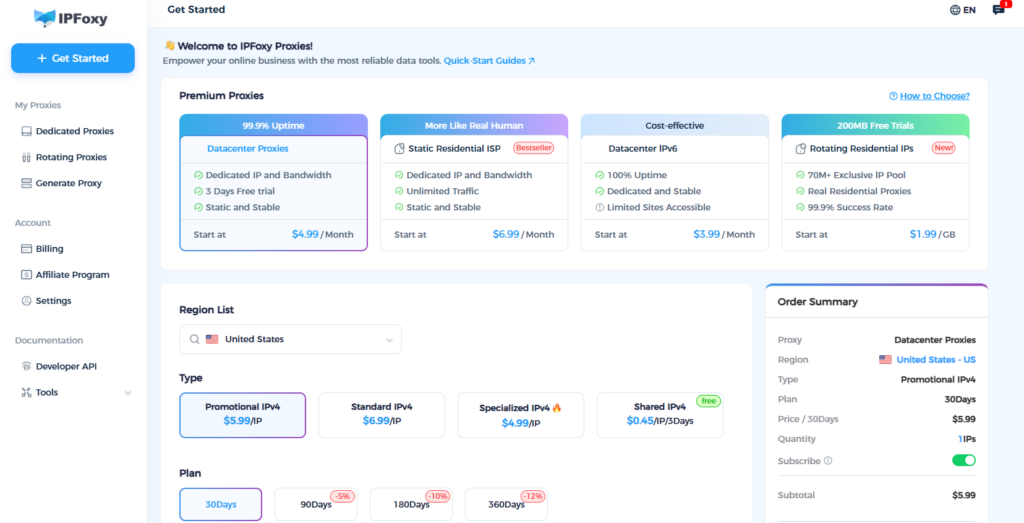
Many teams now use high-quality residential or ISP IPs from services like IPFoxy, assigning relatively fixed, country-consistent IPs per account. This reduces system misjudgments due to network anomalies.
IPFoxy’s advantage lies in IP quality and controllability, making it suitable for long-term account maintenance and matrix operation rather than short-term frequent switching, aligning with X’s “stable account environment” risk control logic.
V. Conclusion
Shadowban is not a random punishment by X but a dynamic risk control result based on behavior and environment.
Focusing only on content while ignoring account environment and long-term behavior patterns often leads to repeated restrictions. Optimizing settings, behavior, and environment simultaneously significantly improves account stability and lifespan.
For those who wish to operate X accounts long-term, avoiding restriction is always more important than lifting it.

