












Nearly every Facebook advertiser has encountered the same nightmare: ads are ready and audiences have been tested, but various error messages pop up when it’s time to deduct fees—“Payment Failed”, “Unable to Verify Payment Method”, “Ad Account Restricted”. Why does Facebook reject the payment even when there’s sufficient funds in the card?
In fact, 70% of Facebook ad payment failures are not related to money. They are caused by unstable payment methods, issuer risk controls, unclean account environments, or verification failures.
That’s why more and more people are switching to Virtual Credit Cards (VCCs) for binding Facebook ads—they offer far greater stability than regular physical cards.
This article covers everything you need to know: causes of payment failures → why VCCs are a must → the step-by-step practical process of VCC binding and verification. Follow it, and you’ll definitely pass verification smoothly, no longer encountering frequent payment failures.
I. Causes of Facebook Ad Payment Failures
Almost every Facebook advertiser has encountered this frustrating scenario: ads are ready, audiences have been tested, yet payment errors like “Payment Failed”, “Unable to Verify Payment Method”, or “Ad Account Restricted” pop up unexpectedly. Why does Facebook reject payments even when your account has sufficient funds?
In fact, 70% of Facebook ad payment failures have nothing to do with insufficient funds. They are usually caused by unstable payment methods, issuer risk controls, unclean account environments, or verification failures. This explains why an increasing number of advertisers are switching to Virtual Credit Cards (VCCs) for Facebook ads—they are far more stable than physical cards.
This guide covers everything you need to know: the causes of payment failures → why VCCs are essential → step-by-step VCC binding and verification. Follow it to pass verification smoothly and avoid frequent payment issues.
II. Why Choose VCC for Facebook Ads?
VCCs perfectly align with Facebook’s ad risk control mechanism.
- Cleaner BINs for higher stability: Most high-quality VCCs come with BIN numbers widely accepted for ad campaigns, making Facebook verification much easier.
- Customizable billing addresses: Match your billing address to your Business Manager (BM) region to reduce the risk of location mismatches.
- Avoid physical card restrictions: Many banks impose limits on international payments, but VCC issuers typically support global transactions—ideal for cross-border advertising.
- Simplify multi-account management: Generate VCCs in bulk for multiple BMs or ad accounts, eliminating the need for stacks of physical cards.
- Higher success with secure tools: Combine VCCs with a secure browser and stable proxy IP (many VCC providers natively support ad payments) to ensure “smooth verification”.
III. Step-by-Step VCC Binding & Verification for Facebook Ads
1. Prepare a Clean Account Environment
Facebook monitors IP stability, cross-border jumps, browser fingerprint consistency, and the matching of payment method and IP regions. Even with a valid card, an unclean environment will lead to binding failures.
Industry best practice: Use a proxy IP with a fingerprint browser.
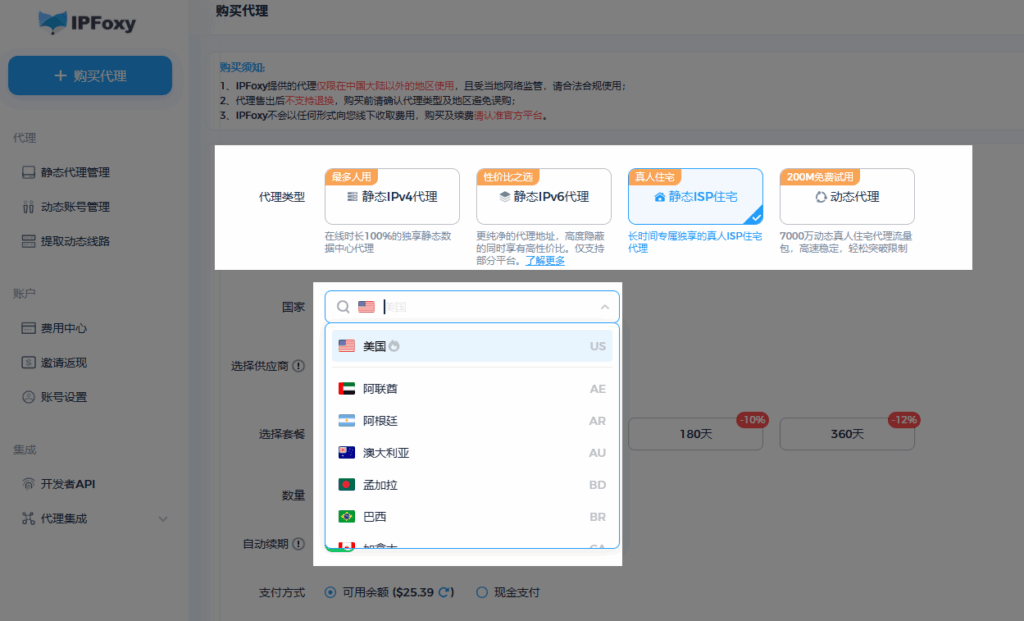
Recommendation: IPFoxy’s premium proxy service, with key advantages:
- Global coverage of stable, pure residential IPs (no random jumps)
- Stable nodes for BM setup, card binding, and ad operation
- Supports long-term fixed IPs to ensure account stability
- Works with fingerprint browsers to isolate multiple accounts
It is ideal for users with multiple BMs or ad accounts, as it reduces binding failures, account restrictions, and frequent verifications.
2. Prepare Your VCC
Choose a VCC brand that supports ad payments. Prepare the following information:
- Card number
- Expiry date
- CVV
- Billing address
Preload 3–5 USD for pre-authorization.
3. Add Payment Method to Facebook Ad Account
Path: Ads Manager → Billing → Payment Methods → Add Payment Method → Credit Card
Fill in your VCC details, and note the following:
- Billing address must match your BM region
- Country must align with your VCC (do not select randomly)
- Use your real name in English (optional)
4. Complete Small-Amount Pre-Authorization
Facebook will deduct approximately 1 USD for verification:
- Successful deduction → Card approved
- “Unable to Verify Payment Method” → 90% chance of environment or BIN number issues
- “Currently Unavailable” → Mostly due to IP or billing address mismatch
5. Test Small-Scale Ad Charges
Create a low-budget ad (e.g., 1–3 USD) and check for the following:
- Successful deduction
- No “Payment Failed: Update Payment Method” alerts
- No “High-Risk Verification Triggered” notifications
If everything is normal, your VCC is fully verified.
6. Re-Verify for New BMs or Ad Accounts
Facebook treats “different BMs as different entities”. Therefore:
- Rebind your VCC for new BMs
- Assign a new VCC to each BM (for better stability)
Summary
Facebook ad payment failures essentially stem from mismatches between the payment card, account environment, and regional verification requirements. Using a VCC significantly increases verification success rates, while combining it with a fixed pure IP and fingerprint browser minimizes risk control issues. Follow the process from environment setup → card binding → verification → charge testing, and you’ll enjoy smooth Facebook payments with no more frequent failures.

