












AI image generation tools are emerging one after another, but few can balance image quality, composition, style, and flexible control. The new NanoBanana Pro has made a grand debut, attracting a large number of creators, designers, and content operators with its powerful functions and high flexibility.
Whether you want to create covers, illustrations, game art, social media images, or short video script frames, NanoBanana Pro may become your “secret weapon”. This article will take you to deeply understand it from core upgrades to seven popular gameplay techniques.
I. Core Highlights of NanoBanana Pro
- High Resolution + Multi-Format Support: It can output formats ranging from social media covers and poster sizes to film covers/horizontal images/vertical images, meeting the needs of different publishing platforms.
- Better Semantic Understanding + Scene Reasoning Ability: It can handle the integration of multiple people, multiple elements, and multiple scenes, not just a single subject. It also includes text/symbol/image-text mixed rendering, and is more friendly to infographics, UI, typesetting, and structured design.
- Enhanced Detail and Texture Expression: Even complex illustrations, fantasy scenes, and textured photography can be realized.
- Flexible Prompts, More Friendly to Chinese Semantic Description: You can use simple Chinese descriptions to make the model understand and generate images close to your expectations.
II. Full Analysis of the Hottest Gameplay Tips — Selected Gameplays
Based on community experience and practical tests, we have summarized the popular gameplays. Each gameplay explains the suitable scenarios, the achievable effects, and practical prompts/operation skills.
Gameplay 1: Poster/UI Design
It is most suitable when you need to make product comparison charts, flowcharts, manuals/tutorial images, menu/packaging designs, posters, teaching images, data visualization charts, image-text mixed covers, web/App interface mock-ups.
Prompt Tips
First, clearly write “This is an infographic/poster/chart”, then describe the main elements, such as Product A, Product B/process steps/comparison items.
Next, explain the layout structure: for example, the left side is the title, the right side is icons + descriptions + data/attribute comparisons, plus “clear layout + readable text + icons + columnar design + unified color scheme + simple background”.
Finally, explain the purpose/scenario: suitable for social media sharing, printed posters, product promotion pages, etc.
This way, the image will look like it was designed by a professional designer using vector tools — clear structure, clear information, and neat typesetting.
Gameplay 2: Realistic Photography / Commercial Photography Style
Suitable for product photography (such as electronic products, jewelry, beauty products, food), fashion/portrait photography, lifestyle covers/cover photography, commercial advertising images, social media covers, realistic style illustrations, etc.
Prompt Tips
Indicate in the prompt “This is an image in realistic photography/commercial photography format”, and clarify “what the subject is” (such as a watch/a piece of clothing/a model/person/product).
Then describe the light, environment, and atmosphere: such as natural light/window light/soft light/warm yellow light/early morning/evening/indoor soft light, etc.
Add material texture (skin, metal, glass, fabric, etc.) and “composition/lens sense” (close-up/half-body/close-up/natural composition/blurred background, etc.).
Finally, explain the purpose: such as e-commerce main image, social media cover, advertising promotion image, photography style illustration.
The generated images have light and shadow, texture, and composition close to real photography effects, making them very suitable for commercial use.
Gameplay 3: Cartoon / Comic / Cute / Flat Illustration Style
Suitable for social media avatars, stickers, comic-style covers, relaxed/humorous illustrations, children/girl-oriented content, emoticons, stickers/anime/comic-style materials, relaxed-style covers, etc.
Prompt Tips
Write “This is a cartoon/comic/flat illustration” in the prompt, and explain what the subject is.
Explain the proportion/style/atmosphere: such as big head and big eyes, simple lines, bright colors, flat design, simple background, cartoon style.
You can also explain the purpose.
This style has a low threshold and fast image generation, making it very suitable for daily content, social media, and relaxed/fun/younger-oriented works.
Gameplay 4: Multi-Element Integration
Suitable for integrating multiple different elements/reference images into the same frame: such as product + scene + character + background; also suitable for making complex background illustrations, environment setting diagrams, concept scenes, composite posters, virtual architecture/room setting diagrams, promotional images + background integration, etc.
Prompt Tips
Tell the model that this is a multi-element integration/composite scene illustration, and explain which elements need to be integrated: such as characters, buildings, props, backgrounds, text/icons, etc.
Explain the desired integration effect: unified light, unified style, natural integration, coordinated perspective/composition, and harmonious overall picture.
Then explain the purpose: setting diagrams, promotional images, packaging preview images, environment illustrations, composite posters, etc.
This gameplay can help you integrate elements from different sources into one image, making it very suitable for complex scenes, concept settings, and comprehensive visual creation.
Gameplay 5: Story/Plot/Cinematic Scenes / Plot Illustrations / Storyboard Style
Suitable for novel illustrations, comic storyboards, film/game plot illustrations, storyboards, plot posters, plot cover images, emotion/atmosphere images, visual expression of literary/game/plot content, etc.
Prompt Tips
Say “This is a plot” in the prompt, and describe “scenes and characters/subjects”: such as a character standing on a foggy old street, a corner of a dilapidated future city, etc.
Describe the atmosphere/emotion/light and shadow/composition: such as melancholy/light and shadow contrast/picture composition/lens sense/scene wide format, etc.
Finally, explain the purpose: cover illustrations, plot images, visual novel illustrations, game/comic storyboards, atmosphere images, story covers, etc.
This gameplay is very suitable for works that require strong emotion, narration, storytelling, and sense of immersion.
III. How to Avoid Restrictions on High-Frequency Requests During Large Model Training?
Once you start in-depth gameplay, such as batch attempts to generate different styles, parameter fine-tuning, continuous iterative image optimization, etc., the request frequency will increase sharply in a short time.
This means:
- A large number of multi-round requests are needed for continuous attempts and modifications.
- Frequent access in a short time is likely to be judged as abnormal behavior by the platform.
Many users switch multiple accounts and models for testing, which also leads to a surge in access volume under the same IP, being identified as suspicious cluster traffic by the system. The result is request failure, slower output speed, or even direct access ban.
Therefore, when users start “high-frequency generation, parameter exploration, and multi-model testing”, they must solve a core problem: how to make the system think you are a stable and normal user, not an abnormal high-frequency visitor?
The answer is to use high-quality proxy dynamic residential IPs, because they can:
- Distribute request pressure to avoid risk control due to frequent calls from a single IP.
- Keep the access environment more like a natural user, reducing the risk caused by frequent generation.
- Ensure that the access environments of different accounts and models are clean without cross-contamination.
- Maintain stable speed and low latency during cross-region access.
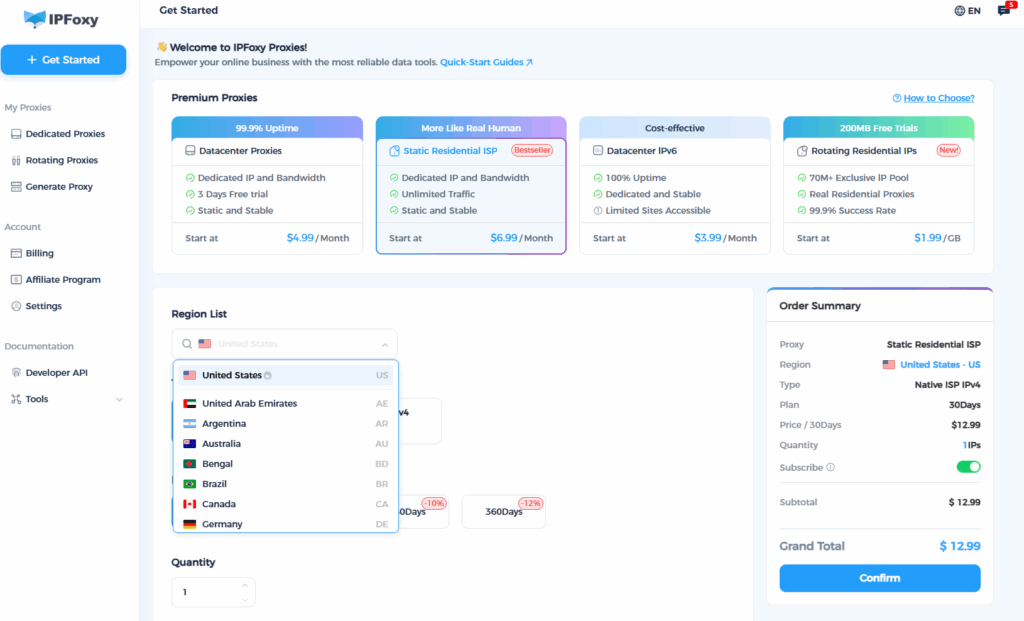
In this case, it is very suitable to use: IPFoxy
In large model training scenarios (high-frequency access, multi-round generation, continuous iteration), the core requirements are:
- Clean IPs that are not easy to trigger risk control.
- Stable nodes with low latency.
- Support for different regional needs and a large number of switches.
IPFoxy exactly has the most critical advantages for such model reasoning scenarios:
- Real residential IP nodes with high purity and credibility, not easy to trigger model platform risk control.
- Dynamic residential IPs support two modes: per-request and sticky sessions, which are very suitable for model iteration and high-frequency requests.
- Cover a large number of mainstream countries around the world, and can switch to the region with the fastest model response speed.
- High node cleanliness, no sharing of “garbage tracks” with other users.
Summary
Through these gameplays, you can tap the potential of NanoBanana Pro. Whether it’s commercial design, product images, story illustrations, multi-element synthesis… almost all the visual needs you can think of can be met with high-quality output through a prompt + reasonable settings.

