In a data-driven content ecosystem, YouTube data scraping has become an essential tool for developers and operators. Whether for video analysis, keyword research, or competitor monitoring, efficient data collection is critical.
This guide walks you from basic concepts to practical implementation, showing how to build a stable YouTube scraper using Python + Playwright. It covers data acquisition methods, code implementation, and anti-blocking strategies to help you quickly set up a reliable scraping solution.
I. What Is YouTube Data Scraping?
In 2026, as competition in video content continues to intensify, YouTube has become a key source for data analysis, content research, and marketing decisions. More developers and teams are focusing on YouTube data scraping to collect video, comment, and channel data.
YouTube data scraping refers to automatically accessing YouTube pages or official APIs to extract structured data in bulk. In practice, the most common approach is building a Python-based YouTube scraper.
Compared to manual browsing, scraping enables large-scale data collection in a short time, such as:
● Video titles, views, and likes
● Comment content and user interaction data
● Channel information and posting frequency
This makes YouTube scraping widely used in content analysis, competitor research, and automated data processing.
However, with increasingly strict anti-bot systems, relying on basic scraping methods is no longer sufficient. Balancing efficiency while avoiding blocks has become a core challenge.
II. What Data Can You Scrape from YouTube?
Before scraping, it’s important to understand the types of data available. Different data types serve different use cases and form the foundation of any Python YouTube scraper.
1.Video data scraping
Video data is used for content analysis, trending video discovery, and keyword research. It typically includes:
● Video title and description
● Views, likes, and comment count
● Tags and category
● Publish date
2.Comment data scraping
Bulk comment collection enables sentiment analysis and user insight discovery. It typically includes:
● Comment content
● Likes on comments
● Replies and thread structure
3.Channel data scraping
Channel data helps evaluate account performance and develop content strategies. It includes:
● Channel name and description
● Subscriber count
● Total number of videos
● Posting frequency and content type
III. Two Methods to Scrape YouTube Data with Python
In practice, there are two main ways to collect YouTube data: using the official API or scraping page data directly.
1.Using the YouTube Data API
The official API allows developers to retrieve certain platform data in a structured way.
Advantages:
● Clear structure and high stability
● Less likely to trigger anti-bot detection
● Official support and better compliance
Disadvantages:
● Request quota limits
● Limited data fields
● Some data is inaccessible
This method is best for lightweight or compliance-focused projects.
2.Scraping page data with Python
Compared to APIs, direct scraping offers greater flexibility.
Common approaches include:
● Sending HTTP requests with requests
● Parsing returned HTML or JSON
● Using Selenium for dynamic content
Advantages:
● More complete data access
● High flexibility and customization
● No API field limitations
Disadvantages:
● Easier to trigger anti-bot systems
● Higher development and maintenance cost
● Stability depends on strategy
3.API vs scraper comparison
| Comparison | YouTube Data API | Python Scraper |
| Data source | Official endpoints | Page HTML / internal APIs |
| Data completeness | Limited | More comprehensive |
| Difficulty | Low | Medium to high |
| Stability | High | Strategy-dependent |
| Blocking risk | Low | Higher |
| Request limits | Quota-based | No fixed limit |
| Flexibility | Low | High |
| Use cases | Small-scale data | Large-scale data collection |
IV. Python Practical Guide: Scraping YouTube Video Data
After understanding the basics, here is a more stable approach using Playwright + Python.
Compared to requests and Selenium, Playwright simulates a real browser environment, making it more effective against dynamic rendering and anti-bot systems.
1.Installation
pip install playwright
playwright install2.Launch Browser and Load Page
from playwright.sync_api import sync_playwright

url = "https://www.youtube.com/watch?v=VIDEO_ID"

with sync_playwright() as p:
    browser = p.chromium.launch(headless=True)
    page = browser.new_page()

    try:
        page.goto(url, timeout=60000)
        page.wait_for_selector("video", timeout=10000)
    except Exception as e:
        print("Page load failed:", e)
        browser.close()
        exit()

    html = page.content()
    print(html[:1000])

    browser.close()
Suggestions:
● headless=True is suitable for server environments
● wait_for_selector is more stable than networkidle for YouTube
● This retrieves the fully rendered DOM instead of raw HTML
3.Extract Video Data
from playwright.sync_api import sync_playwright

url = "https://www.youtube.com/watch?v=VIDEO_ID"

with sync_playwright() as p:
    browser = p.chromium.launch(headless=True)
    page = browser.new_page()

    try:
        page.goto(url, timeout=60000)
        page.wait_for_selector("video", timeout=10000)
    except Exception as e:
        print("Page load failed:", e)
        browser.close()
        exit()

    title = None
    views = None

    try:
        data = page.evaluate("() => window.ytInitialPlayerResponse")

        if not data:
            print("Data not found, possibly blocked or not fully loaded")
            browser.close()
            exit()

        title = data["videoDetails"]["title"]
        views = int(data["videoDetails"]["viewCount"])

        print("Title:", title)
        print("Views:", views)

    except Exception as e:
        print("Data extraction failed:", e)
        browser.close()
        exit()

    browser.close()
Notes:
● Directly reading window.ytInitialPlayerResponse is more stable than regex parsing
● Avoid risks from HTML structure changes
● Add exception handling to prevent crashes
● In some regions or under restrictions, the variable may be empty
4.Data Storage
import json

if not title or not views:
    print("Incomplete data, abort saving")
    exit()

video_data = {
    "title": title,
    "views": views
}

with open("youtube_data.json", "w", encoding="utf-8") as f:
    json.dump(video_data, f, ensure_ascii=False, indent=4)
V. How to Avoid Being Blocked When Scraping YouTube
Common issues include IP bans, CAPTCHA, and incomplete data. The key to stability is controlling request behavior, distributing sources, and simulating real users.
1.Use rotating residential proxy
YouTube applies risk control based on IP behavior, so using a proxy is essential.
High-quality rotating residential proxy solutions are recommended. If IPs are reused or abused, restrictions are easily triggered. Services like IPFoxy provide clean IP pools with flexible rotation mechanisms, reducing detection risk. You can also configure exit locations based on different tasks.
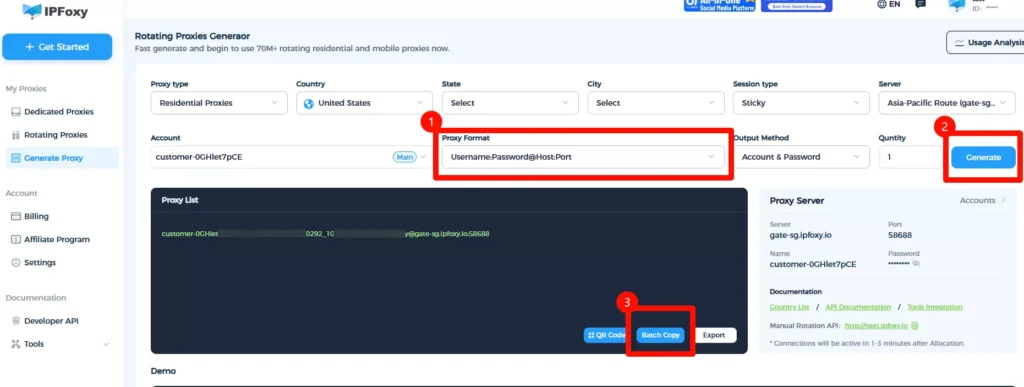
Example proxy setup in Python:
import urllib.request

proxy = urllib.request.ProxyHandler({
    'https': 'username:password@gate-us-ipfoxy.io:58688',
    'http': 'username:password@gate-us-ipfoxy.io:58688',
})

opener = urllib.request.build_opener(proxy)
urllib.request.install_opener(opener)

response = urllib.request.urlopen('http://www.ip-api.com/json').read()
print(response)
If the IP changes, the proxy is working. Use it in Playwright:
from playwright.sync_api import sync_playwright

with sync_playwright() as p:
    browser = p.chromium.launch(
        headless=True,
        proxy={
            "server": "http://gate-us-ipfoxy.io:58688",
            "username": "username",
            "password": "password"
        }
)2.Control Request Frequency
High-frequency requests are a major trigger for blocking. Keep intervals ≥ 3 seconds and add randomness.
import time, random

def random_delay():
    time.sleep(random.uniform(2, 5))

random_delay()
IP rotation strategies:
● Sticky Session: suitable for continuous access (e.g., pagination, comments)
● Rotating per Request: ideal for batch scraping multiple videos
● Manual switching: useful when encountering CAPTCHA or restrictions

3.Simulate Real Browser Behavior
Using only a proxy is not enough. YouTube also detects browser behavior.
Set User-Agent, wait for elements, and simulate actions like scrolling. Avoid large-scale scraping with pure HTTP requests.
page = browser.new_page(
    user_agent="Mozilla/5.0 (Windows NT 10.0; Win64; x64)"
)

page.goto(url)
page.wait_for_selector("video")4.Control Data Scale
Different scales require different strategies:
Scale
<100: Playwright + single IP
100–10,000: Playwright + rotating proxy
10,000+: Distributed system + IP pool + scheduler
VI. FAQ
Q: Playwright vs Selenium for YouTube scraping?
Playwright is better for dynamic websites with stronger anti-block capabilities. Selenium is more suitable for traditional automation testing.
Q: Can I scrape without a proxy?
Possible for small tests, but not viable for medium to large-scale scraping. A proxy helps hide your real IP and reduces blocking risk.
Q: How should scraped data be stored?
JSON or CSV both work. JSON is better for nested data, while CSV is suitable for structured analysis. Always validate data before saving.
Summary
This guide covered the full workflow of YouTube data scraping, from fundamentals to implementation. You’ve learned how to build a scraper using Python and Playwright, and how to improve stability using proxy, request control, and browser simulation.
For further expansion, you can explore comment scraping, search page data collection, or distributed scraping systems. Choosing the right approach and optimizing strategies is key to building a stable and scalable data collection system.