As we enter 2026, OpenAI’s model architecture has evolved to GPT-5.4, alongside the widespread adoption of reasoning models like o3-mini and o1-pro. However, many experienced users have noticed a frustrating issue: ChatGPT suddenly feels “less intelligent”—with weaker logic, refusal to follow complex instructions, and even failure to access real-time web search.
This phenomenon is commonly referred to as “degradation.” In this guide, we’ll break down the underlying causes of ChatGPT degradation in 2026 and provide practical, tested solutions to restore performance.
I. What Is ChatGPT Degradation? Five Common Signs
“Degradation” refers to a sudden and noticeable drop in ChatGPT’s performance without prior notice. Typical signs include:
- Model downgrade: Even when selecting GPT-5.4, responses resemble older models like GPT-4o or even GPT-3.5, with shallow reasoning and mechanical answers.
- Feature limitations: Image generation tools may display “Made with the old version of image generation.” Web browsing fails to load, and file analysis or real-time data features become unavailable.
- Loss of reasoning depth: Tasks that require deep reasoning no longer show step-by-step thinking. Responses are instant but often incorrect, with no visible reasoning process.
- Change in response style: Natural, well-structured responses are replaced by rigid, template-like outputs lacking tone variation.
- Reduced content depth: Complex questions receive short, vague answers with limited insights and sometimes flawed logic.
II. How to Check If Your ChatGPT Is Degraded
You can test your model using the following prompts:
- Prompt A: “What model are you?”
If the answer references a legacy model or cannot clearly confirm GPT-5.4 capabilities, degradation is likely. - Prompt B: Ask a logic-heavy question (e.g., numerical comparisons or complex debugging tasks) and evaluate reasoning depth.
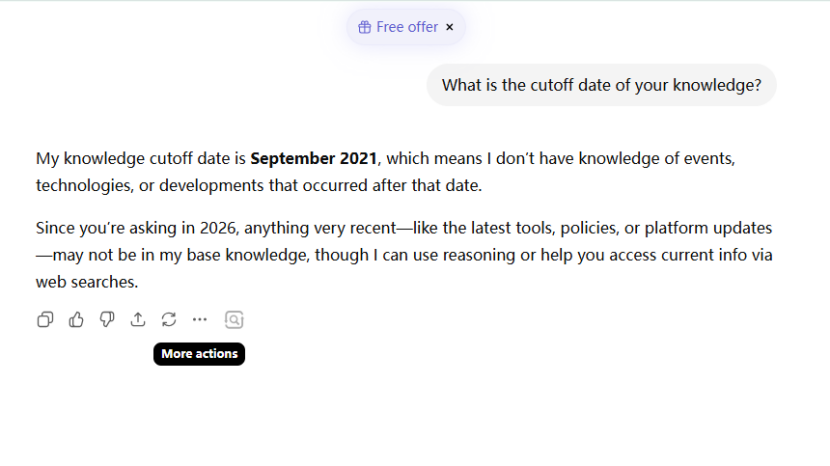
- Prompt C: “What is your knowledge cutoff date?”
The correct answer should consistently be August 2025. Any other date (e.g., 2021, 2023, or different 2025 months) indicates degradation. - Technical check:
Open Developer Tools (F12), inspect the Network tab, and verify whether the model ID has been switched to a lower-tier model.
III. Core Causes of ChatGPT Degradation
1.Official model strategy
In early 2026, OpenAI acknowledged that GPT-5.2 experienced a decline in writing quality. This was a deliberate trade-off: more resources were allocated to improving reasoning, coding accuracy, and math capabilities, while creative writing and conversational fluency were deprioritized.
Future GPT-5.x updates are expected to restore and surpass previous writing performance.
2.IP quality directly affects performance
IP reputation is one of the most critical external factors behind degradation.
- Shared IP risks:
When many users operate under the same proxy IP, it may be flagged as suspicious or abusive due to abnormal traffic patterns. - Low IP authenticity:
Datacenter proxy IPs are often labeled as high-risk. Instead of banning users, the system may silently downgrade response quality to conserve resources. - Blacklisted IP pools:
IPs associated with failed requests or violations may be flagged, affecting future users even if their behavior is compliant. - PoW (Proof-of-Work) mechanism:
The system evaluates environment credibility using a PoW-like mechanism. High-quality IPs receive full model access, while low-trust environments are assigned limited resources.
3.Account behavior factors
Frequent account switching under the same IP, inconsistent geolocation, or repetitive requests can trigger risk controls. For example, sending dozens of similar prompts in a short time may reduce response quality.
4.Automatic model routing (Auto-switching)
After GPT-5, the system introduced automatic model selection based on task complexity. Simple queries are routed to lower-cost models, while complex ones use high-performance models.
However, incorrect routing can result in underpowered responses—making the model appear less capable than expected.
IV. How to Fix ChatGPT Degradation (Proven Methods)
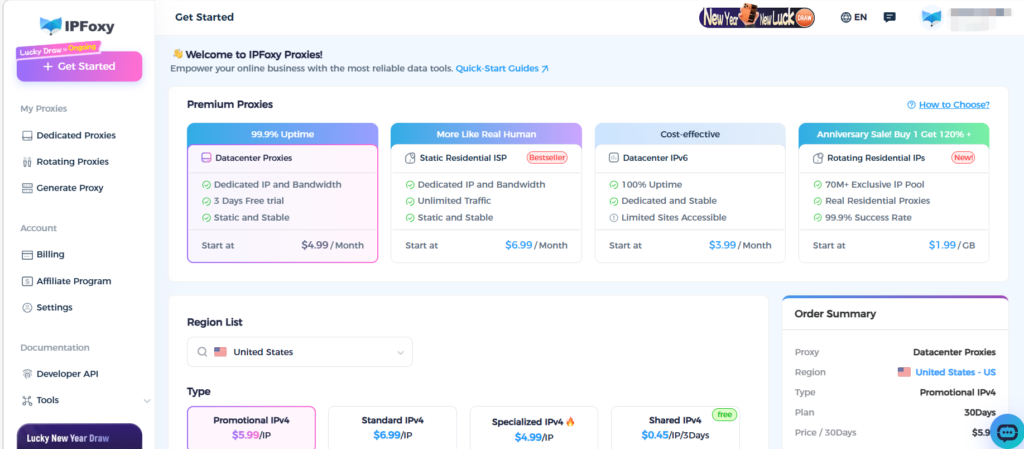
1.Use residential proxy
Datacenter proxy solutions are no longer sufficient under current risk control systems. The most effective solution is switching to a dedicated residential proxy, which helps re-establish a high-trust environment.
Residential proxy IPs come from real ISP networks, offering higher credibility and significantly reducing degradation probability.
Typical setup steps:
- Obtain a dedicated residential proxy (recommended regions: US, Singapore)
- Configure proxy credentials (IP, port, username, password)
- Apply proxy settings in your browser
- Restart the browser and log back into ChatGPT
2.Clean your browser environment
- Delete OpenAI-related cookies and local storage
- Disable WebRTC to prevent IP leaks
- Use incognito mode with a clean proxy environment
3.Use environment isolation
For multi-account setups, avoid sharing environments. Use an anti-detect browser combined with clean proxy IPs to create isolated environments:
- Unique browser fingerprints (Canvas, WebGL, Audio, etc.)
- Dedicated IP per account
- Matching timezone and language settings
4.Switch to the mobile app
Community feedback suggests that the mobile app environment is less likely to trigger degradation. Using it for several days may help restore account status.
5.Optimize prompt structure
Sometimes the issue is not the model but unclear prompts. Use the BROKE framework:
- Background: Provide context
- Role: Assign a role to the AI
- Objective: Define the task clearly
- Key constraints: Set boundaries
- Expected output: Specify output format
You can also enforce deeper reasoning with instructions like:
“Analyze step by step,” “Do not skip reasoning,” or “Provide detailed explanation.”
Conclusion
ChatGPT degradation can be frustrating, but it is not irreversible. By understanding the underlying mechanisms—especially IP reputation and system-level resource allocation—you can take targeted actions to restore performance.
If your AI feels like it’s “pretending to be smart,” it may be time to upgrade your environment and regain full model capabilities.