X (Twitter) account warm-up is the foundation of account operations, yet many users encounter reach limitations or even bans during execution. The core issue is insufficient account trust.
So, how should you warm up an X account in 2026? How can you safely build a high-trust account? This guide explains the key logic, step-by-step process, and anti-ban strategies.
I. How Does X (Twitter) Account Warm-Up Work? Core Logic Explained
Before getting started, it’s important to understand that account warm-up is essentially a continuous process of building account “trust.”
The platform evaluates your login environment, behavioral patterns, and engagement data to determine whether you are a real user. Once flagged as abnormal, your account may face limited reach or even suspension.
At its core, X account warm-up revolves around three key principles:
● Simulate real user behavior
● Maintain a stable usage environment
● Gradually increase account activity

II. 2026 Step-by-Step Process: From New Account to Stable Operation
A standard warm-up cycle can be divided into three stages: registration, cold start, and stabilization.
1.Registration Stage
Phone numbers with +86 country codes are often considered high-risk due to past misuse. Mismatches between IP location and phone number region can also trigger the “This phone number cannot be registered” restriction.
To improve success rate, prioritize more trusted registration methods:
● Register with email: Select “Use email instead” and sign up using common providers like Google or Outlook.
● Use third-party login: Sign up via Google account or Apple ID to leverage existing trust systems and often bypass phone verification.
● Use non-local phone numbers for verification: If required, use SMS verification platforms to reduce restriction risks.
● Use a dedicated static residential proxy: These IPs come from real household networks, offering higher trust, fixed location, and better alignment with normal user behavior, reducing registration blocks and risk triggers.
In practice, using IPFoxy’s dedicated static residential proxy helps maintain a realistic account environment. This is especially important for multi-account operations, allowing each account to resemble a real user rather than a batch-controlled bot, thereby reducing risk and improving account weight.
Example setup process:
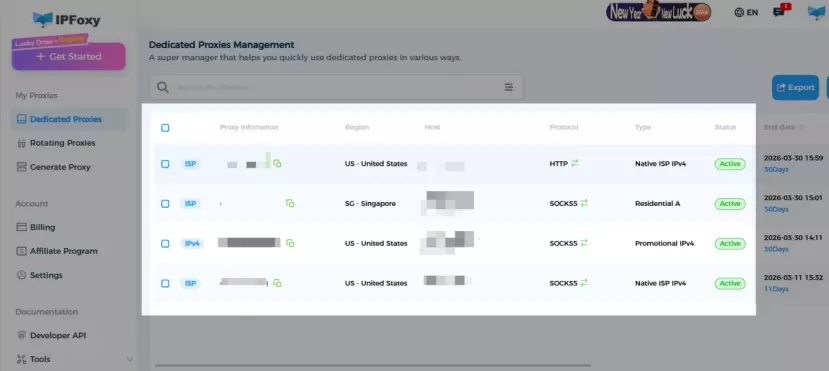
1.Obtain a “static residential ISP proxy” from the IPFoxy dashboard and copy the host, port, protocol, and credentials.
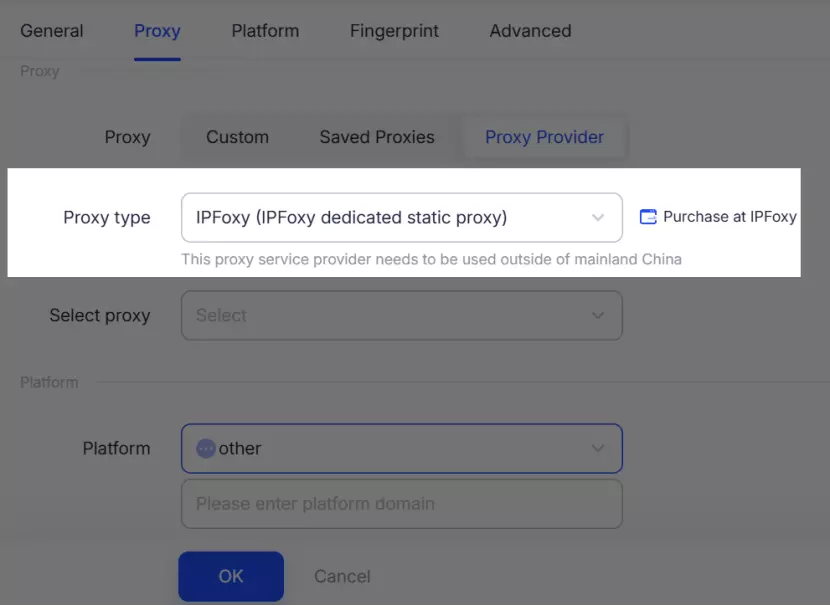
2.Configure the proxy in an Anti-detect browser, Chrome, or cloud phone, and create an independent environment. Ideally follow “one account, one IP, one environment.”
2.Cold Start Stage (First 3–7 Days)
New accounts are in a high-risk phase. Any abnormal behavior may lead to reach limitation or suspension. The goal here is to “stay low-profile.”
Recommended actions:
● Focus on browsing rather than posting
● Perform limited likes and follows daily
● Avoid frequent profile changes
● Do not post ads or external links
The objective is to establish normal usage patterns instead of marketing behavior.
Improper actions during this stage may trigger a Shadowban.
Common signs:
● Tweets do not appear in search
● Little to no organic reach or engagement
● Content visible only to yourself or very few users
How to recover from a Shadowban:
● Stop posting for 1–2 days and delete obvious promotional or duplicate content
● Increase natural behavior like browsing, liking, and commenting
● Maintain a stable login environment
3.Stabilization Stage (Day 7–30)
After passing the initial risk control phase, the account can gradually move into stable operation.
Recommendations:
● Start posting original content regularly
● Gradually increase engagement (comments, reposts)
● Control posting frequency and avoid sudden spikes
As behavioral data accumulates, account trust and weight will improve, while risk decreases significantly.
III. Six Key X (Twitter) Account Warm-Up Tips
After completing the basic process, long-term stability and growth depend on execution details and problem handling.
1.Control Activity Pace
The platform continuously monitors activity patterns. Sudden spikes in likes, follows, or posts may trigger risk detection.
Optimization tips:
● Adjust posting time based on your target region
● Gradually increase likes and follows
● Avoid repetitive actions (e.g., mass following in a short time)
2.Improve Engagement Quality
Quality matters more than quantity. Building real interaction relationships is crucial, especially in early growth.
Optimization tips:
● Consistently engage with ~10 niche accounts
● Reply to users with similar or slightly higher follower counts
● Use comments to gain initial exposure
3.Consistently Deliver Valuable Content
Long-term growth depends on providing meaningful content, not just posting frequently.
Optimization tips:
● Share real updates such as progress, milestones, or experiences
● Provide insights instead of simple reposts
● Keep content specific and informative
4.Optimize Profile and Positioning
As users visit your profile, a clear identity directly impacts growth.
Optimization tips:
● Highlight your core value clearly in your bio
● Focus on one main niche and stay consistent
5.Use Threads to Increase Reach
Structured long-form content is more likely to be recommended by the platform.
Optimization tips:
● Use thread format to express complete ideas
● Focus on insights rather than information dumping
● Maintain clear logic and depth
6.Restore Recommendation Weight
If your account experiences long-term low reach or suspected limitation, you can reset content preferences and system tags to help the platform reassess your account.
Note: Use the web version (browser) for better effectiveness.
Path: Settings → Privacy and safety
Steps:
● Under “Your posts”: Uncheck “Mark media you post as containing sensitive material”
● Under “Content you see”: Uncheck “Display media that may contain sensitive content”
● Under “Interests”: Clear all selected interests
● Under “Search settings”: Uncheck “Hide sensitive content”
IV. FAQ
Yes, but avoid frequent changes. Switching IPs or devices repeatedly in a short time may be flagged as abnormal login behavior. Adjust only after entering the stable phase.
No. Accounts that purchase followers have an extremely high ban rate (up to 92%). Focus on organic growth through quality content.
Yes. Low exposure in early stages is normal due to platform review mechanisms. As activity and engagement increase, reach will improve gradually.
V. Conclusion
X (Twitter) account warm-up is not about a single tactic, but a long-term process. The key lies in three aspects: a stable environment, natural behavior, and consistent content output.