












Are you still manually producing product videos in 2026? The ecommerce content landscape has already changed dramatically.
AI video creation powered by Nano Banana and Veo 3 is rapidly reshaping short-form product video production. Nano Banana turns ordinary photos into visually appealing images in one click, while Veo 3 transforms those images into smooth, dynamic short videos optimized for conversions. When combined, they form a powerful AI-driven product video workflow.
From tool setup and prompt creation to producing your first video and refining it for distribution, this guide walks through the entire process step by step to help you quickly create your own AI product videos.
I. Why Choose Nano Banana and Veo 3 for AI Video Creation?
What Is Nano Banana?
Nano Banana is an AI image generation tool that allows users to create high-quality images by simply entering natural language prompts. It supports both text-to-image and image-to-image generation.
For ecommerce sellers, Nano Banana enables you to:
- Create unique brand logos quickly by freely adjusting colors, styles, and sizes to match your store identity
- Build highly customized product backgrounds by flexibly changing elements for different niches, holidays, or promotional themes, allowing fast generation of professional product images and campaign visuals
- Use it in short videos to instantly switch outfits and backgrounds, helping creators and sellers build consistent digital characters and efficiently scale content production
What Is Veo 3?
Veo 3 is Google’s text-to-video model designed for producing high-quality short videos. It can generate visuals and synchronized audio directly from text prompts, including dialogue, ambient sound, background noise, and sound effects.
Veo 3 offers:
- Multiple aspect ratios to fit platforms such as TikTok, Reels, and Shorts
- Strong performance in rendering human motion, product physics, lighting, and realism
- Accurate depiction of common product video actions such as picking up items, product trials, and detail showcases
For ecommerce sellers, Veo 3 significantly simplifies product video production. By entering a product selling point and a scene description, you can generate a complete video clip with visuals and audio, without separately handling voiceovers or background music. This makes it ideal for new product testing, rapid content scaling, and A/B testing.
When combined, Nano Banana and Veo 3 cover the core requirements of product short videos: consistent visual identity and strong dynamic presentation. Nano Banana provides stable visual inputs, ensuring consistent characters and product appearances, while Veo 3 transforms static images into videos with rhythm, motion, emotion, and sound.
II. Step-by-Step Guide to Creating Viral Videos with Nano Banana and Veo 3
Step 1: Access the Tools
- Log in to Google AI Studio or Gemini and locate Nano Banana within Gemini’s image tools. Be cautious when searching online and verify that you are accessing official platforms.
- Check model availability in AI Studio or apply for Veo 3 access through Google’s video generation page.
If direct access is unavailable, you may try third-party demos or partner platforms, though no specific recommendations are provided here.
Step 2: Generate Images with Nano Banana
- Upload a reference image such as your face, a character, or a product theme. Nano Banana performs best when the subject is clear, well-lit, and facing forward.
- Use precise and detailed prompts to improve results. Add specifics about pose, clothing, or expressions. You can also use AI tools like ChatGPT or DeepSeek to help craft prompts.
- Generate multiple images, then select your preferred pose and texture and save the highest-resolution version.
Step 3: Create Prompts for Veo 3
Veo 3 works best with short and specific scene descriptions. You can structure prompts as a sequence of micro-shots: subject → action → camera → lighting → atmosphere → sound.
Step 4: Combine Image and Text Inputs
Veo 3 supports text prompts, but image references often improve accuracy and efficiency. Upload images generated by Nano Banana as reference visuals.
Workflow:
- Export Nano Banana images in PNG or JPEG format at the highest possible resolution
- In Veo 3, upload images using the “image reference” or “image condition” option
- Reference the uploaded images in your prompt, such as using the Nano Banana character as the subject and describing camera motion or environmental effects
Step 5: Generate Videos with Veo 3
- Select the aspect ratio, such as 16:9 for YouTube or 9:16 for Reels and TikTok
- Choose the video duration, typically around 8 seconds
- Submit the job. Generation time can range from seconds to minutes depending on queue and resolution. Some interfaces provide preview frames
Iteration tips:
- If the video appears shaky, emphasize smooth motion or cinematic motion blur in regeneration prompts
- If audio does not match expectations, instruct Veo 3 to generate without dialogue and add voiceovers in post-production
III. Advanced Guide: How to Improve AI Video Production Efficiency
As users move from casual testing to intensive usage, performance issues often appear, such as slow responses or failed requests. This happens because advanced workflows like batch style testing, parameter tuning, and continuous image iteration dramatically increase request frequency in a short time.
High-frequency requests, multi-account testing, repeated revisions, and rapid access can trigger platform risk controls. The system may not distinguish normal creation from abnormal traffic, leading to:
- Request failures
- Significantly slower output
- Account restrictions or access bans
To scale AI video creation for commercial use, one key question must be addressed: how to avoid being identified as abnormal traffic.
There are two main approaches:
1. Manually Control Usage Rhythm
Optimization strategies include:
- Avoid fixed request intervals such as one request every three seconds
- Add random pauses of 2 to 15 seconds between generations
- Insert intentional idle periods during long sessions
- Split tasks into batches instead of submitting large volumes at once
- Reduce completely identical prompt and parameter combinations
2. Use High-Quality Rotating Residential Proxy Solutions
During high-frequency requests, high-quality proxy solutions can:
- Distribute request pressure to avoid triggering controls from repeated calls on a single IP
- Make access behavior resemble real user activity and reduce risk
- Provide clean, independent environments for different accounts and avoid correlation
- Maintain stable speed and low latency during cross-region access
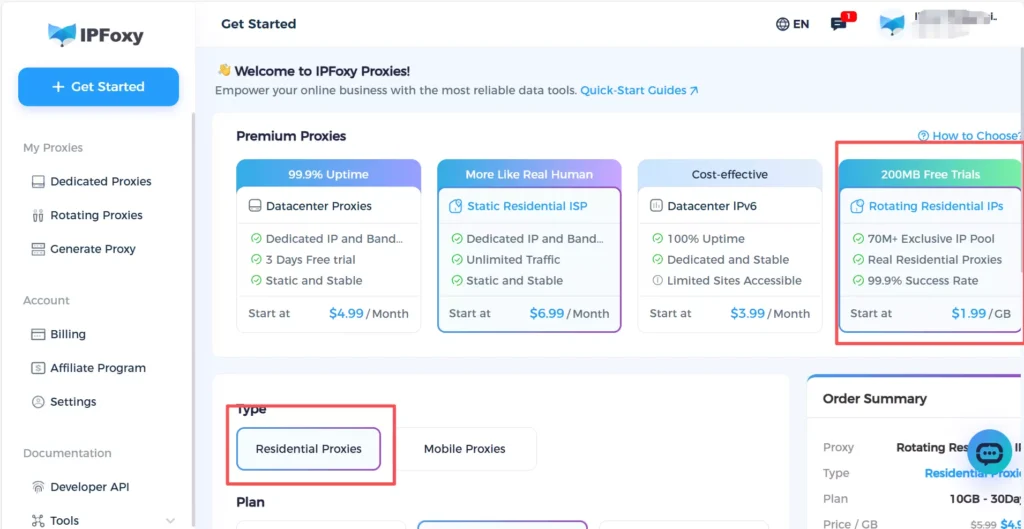
For advanced usage scenarios, IPFoxy is well suited to these needs. IPFoxy provides:
- Real residential proxy nodes with high cleanliness and credibility, aligning with platform expectations of normal users
- Rotating residential proxy options with sticky sessions suitable for high-frequency requests and iterative workflows
- Global coverage across major regions, allowing selection of the fastest response locations
- Clean IP pools that avoid sharing abnormal or polluted usage histories
IV. Frequently Asked Questions
A: The gap is now very small. AI videos perform reliably in product presentation, scene simulation, and selling point demonstrations, while real filming still excels in personal branding and emotional delivery. Many sellers use AI videos for initial testing before deciding on real shoots.
A: Yes. AI significantly lowers the barrier. Many AI video tools already handle camera work, pacing, and basic audio, allowing users to focus on selling points and script logic without professional editing skills
A: As long as the content is varied, informative, and not mass-reposted without changes, AI videos are not inherently limited. Platforms focus on content quality, repetition levels, and originality rather than whether AI was used
A: Start with a single product, one selling point, and an 8-second video. Once one piece runs successfully, gradually expand beats, styles, and account scale instead of overcomplicating from the beginning.
Conclusion
In 2026, competition in ecommerce short-form video is no longer about who films better, but who tests faster and scales more efficiently. As product launches accelerate and platform cycles shorten, traditional one-off filming is being replaced by efficient, repeatable AI video workflows. Those who integrate AI into their content pipelines earlier will be better positioned to capture the efficiency advantages of AI-driven production.

