












In 2026, many users experience issues receiving Telegram verification codes when registering or logging in. This is not necessarily a service problem—such issues often result from a combination of phone number restrictions, network environment, and account security mechanisms rather than a single cause.
Before trying different methods to receive codes, it is important to identify the type of verification failure you are encountering.
I. Main Reasons Telegram Verification Codes Are Not Received
1、Phone Number Limitations
This is the most common reason. Some carriers may restrict international SMS channels or delay messages during peak hours. Additionally, carriers often apply filtering for messages from international platforms. Telegram’s SMS provider does not guarantee stable coverage in all regions. As a result, a phone number may not receive Telegram codes even if it can receive other international SMS.
2、Unstable or Problematic Network Environment
Telegram’s verification is more than just sending a text—it involves full network verification. Issues that can cause failures include:
- Unstable VPN or proxy connections
- High network latency causing timeouts
- Firewalls blocking certain types of connections
In many cases, the code is sent but blocked at the network level.
3、Phone Number Flagged as High Risk
If the number has been used for frequent account registrations, multiple failed code requests, or repeatedly used on third-party code platforms, Telegram may flag it as high risk. Even if the SMS channel works, the system may block the code.
4、Account Security Mechanisms Triggered
Abnormal login behavior may raise verification thresholds, such as:
- Logging in from multiple devices in a short time
- Frequent geographic changes
- Network inconsistencies with previous usage
In these cases, codes may be delayed or temporarily blocked.
5、App Version or System Compatibility Issues
Using outdated Telegram clients or devices with incorrect system time or timezone may prevent proper verification.
6、Phone Number Status Issues
Problems such as unpaid bills, suspended service, disabled SMS, or inactive international messaging permissions can prevent codes from being delivered.
7、Frequent Code Requests Triggering Cooldown
Repeatedly clicking “Resend Code” in a short period may activate Telegram’s cooldown mechanism, temporarily blocking further code requests.
II. Solutions for Telegram Verification Code Issues
1、Try Email Verification
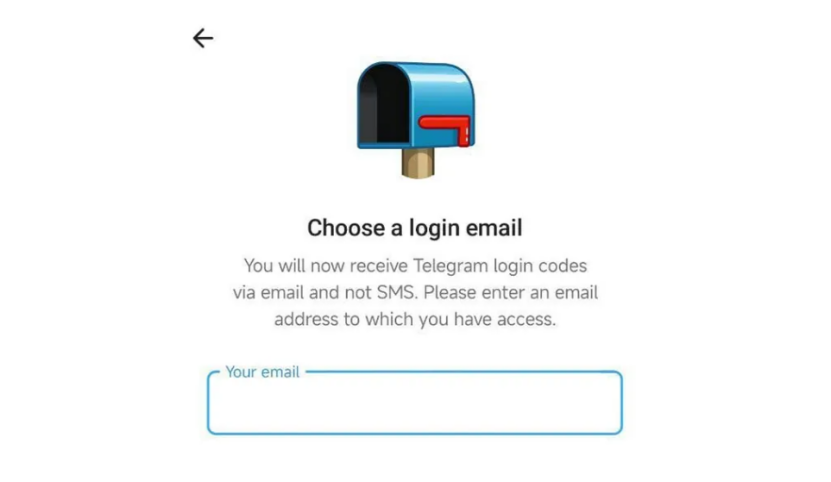
Since October 2025, Telegram has gradually rolled out email verification for some users. Only the official client allows sending verification codes via SMS; third-party clients like iMe, Nicegram, or Plus Messenger can only send codes to logged-in devices.
- New users may be prompted to bind an email during registration.
- Existing users can try logging out and back in to trigger an email binding prompt.
- Note: Email binding still requires SMS verification. If the number cannot receive codes, avoid attempting email binding.
2、Change Device or Network Environment
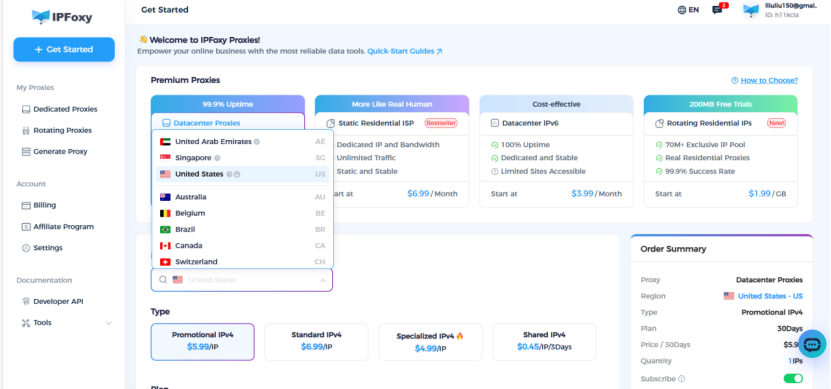
Many users successfully receive codes by switching to a stable, consistent network. Telegram evaluates device fingerprint, network stability, and geographic consistency.
Using a dedicated residential IP network, such as an independent residential IP from IPFoxy, can reduce failures caused by shared or unstable lines. This approach does not bypass verification but lowers the risk of network-triggered blocks.
3、Check Phone Number and Carrier Settings
Before other solutions, ensure:
- Phone service is active and paid
- International SMS is enabled
- Device is restarted and app cache cleared
- System time and timezone are correct
Basic checks like these often solve hidden issues.
4、Use a Virtual Phone Number
If the number cannot receive codes long-term, a virtual number service may be used.
- Quality varies across platforms
- Overused or public virtual numbers have lower success rates
- Avoid binding important accounts to low-quality numbers
5、Use Telegram X for In-App Verification
Telegram X offers higher success rates for in-app verification in some environments. This method does not rely on SMS and is suitable when SMS delivery is unstable.
III. Telegram Verification Code FAQ
Q1: The code keeps spinning with no message. Is my account restricted?
Not necessarily. This often results from network timeouts or interruptions, not a block. Try using a stable network before retrying.
Q2: I changed the network but still cannot receive the code. Is my number invalid?
Not always. It may be temporarily flagged as high risk or under cooldown due to repeated failed attempts. Continuing to retry may extend the restriction.
Q3: The same number works on someone else’s device but not mine. Why?
Telegram considers device fingerprint and network environment. Previous anomalies may cause requests to be blocked even if the number is normal.
Q4: Are Telegram accounts registered with virtual numbers safe?
It depends on number quality. Reused or disposable numbers are more likely to trigger blocks. Temporary use is acceptable, but long-term binding of low-quality numbers is not recommended.
Q5: Will changing network be seen as abnormal behavior?
The key is frequency and severity. Occasional stable network changes are fine, but frequent drastic switches can trigger security measures. Using stable, low-fluctuation networks like IPFoxy helps verification succeed.
Conclusion
Failure to receive Telegram verification codes is usually caused by a combination of phone number limitations, network conditions, and account security mechanisms. In the short term, email verification or switching devices/networks can resolve login issues. Long-term, maintaining a stable and reliable network environment is crucial. IPFoxy provides a stable network foundation that supports smoother verification flows rather than serving as a code reception tool itself.

