Recently, numerous users have reported: Gemini suddenly displays messages like “account abnormal,” “service unavailable,” or “function restricted,” and some accounts are even directly banned/disabled. Many creators, students, and professionals store project data, thesis drafts, and work content in Gemini—losing access can lead to huge losses.
Why the sudden mass bans? Is it your fault, or a system upgrade?
This article explains everything: latest risk control logic → how to avoid being banned → appeal templates if banned.
I. Latest Risk Control Logic for Gemini’s Recent Mass Bans
1.Abnormal Account Environment (Cross-region, Multiple IPs, Frequent Switches)
Gemini’s risk control is increasingly aligned with Google’s. You may trigger alerts if:
- Login IPs from different countries
- Account logged into multiple devices in a short time
- Using public proxies, shared/cheap proxies
Typical symptoms: Constant verification after login, repeated login failures, “abnormal activity” prompts.
Recent bans are highly linked to these behaviors:
- Logging into multiple Gemini accounts in the same browser environment
- Unisolated fingerprints (disordered Cookies/UA/timezone/fingerprint parameters)
- Using browser environments with high fingerprint duplication for multiple accounts
Gemini has strengthened detection of fingerprint duplication and Account Linking, especially for multi-account users.
3. High-Risk Paid Subscriptions (Payment Anomalies, Third-Party Top-ups, Cross-region Subscriptions)
Common high-risk scenarios:
- Using non-personal credit cards
- Using “third-party subscription services,” “agent top-ups,” or “cross-region subscriptions”
- Google detecting inconsistent subscription sources
Such accounts are usually permanently banned without appeal.
4. Model Abuse (Mass Generation, Batch API Calls)
You may be flagged if:
- High-frequency, long-duration usage
- Obvious batch content generation (scripted prompts)
- Crawler-like behaviors
This applies especially to work accounts, content accounts, and automated generation accounts.
5. Sensitive Scenario Triggers (Excessive Queries in Certain Fields)
Gemini’s sensitive content model triggers automatic security reviews. Frequent sensitive keyword queries over consecutive days will tag you with a risk profile—repeated short-term triggers may lead to bans.
6. Low-Quality New Accounts / Marked as Abnormal Sources
Batch “low-quality new accounts” are a recent ban hotspot, including:
- Purchased Gmail accounts
- Mass-registered Gmail accounts from the same IP
- Using Gemini immediately after registration without “account aging”
Even non-violating accounts may be flagged as “suspicious” by the system.
II. Gemini Survival Guide
1. Stabilize Your Account Environment
The core cause of recent mass bans is unstable account environments, which include two key parts:
- IP (network environment)
- Browser fingerprint (device environment)
Abnormalities, sharing, or duplication in either can trigger risk control. The key to safety is creating an “independent, stable, human-like usage environment” for your Gemini account.
Most stable solution: Combine proxy + Anti-detect browser
(1) Stable, Long-Term Consistent IP
Gemini has strict IP requirements—you need not just access, but also:
- Consistent country (no switching from US to UK overnight)
- Clean IP type (avoid public pools, cheap/shared proxies)
- No frequent switches (daily IP changes are high-risk)
This is mandatory for Gemini Advanced paid users.
(2) Isolate Anti-detect Browser Environments
Google/Gemini now checks if your “device fingerprint” resembles a real device: browser UA, resolution, Canvas fingerprint, WebGL info, timezone/language, and Cookie history. Logging into multiple Gemini accounts in one browser or using highly duplicated fingerprints will likely label you as a “batch account/script account,” triggering immediate risk control.
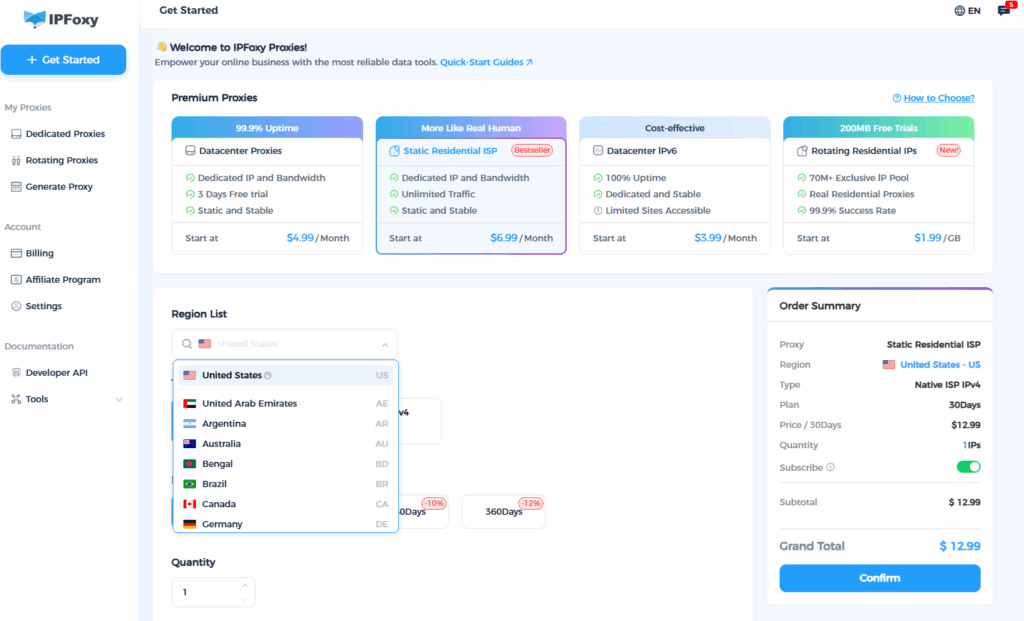
To bind IP and Anti-detect browser tightly while ensuring IP purity and stability, many users now pair each environment with IPFoxy’s dedicated static residential proxy.
Why IPFoxy is more stable:
- Exclusive, non-shared IPs (pure and stable, no “blacklisted” or “abused” risks)
- Country selection and stable nodes for long-term Gemini login
- Ideal for “one account, one environment” usage
Simple usage steps:
- Create an independent environment in Anti-detect browser
- Bind it to an IPFoxy dedicated static residential proxy
- Log into only one Gemini account in this environment
- Maintain consistency long-term
Gemini will recognize you as a “real user on the same device + network”—this is the most stable, low-risk setup, proven safe amid the recent ban wave.
2. Use Like a Real Person
- Avoid consecutive mass long-content generation in a short time
- Maintain normal usage rhythm (spread usage throughout the day)
- Minimize scripted prompts
For high-frequency use (e.g., content creators), use multiple accounts to distribute tasks.
3. Avoid Third-Party/Low-Cost Subscriptions
This is the second leading cause of bans.
Gemini Advanced subscriptions must meet:
- Personal credit card
- IP region matching
- Google Play region matching
- Billing address matching
Any deviation is high-risk.
4. Age New Accounts for 3–7 Days Before Using Gemini
Standard new account aging process:
- Log into Gmail normally
- Browse YouTube
- Use Google Search
- Link normal mobile activities
- Gradually use Gemini (start with simple tasks)
This significantly reduces ban risk.
III. Account Reinstatement Appeal Templates
Below are two high-success templates for common scenarios: student users + professional users. Replace placeholders with your information.
1. Student Scenario (International Students / Thesis Writers)
Subject: Request for Review and Reinstatement of My Gemini Account
Dear Google Support Team,
My Gemini account was recently suspended. I believe this may have been triggered by an IP/location change. I am currently a [Country] student temporarily staying in [Country], so I need to access Gemini for my academic work.
Gemini stores many of my important study materials, including:
- Parts of my ongoing research paper
- Course notes
- Drafts for class assignments
Losing access has severely impacted my studies. I confirm that I did not use any automated tools or violate any policies. The unusual activity was solely due to my temporary change in study location.
I sincerely request a manual review and reinstatement of my account. I will maintain a stable login environment and ensure fully compliant usage going forward.
Thank you for your help.
Best regards,
[Your Name]
2. Professional Scenario (Work Needs, Critical Data Stored in Gemini)
Subject: Request for Account Reinstatement Due to Work Needs
Dear Google Support Team,
My Gemini account was unexpectedly suspended. The issue may have been caused by a device or network change during my work routine.
I rely on Gemini daily for my job, including:
- Generating work reports
- Drafting emails and project documents
- Storing work notes and research references
Many important materials are saved in my Gemini account, and losing access has significantly disrupted my workflow. I am the legitimate owner of the account and have never used automation or violated any usage policies.
Please help me review and restore access to my account. I will ensure consistent and stable usage in the future.
Thank you very much for your assistance.
Best regards,
[Your Name]
Summary
Gemini’s recent mass bans mainly target unstable environments, multi-account mixing, cross-region subscriptions, and abnormal behaviors. For long-term stable use, the core rule is: Keep your account environment clean, IP stable, and fingerprints isolated—Gemini won’t ban you without reason. If your account is banned, use the templates above to appeal—recovery is usually successful.