












In e-commerce, social media multi-account management, and mobile data collection, proxy quality directly affects risk control and connection stability. Choosing a mobile proxy should not be based only on the number of IPs or price. Network source, location coverage, rotation options, stability, and other factors should also be considered.
This article covers four aspects of 4G/5G mobile proxies: their basic characteristics, key selection criteria, suitable use cases, and practical setup methods.
I. What Is a 4G/5G Mobile Proxy? How Is It Different from Other Proxies?
A 4G/5G mobile proxy is a proxy service that uses mobile networks. Its IP addresses come from mobile networks rather than data centers or residential broadband networks. Compared with standard data center proxies, mobile proxies are better suited to scenarios that require a real mobile network environment, specific geographic locations, or mobile network testing.
In addition to mobile proxies, common proxy types include data center proxies and residential proxies. They differ mainly in their IP sources and typical use cases.
Data center proxies mainly come from data centers or cloud servers and generally offer fast speeds and large resource pools.
Residential proxies come from home broadband networks and provide a network environment that is closer to typical residential users.
Mobile proxies come from mobile networks and have 4G/5G mobile network characteristics.
The following table compares the three proxy types across several dimensions:
| Comparison | Data Center Proxy | Residential Proxy | Mobile Proxy |
|---|---|---|---|
| IP source | Data centers and cloud servers | Home broadband networks | Mobile networks |
| Network type | Data center network | Residential broadband | 4G/5G mobile network |
| IP rotation | Depends on the provider | Rotating proxy or dedicated IP | Rotating proxy or sticky session |
| Stability | Generally fast and stable | Network environment closer to residential users | Depends on the carrier and network |
| Common uses | Data collection, web access | Localized services, data collection | Ad verification, App testing, social media management |
II. How to Choose a 4G/5G Mobile Proxy?
1. Check the IP Source: Is It from a Real Mobile Network?
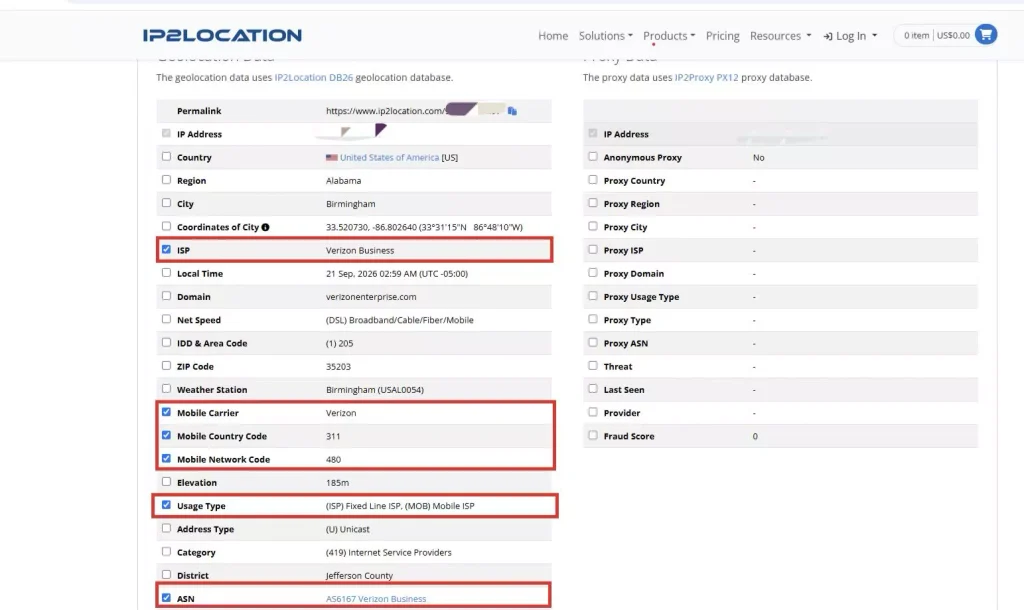
When choosing a 4G/5G mobile proxy, first check the IP’s network source. IP detection tools can be used to check the ASN, ISP, network type, and mobile carrier associated with an IP and determine whether it has genuine mobile network characteristics.
If an IP comes from a mobile network, the network type in the detection results will usually be listed as Mobile or Mobile ISP. The ISP identifies the network service provider associated with the IP, while the Mobile Carrier can further identify the specific mobile operator. ASN can also help determine which network organization the IP belongs to.
2. Check IP Location Coverage
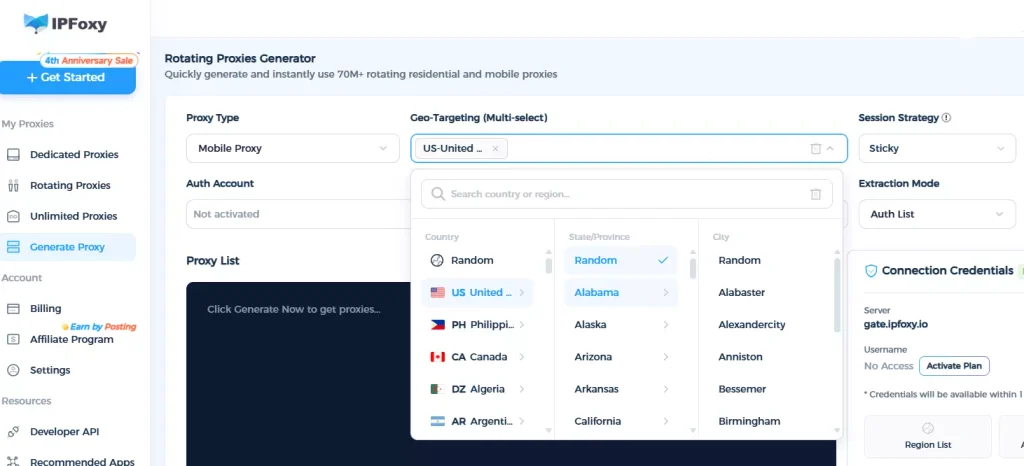
Determine the required country, region, or city based on your business needs, then check whether the proxy provider offers IP resources in the required locations.
If you only need mobile IPs from a specific country, focus on resource availability in that location. For localized testing or ad verification, also check whether city-level targeting is supported.
3. Check the IP Rotation Method
Different businesses have different requirements for IP persistence. Therefore, choose a mobile proxy rotation method based on how the proxy will be used.
Common options include:
- Rotating per request: The IP changes after each request, making it suitable for scenarios that require frequent IP changes.
- Sticky session: The same IP is maintained for a specified period, making it suitable for scenarios that require a continuous connection to the same network environment.
- Manual refresh: The current IP can be changed manually based on business requirements.
There is no need to simply pursue a higher rotation frequency. The rotation method should match the required IP continuity and change frequency.
4. Check Stability and Connection Success Rate
Stability directly affects the actual performance of a proxy.
Key factors to consider include:
- Connection success rate
- Response time
- IP availability
- Long-term performance
If the provider offers data such as success rates, request counts, or traffic usage, these metrics can also be used to evaluate proxy quality.
Before large-scale deployment, test proxy nodes in the target location and determine the appropriate usage volume based on the actual results.
5. Check Proxy Protocols
The proxy protocol determines how the proxy connects to browsers, software, or scripts.
Common protocols include HTTP/HTTPS and SOCKS5. Different devices and tools may support different protocols. For example, some cloud phone environments require SOCKS5, while other tools may support HTTP proxies.
Before purchasing, make sure that the proxy protocol is compatible with the target device or business tool.
6. Check the Pricing Model
Different proxy providers may use different pricing models, including billing by traffic, IP count, or subscription period.
When comparing options, calculate the cost based on actual usage instead of comparing unit prices alone. For example, data collection usually requires close attention to traffic consumption, while long-term use should take both subscription periods and resource costs into account.
III. What Business Scenarios Are 4G/5G Mobile Proxies Suitable For?
Different businesses have different network requirements. The main characteristics of 4G/5G mobile proxies are their mobile network environment and ability to change IPs dynamically. They can be used in the following scenarios.
1. Multi-Account Social Media Management
Platforms such as Facebook, Instagram, TikTok, and X have strict risk control systems. If multiple accounts continuously share the same fixed IP or use commonly detected data center IPs, the platform may identify the activity as abnormal or automated, potentially triggering restrictions, account verification, or other risk control measures.
Mobile IPs come from mobile networks used by mobile devices. Dynamic mobile proxies can provide different mobile IPs for different accounts, creating a network environment closer to mobile users and reducing IP-based account association risks.
2. Mobile Ad Verification and Anti-Fraud
Advertisers need to verify whether ads are displayed correctly across different countries, cities, and mobile carriers such as AT&T and Vodafone. They also need to identify potential traffic fraud, such as abnormal traffic or manipulated requests. Standard fixed networks cannot fully reproduce different mobile network environments.
Dynamic 4G/5G mobile proxies allow testers or automated systems to switch between mobile networks in different target locations. This makes it possible to access ad pages from a local mobile network environment and verify ad display, geographic targeting, landing page redirects, and billing logic.
3. App Testing and User Experience Optimization
Apps may experience connection failures, slow loading, or functional issues under different mobile networks, locations, and carrier environments. A fixed broadband connection cannot fully reproduce the complexity of mobile network conditions.
By using 4G/5G mobile IPs from different locations and carriers, developers and QA teams can build realistic mobile network testing environments, reproduce connection issues, and improve App stability and user experience across different mobile networks.
4. Data Collection and Anti-Bot Environments
Many major platforms, including e-commerce and social media websites, use anti-bot systems that may restrict or block data center IPs. Mobile networks may use CGNAT (Carrier-Grade NAT), where multiple mobile devices share the same public IP address.
Dynamic mobile proxies can therefore provide a mobile network environment for data collection. Combined with automatic IP rotation, they can support data collection across multiple locations and help handle websites with stricter anti-bot measures.
5. Market Research and Competitor Monitoring
Many e-commerce platforms, flight and hotel booking websites, and Apps may adjust pricing, recommendations, and promotions based on the user’s location and network type.
Using 4G/5G mobile IPs from different target locations allows businesses to simulate local mobile network access and compare pricing, promotions, and page displays across different markets. This can provide data for competitor analysis and pricing strategies.

IV. How to Use a 4G/5G Mobile Proxy
After selecting a proxy, the actual setup process can generally be divided into four steps: obtaining proxy information, setting the rotation method, configuring the proxy, and testing the connection.
1. Obtain Mobile Proxy Information
After purchasing a mobile proxy, generate the required proxy connection based on the target location and usage requirements. The connection information usually includes the host, IP, port, username, and password.
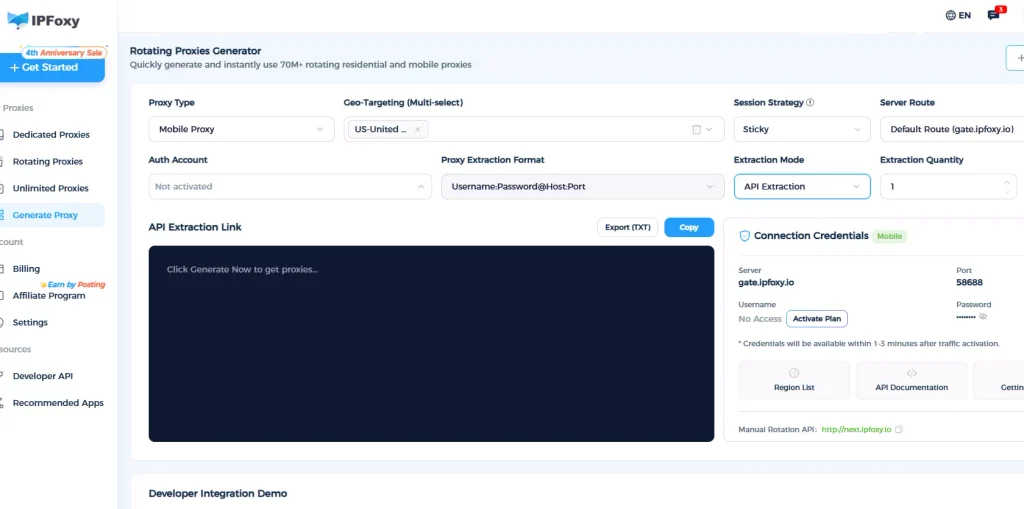
For example, with the IPFoxy mobile proxy service, you can select the proxy type, location, rotation method, and number of proxy lines when generating a dynamic proxy, and then generate the corresponding proxy information.
If you use a proxy provider such as IPFoxy that provides an API, you can also obtain proxy addresses through the API for batch requests and management.
2. Set the Proxy Rotation Mode
Choose the appropriate rotation method based on your business requirements.
When generating a mobile proxy, you can select a sticky session or rotation per request. If you need to keep the same IP for a certain period, select a sticky session and specify the session duration. If you need to change IPs frequently, choose rotation per request.
Some mobile proxies also support customizable sticky session durations to meet different session requirements.
3. Configure the Proxy on the Target Device
After obtaining the proxy information, configure it according to the actual usage environment.
Common methods include:
- Browser: Enter the IP, port, and authentication information in the proxy settings of a browser or Anti-detect browser.
- Scripts: Configure proxy parameters in Python, PHP, Java, Go, or other programming languages.
- Mobile devices or cloud phones: Configure the proxy according to the protocols supported by the device.
For ad verification or automation scenarios, you can also configure an IPFoxy proxy using a Python script as shown below:
import urllib.request
import urllib.request

if __name__ == '__main__':
    proxy = urllib.request.ProxyHandler({
        'https': 'username:password@gate-ipfoxy.io:44001',
        'http': 'username:password@gate-ipfoxy.io:44001',
    })
    opener = urllib.request.build_opener(proxy,urllib.request.HTTPHandler)
    urllib.request.install_opener(opener)
    content = urllib.request.urlopen('http://www.ip-api.com/json').read()
    print(content)
4. Test and Verify the Proxy
After configuration, do not immediately deploy the proxy at scale. First, check the current IP’s location, carrier, and network type to confirm that the proxy meets your requirements.
Then access the actual business target and test the connection success rate, response speed, and IP availability. If the results meet your requirements, gradually increase the usage volume.
V. FAQ
The main difference is their network source. Residential proxies usually come from home broadband networks, while mobile proxies come from mobile networks. As a result, they provide different network environments and IP characteristics.
The choice depends on your business requirements. If a specific mobile network environment is required, prioritize the target network type, location coverage, and actual test results rather than simply comparing 4G and 5G.
You can test the IP location, carrier, network type, connection success rate, and response speed to confirm that the proxy meets your actual requirements.
VI. Conclusion
When choosing a 4G/5G mobile proxy, consider factors such as IP source, location coverage, rotation method, stability, proxy protocol, and pricing model.
After selecting a proxy, choose the appropriate rotation method based on the business scenario and complete the proxy acquisition, configuration, and testing process.
For different use cases such as ad verification, App testing, data collection, and market research, prioritize the location, network environment, and IP resources that match your actual requirements instead of focusing only on IP quantity or price.