











As AI agents transition from generating content to executing tasks, browser automation has emerged as a critical gateway connecting AI with web applications. However, traditional automation tools rely on fixed scripts and rigid page structures; when websites update frequently or interaction flows become complex, maintenance costs escalate continuously. By combining large language models with browser control capabilities, Browser Use enables AI to understand web pages and complete operations autonomously.
I. What Is Browser Use?
Browser Use is an AI automation framework that connects large language models with browser operational capabilities. At its core, it integrates browser control technologies like Playwright to enable AI agents to complete web interaction tasks. Unlike traditional browser automation that relies on fixed scripts, Browser Use combines web structures, visual information, and task goals to judge the next step autonomously.
1、Limitations of Traditional Browser Automation
Traditional browser automation tools primarily rely on DOM structures to control pages. Developers need to locate elements in advance using methods like XPath or CSS Selectors and define operational flows such as clicking, inputting, and navigating through code.
Three limitations:
- High maintenance costs: Front-end frameworks like React and Vue rely heavily on dynamic rendering. Page structures, element attributes, and class names change frequently, causing original positioning rules to fail.
- Limited generalization: Automation scripts are typically developed around a single website, making it difficult to reuse them directly across different platforms.
- Difficulty handling complex pages: Scenarios involving dynamic loading, login verifications, pop-ups, and Shadow DOM require additional conditional logic, increasing development complexity.
2、How Browser Use Understands Web Pages
The core difference of Browser Use lies in the fact that it no longer relies entirely on fixed element positioning, but completes web page operations through visual information and semantic understanding instead.
When executing tasks, Browser Use sends the current web page screenshot, interactive element data, and the task goal input by the user to the large language model. The model judges the current state based on the page content and generates the next operational command, such as clicking buttons, inputting keywords, or extracting product details.
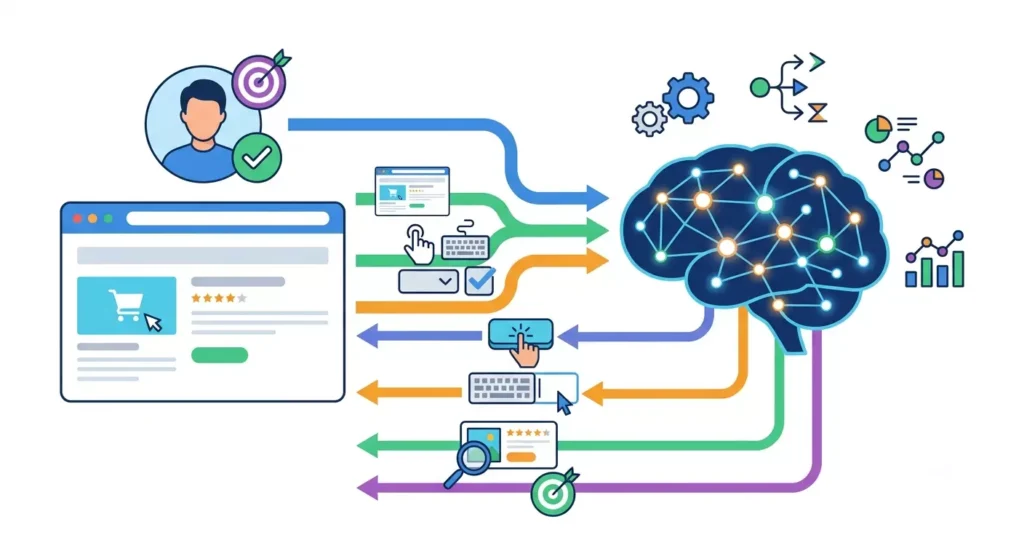
A Matrix Overview of the Differences Between Browser Use and Traditional Browser Automation:
| Dimension | Traditional Browser Automation | Browser Use |
| Element Positioning | XPath, CSS Selector, DOM | Visual recognition + semantic understanding |
| Operational Logic | Code-predefined workflows | AI autonomous planning based on tasks |
| Page Adaptation | Page changes easily cause script failure | Adjusts dynamically based on page state |
| Development Method | Requires writing extensive automation code | Uses natural language to describe goals |
| Typical Scenarios | Fixed-process automation | AI Agents, complex web tasks |
Simply put: traditional browser automation focuses on “how to execute designated steps,” while Browser Use focuses on “how to let the AI complete the target task.”
II. Browser Use Practical Guide
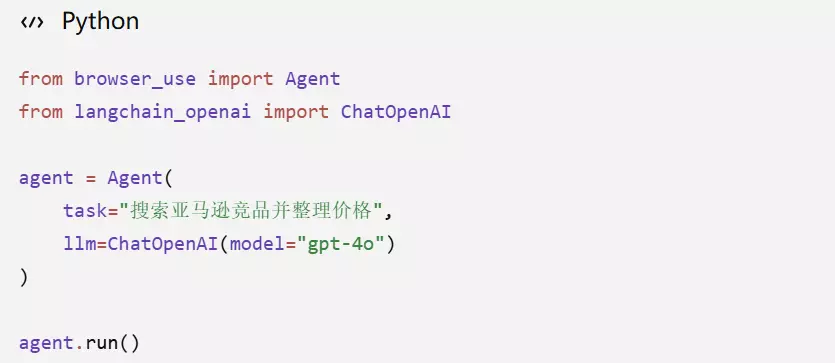
1、Quickly Creating a Browser Use Agent with Python
Before using Browser Use, you need to complete Python environment configuration, browser dependency installation, and large language model connection. Once the basic configuration is done, developers only need to define the task goal, and the agent can automatically execute subsequent operations based on the web page state.
Simple operational steps:
(1)Install Browser Use
(2)Configure the LLM
(3)Create the Agent
(4)Input the task goal
2、Browser Use Basic Task Execution Workflow
When you run the automation code, Browser Use undergoes a rigorous “perception-decision-execution” loop under the hood.
- Environment perception: Launch the Chromium browser and load the target web page. Capture the current page’s HTML tree, extract all interactive elements (buttons, input boxes, links), and take a screenshot of the current screen.
- Task decision: Send the task goal, stripped-down DOM tree, and web page screenshot to the LLM. The LLM evaluates the gap between the current state and the goal, reasons through the context, and outputs the next required action.
- Action execution: The Browser Use framework receives instructions from the LLM (such as click_element(id=12) or input_text(id=5, text=”ergonomic chair”)) and drives the browser via Playwright to perform the actual operation.
- State update: After the operation is complete, wait for page refreshes and dynamic loading, then re-enter the first step until the large model judges that “the task is finally completed” and returns the result.
3、Browser Use Automation Real-World Workflow
Taking e-commerce competitor analysis as an example, traditional methods usually require operators to search for products manually, record prices, and organize user reviews, which consumes significant time and is difficult to track continuously. Through Browser Use, users only need to input the target task, and the agent can complete the entire workflow based on the web page state:
- Access the target website: The agent opens the designated e-commerce platform according to task instructions and enters the target product page.
- Execute keyword searches: Input product keywords based on user needs and filter relevant competitor data.
- Extract key data: Automatically capture page information such as product prices, ratings, sales volume, and reviews.
- Organize analysis results: Structured processing is applied to the collected data, outputting information required for subsequent product selection or operational analysis.
In this manner, Browser Use transforms web workflows that originally relied on manual operations into executable AI agent tasks, making it suitable for scenarios like competitor monitoring and market analysis that require repetitive browsing and information organization.
4、A Matrix Overview of Browser Use Application Scenarios
| Application Scenario | Typical Tasks | Application Value of Browser Use |
| E-Commerce Operations | Product searching, competitor price monitoring, product selection analysis, backend operations | Adapts to page structure changes across different e-commerce sites, reducing duplicate development costs for automation scripts. |
| Global Data Collection | Market information organization, social media content analysis, public data gathering | Handles complex tasks requiring web interactions, suitable for scenarios lacking APIs or experiencing large page structure shifts. |
| Enterprise Process Automation | Data entry and synchronization for CRM, ERP, and SaaS systems | Connects different systems by emulating user operations, extending workflows that traditional API automation cannot cover. |
| Software Testing | Page interaction testing, form testing, compatibility checks | Uses visual understanding capabilities to test dynamic web pages, improving test coverage in complex interaction scenarios. |
III. How to Ensure Stable Operation of Browser Use?
1、Establish a Stable Browser Running Environment
Browser Use relies on browsers to complete web interactions, while global websites usually combine IPs, device environments, and access behaviors to judge if a request is anomalous. If a fixed environment is used to execute a large volume of tasks over the long term, it may trigger CAPTCHAs or access restrictions, affecting the continuous running of the agent.
Key areas to focus on:
- Maintain environmental parameter matching: Configurations like User-Agent, language, and time zones should align with the access region to avoid obvious environmental conflicts.
- Optimize automation settings: Adjust browser running parameters based on business needs to minimize the differences between the automated environment and real user profiles.
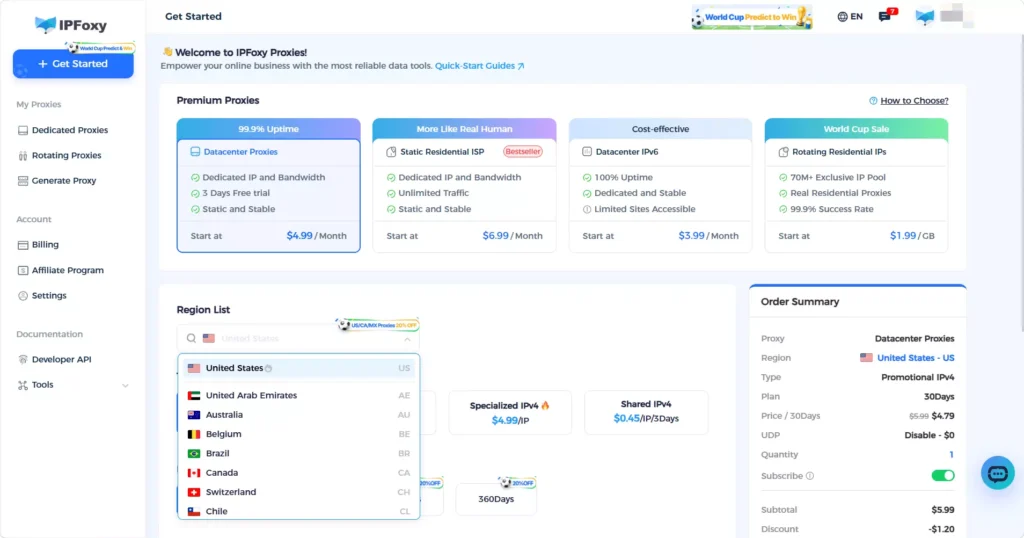
- Configure stable network egress: For long-term access scenarios like e-commerce competitor monitoring and data collection, combine the setup with a dedicated static residential proxy (such as IPFoxy) to maintain a stable IP environment. Compared to frequently changing network configurations, static residential IPs are better suited for tasks requiring continuous access and long-term state maintenance, helping reduce anomaly verifications.
2、Control LLM Call Costs Reasonably
Unlike traditional automation, Browser Use needs to call large models continuously to analyze web page states; therefore, token consumption is a critical issue for corporate deployment. Especially in Vision mode, web page screenshots and DOM data inflate model input costs.
Common optimization methods:
- Reduce irrelevant page data: Crop screenshots and filter DOM content to retain only key interaction elements like buttons, input boxes, and links.
- Deploy a combined model architecture: Use low-cost models for simple page operations, and call stronger models only for complex page understanding or multi-step reasoning tasks.
- Save execution states: Retain session details for repetitive tasks to minimize extra calls caused by the agent analyzing the exact same page repeatedly.
3、Establish a Maintainable Agent Architecture
When Browser Use handles long-process tasks, requiring a single agent to complete searching, analyzing, and operating simultaneously increases execution failure probabilities. Therefore, in enterprise scenarios, utilizing a multi-agent architecture to split tasks is highly recommended.
Analytical workflow:
- Data collection agent: Responsible for searching products and acquiring page data.
- Analysis agent: Responsible for organizing information like prices and reviews.
- Execution agent: Responsible for completing backend operations.
Concurrently, error recovery mechanisms must be added. When network fluctuations, page load failures, or model timeouts occur, saving session data like cookies allows the agent to resume execution from the point of interruption, avoiding running the entire workflow from scratch.
IV. FAQ
Yes, but it requires optimization for production environments. During long-term operations, you must focus on browser environment stability, task exception recovery, and model call costs. Designing workflows and state management reasonably improves the execution continuity of the agent.
The cost of Browser Use primarily stems from large language model calls. Because every task execution requires analyzing the web page state, complex processes can generate substantial token consumption. You can lower overall costs by reducing irrelevant page data, optimizing workflows, and choosing appropriate models.
In complex web tasks, network fluctuations, page changes, or abnormal model responses can cause task interruptions. During actual deployment, you can save the browser session state and integrate exception capture mechanisms to let the agent resume from the point of interruption, preventing the entire process from running repeatedly.
Browser Use will not completely replace RPA; instead, it extends automation capabilities. Fixed-process tasks remain highly suited for traditional RPA, while tasks requiring web page understanding and dynamic decision-making are better suited for AI agents.
V. Conclusion
Browser Use drives browser automation from a rule-driven approach to an AI-driven framework, enabling AI agents to understand web pages and complete complex operations. Compared to traditional automation tools, it possesses stronger page adaptability and task generalization capabilities. In scenarios like e-commerce and data analysis, optimizing running environments, controlling LLM costs, and adopting multi-agent architectures can further enhance the stability and execution efficiency of AI browser automation.