While you only have two or three accounts, you can handle them by hand. The moment there are more, small things start to get expensive. One forgotten cookie, the same fingerprint on two profiles, or an accidental login from your own IP, and the platform already sees the connection. And after one ban, the whole group usually goes down with it, because anti-fraud reads the same device behind different logins.
Afina Browser is built the other way around. Each account lives in its own environment, where the fingerprint, network, cookies, and cache belong to it alone. Below we break down what that environment is made of, which features close the typical pains of multi-accounting, and where the browser pays off most.
Why accounts get linked even on different proxies
Many people assume a separate IP already settles the question. It doesn’t. Sites read dozens of signals at once, and the address is just one of them. Canvas, WebGL, fonts, engine version, interface language, screen resolution, cookie behavior, all of it adds up to a single device portrait.
Two profiles can come from different addresses, but if they share the same fingerprint and overlapping sessions, the link still shows. So isolation has to work on every level, not come down to swapping the address.
What usually gives a profile cluster away:
- an identical digital fingerprint across several accounts
- shared cookies or a leaked old session between profiles
- a mismatch between the IP geolocation and the browser’s time zone and language
- a real IP leak through WebRTC past the proxy
Afina closes all these points at the profile level itself, without external add-ons, so each account looks like a separate user from the very first launch.
The profile as a separate digital space
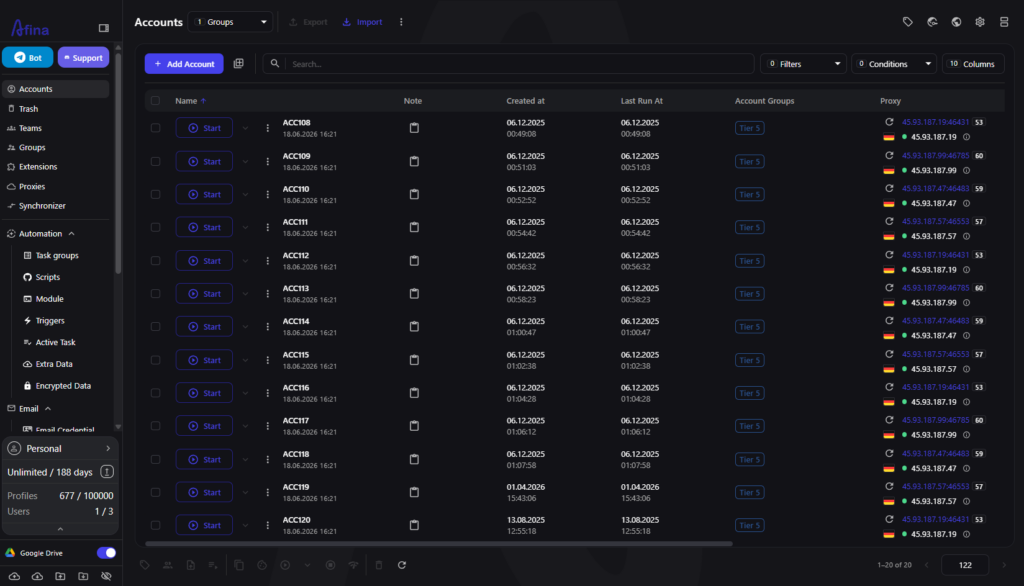
The browser’s idea is simple. One account runs in one self-contained profile. Inside it there’s its own pair of fingerprint and network, its own set of cookies, and its own storage that doesn’t overlap with the rest.
Profiles can’t see one another, so even dozens of windows open in parallel don’t share data. That removes the main fear of manual work, when one tiny detail drags a whole pool down with it.
Creating a profile takes seconds, and bulk creation spins up dozens of blanks with clean parameters at once. From there they’re easy to sort into groups and tags by platform or project, so a large volume stays under control.
Setting up the digital fingerprint to match a real device
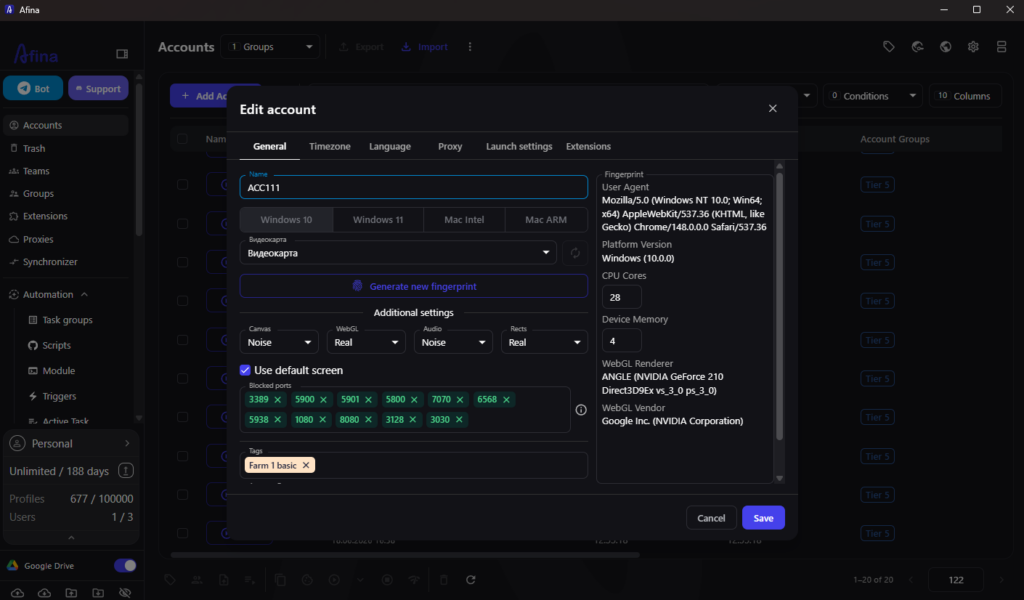
Fingerprints are where accounts fail most often, so Afina gives them special attention. The browser lets you align canvas, WebGL, fonts, time zone, and language so the profile looks like a coherent device, with parameters tuned to one another.
What matters is that these parameters don’t conflict. When [fingerprint management] works together with the network, the clock, the language headers, and the geo data come together into one consistent picture.
What this affects in practice:
- the profile passes typical fingerprint checks without obvious anomalies
- the language and time zone are pulled from the IP instead of being set by hand
- a bulk fingerprint change for a group of profiles doesn’t break their consistency
And it works in a slightly paradoxical way. An account avoids attention precisely because it looks ordinary, not perfectly clean.
The network under control: proxies, UDP, and WebRTC
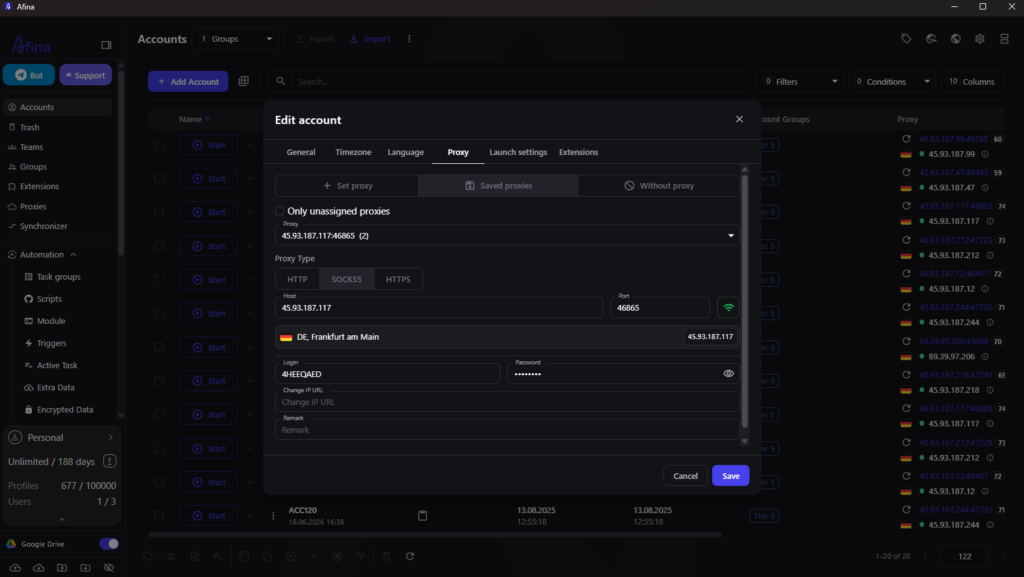
In Afina a proxy belongs to a specific profile, not to the whole browser at once. Each account gets its own channel, and the built-in [proxy manager] keeps the entire pool in one place, with statuses, exit addresses, and country flags.
You get the channel itself from a reliable provider, such as IPfoxy, and the browser is responsible for making that IP look natural paired with the profile. It supports HTTP, HTTPS, and SOCKS5, and UDP over SOCKS5 turns on automatically as soon as the channel passes UDP traffic, so QUIC and HTTP3 stay active.
WebRTC control is worth a mention too. When needed, you turn it off completely so the real IP doesn’t leak past the proxy, and the mandatory-proxy rule keeps a profile from starting without a network. Small things, but accounts fail on exactly these when the geo and the address start to contradict each other.
Half the success with ready-made accounts depends on how you import sessions. The cookie manager in Afina lets you import, export, and isolate cookies so a login looks like the continuation of an old session and doesn’t trigger a new-authorization check.
Profile data is stored locally and protected with AES-256 encryption and your own keys. Backup and synchronization through Google Drive or Afina Cloud bring the working environment back after a reinstall and let a team work with shared roles. The account pool is no longer tied to a single machine and survives a move without losses.
Routine on autopilot: scripts, the synchronizer, and triggers
The bigger the pool, the more expensive manual routine becomes. Here Afina shifts from separate actions to automation, where repetitive scenarios run on their own.
The visual builder assembles scripts from blocks without code, and more complex logic can be moved into separate modules. On top of that runs a scheduler that launches tasks on a timetable.
What removes the most manual work:
- no-code scripts for warm-up and routine actions across hundreds of profiles
- a synchronizer that mirrors one action across many windows at once
- scheduled triggers and task groups for mass launches
- a catalog of ready-made scenarios you can download and use right away
Thanks to this, a single operator handles a volume that used to need a whole team, and does it without the chaos of dozens of open tabs.
Controlling the browser from an AI agent’s side
Afina is also open to external control, and that option often gets underrated. A local API and an MCP server let an AI agent or Claude Code create profiles, assign proxies, and run scripts directly.
Automation moves to another level because of this. Instead of clicking through the interface, you describe the task and the agent carries it out through the browser. For teams building their own pipelines, the anti-detect stops being a standalone program and becomes part of a wider system.
Who gets the most out of Afina
The browser is useful anywhere work depends on more than a couple of accounts. The bigger the scale, the more noticeable the gain from isolation and automation.
Typical areas where [multi-accounting at scale](https://afina.io/en/multiaccounting) gives the most:
- traffic arbitrage and media buying with several ad accounts
- SMM and running many brands and pages without overlap
- e-commerce and working across several marketplaces under different geos
- Web3 and crypto tasks with a large number of profiles
- agencies that distribute accounts across clients and employees
The same logic everywhere. A large pool of accounts that has to stay isolated and ready for daily work.
Try Afina Browser
If manual management is already hitting the ceiling, Afina takes away the main headache. Profiles don’t overlap, the fingerprint matches the network, and scripts take over the routine. Create your first profiles, connect your channels, tune the fingerprint to your tasks, and hand the routine over to automation.
Before downloading, activate a promo code and grab a discount on your plan:
- SALE20 gives 20% off all plans except Max
- SALE30 gives 30% off the Max plan
FAQ
It removes the technical reasons for links: a shared fingerprint, one IP, and mixed cookies. Each profile works as a separate environment, and that’s exactly what anti-fraud systems compare. The isolation is strong, though it doesn’t replace careful behavior with the accounts.
With bulk creation, tags, the synchronizer, and no-code automation, one person runs hundreds of profiles from a single space. Grouping by platform or geo keeps large pools readable even day to day.
The browser works with proxies in HTTP, HTTPS, and SOCKS5, and it also supports UDP over SOCKS5 for QUIC and HTTP3 traffic. A channel is assigned to each profile separately.
Yes. Profiles are backed up and synchronized through Google Drive or Afina Cloud, and local data is protected with AES-256 encryption. The working environment is restored, and the team carries on with shared roles.