If you are a handmade artist, vintage lover, or independent designer and want to make money on Etsy, the term “local store” is something you cannot avoid. In 2026, Etsy’s review system will only become stricter and more aggressive. You either get banned right after opening—or you build a stable, revenue-generating store. The difference comes down to whether you did your homework at the beginning.
This beginner-friendly guide will break down the full Etsy local store setup process and the core anti-ban principles in the most straightforward way.
I. What is an Etsy Local Store?
Simply put, an Etsy local store refers to a shop registered using real identity and credentials from the target country (such as the United States, United Kingdom, Hong Kong, etc.).
Compared to cross-border stores registered with mainland China information, the difference is huge from the start.
Core advantages in one sentence: higher traffic, faster payouts, lower ban risk.
- Traffic boost: Etsy’s algorithm prioritizes local stores because they are considered more “authentic” and more trusted by local buyers.
- Faster payouts: Local stores can directly bind local bank accounts (e.g., U.S. checking accounts), resulting in faster settlements and lower fees. Cross-border stores rely on third-party tools like Payoneer or WorldFirst, which are slower and involve exchange loss.
- Lower ban risk (relatively): As long as your environment and data are clean, local stores are significantly more stable. Cross-border stores are frequently triggered for KYC reviews and related bans.
Local Store vs Cross-border Store Comparison
| Comparison | Local Store (e.g. US) | Cross-border Store |
| Traffic Weight | High, platform-supported | Low, slow initial exposure |
| Payment | Local bank, fast & low-cost | Third-party payout tools |
| Setup Cost | High (identity, address, tax docs) | Low (business license + ID) |
| Ban Risk | Relatively low if compliant | Higher (KYC & linking issues) |
II. Etsy Local Store Setup & Operation Guide (Step-by-Step)
Step 1: Prepare core registration materials
To open a stable U.S. local store, the following materials are essential and must be real, clean, and unused:
- Identity information: Real U.S. resident name and SSN (Social Security Number) or ITIN (Individual Taxpayer Identification Number). This is your “ID card.”
- Phone number: A U.S. local number for verification codes. Virtual numbers like Google Voice are risky; physical SIMs like Ultra Mobile or T-Mobile are recommended.
- Bank account: A U.S. checking account for payouts. Chase or Bank of America is preferred.
- Address & tax forms: A real residential U.S. address (not PO box) and tax documents such as 1099-K. This address may receive Etsy verification postcards.
- Email: Gmail or Outlook is recommended. Avoid domestic email providers.
- Clean IP network: This is critical and explained below.

Step 2: Configure environment and start registration
Before starting registration, you must understand Etsy’s risk control logic. Many sellers get banned immediately after signup—not because of their data, but because of environment issues.
Etsy does not only verify what you input. It actively analyzes two core signals:
- Device/browser fingerprint
- Network IP address
If either looks suspicious, the system may classify the account as “non-human operation” or “high-risk fraud,” leading to KYC review or permanent bans.
Therefore, environment setup is essentially about making Etsy believe you are a real local user.A common setup is: fingerprint browser + proxy IP from IPFoxy.
Steps:
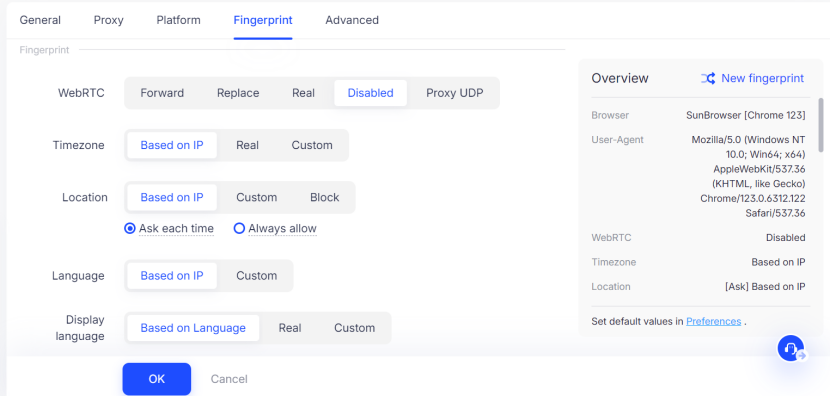
- Open a Antidetect browser (e.g., AdsPower) and create a new profile. Set language to English and time zone matching your IP region.
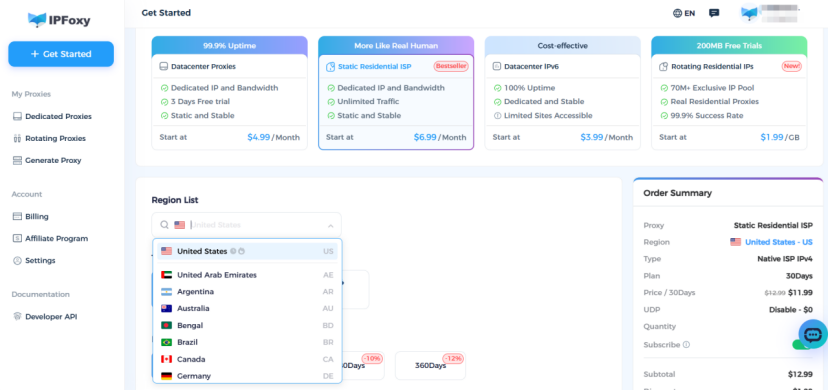
- Purchase a dedicated proxy from IPFoxy and obtain residential IP credentials (IP, port, username, password).
- Configure the proxy inside the browser network settings and test connection.
- Use whoer.net to check environment integrity (no DNS leaks, correct fingerprint).
- Once clean, proceed to Etsy registration.
Step 3: Compliant shipping & cost control
- Real tracking routes: Etsy strictly monitors fake shipping. If you ship from China, never use domestic tracking numbers directly. You must use overseas warehouse fulfillment or valid local tracking numbers that match your “local store identity.”
- Processing time setup: Set reasonable processing time (e.g., 3–5 days) so logistics match your store location.
- Cost calculation: Don’t forget platform fees: 5% transaction fee,~3%–4% payment processing fee and $0.20 listing fee per item
III. Etsy Anti-Ban & Risk Avoidance Guide
1. Real & Trusted IP
Etsy is extremely sensitive to IP behavior and can accurately classify IP types:
- Datacenter IPs (AWS, Google Cloud, Alibaba Cloud): Immediately flagged and often banned upon registration.
- Shared proxy IPs: If one user triggers risk, all accounts using the IP may be linked and banned.
- Non-target country IPs: Example: registering a U.S. store using UK/HK IP will be rejected.
Correct approach:
Use native residential ISP proxies (e.g., Comcast, AT&T home networks). These appear as normal household internet users.
So you need to ensure IP, timezone, language, and registration identity all match.Using dedicated static residential IPs from IPFoxy ensures a clean, stable environment.
2. Compliant fulfillment
- Always use valid tracking numbers
- Set realistic processing times
- Consider overseas warehouse fulfillment for large-scale operations
3. Operational rules
- Avoid frequent changes in store name, password, or payment info within the first 3 months
- Start slowly: 1–2 listings per day in the first 2 weeks
- Reply to customers within 24 hours
- Maintain stable login environment (same device, same IP, same browser profile)
IV. FAQ
Usually due to environment issues: datacenter IP, poor fingerprint masking, or previously linked device history.
Follow “one device, one IP, one store” rule strictly.
Local stores are usually approved within 3–5 business days, but risk reviews may extend to 2–4 weeks.
It depends on the provider. Choose reliable sources with long-term support to avoid reused identity risks.
Yes. ITIN is accepted by Etsy, but must be officially issued by the IRS.
V. Summary
Building an Etsy local store is not just about registration—it’s about creating a fully “local identity system.”
From day one, you must think like a real local seller—use local identity, local network, and local operational logic.
Only when every part (data, environment, logistics, operations) is properly aligned can your store survive long-term and scale sustainably.