












Many e-commerce sellers encounter the same problem when using WhatsApp for customer outreach or social media operations: newly registered accounts get restricted shortly after creation, or even banned directly. In fact, WhatsApp has a complete risk-control system that evaluates whether an account behaves like a real user by analyzing social relationships, usage behavior, and login environment. Therefore, before using an account for business activities, understanding the platform’s underlying logic and building account trust through a proper warm-up process is essential for long-term stable operation.
This article will systematically explain the core logic behind WhatsApp account warm-up, the 21-day SOP process, and common FAQs to help you establish a stable account environment and reduce the risk of restrictions or bans.
I. The Core Logic of WhatsApp Account Warm-Up
1、Building a Real Social Network
WhatsApp is fundamentally a relationship-based social platform. The first priority is to build a genuine social network so that the system does not classify the account as spam. This requires continuously performing normal user activities such as:
- Importing contacts from your phone address book
- Chatting with acquaintances
- Making voice or video calls
- Joining real groups
- Maintaining long-term interactions
When the system sees that your account has a complete social relationship chain, the account’s trust level and weight increase significantly.
2、Behavior Patterns That Match Real Users
WhatsApp closely monitors frequent or unnatural activity. Excessive activity can actually attract platform attention. Instead, you should maintain natural activity levels. The core principle is slow and authentic behavior so the system recognizes the account as a normal user.
3、A Stable Network Environment
WhatsApp evaluates account environments mainly based on two aspects:
- Device isolation: If multiple accounts are logged in on the same device environment for a long time, the platform can easily detect relationships between those accounts. If one account becomes abnormal, it may lead to batch restrictions or bans.
IP isolation: Frequently changing IP addresses or using shared data center IPs can trigger bot detection and cause the account to be flagged as a virtual account. A stable and authentic IP environment helps gradually establish a trusted login history, reducing the probability of triggering risk control.
II. WhatsApp Account Warm-Up SOP (21-Day Process)
Day 1: Account Setup and Initialization
1、Account environment configuration
For WhatsApp account warm-up, a stable and clean residential proxy is critical for long-term operation. Compared with shared data center IPs, residential IPs appear more authentic and stable, making them less likely to trigger bans. It is recommended to obtain a residential proxy from IPFoxy to configure the device used for registration and login, ensuring the uniqueness and authenticity of the account environment. IPFoxy proxies come from real residential networks provided by local carriers, with high IP purity and low fraud risk.
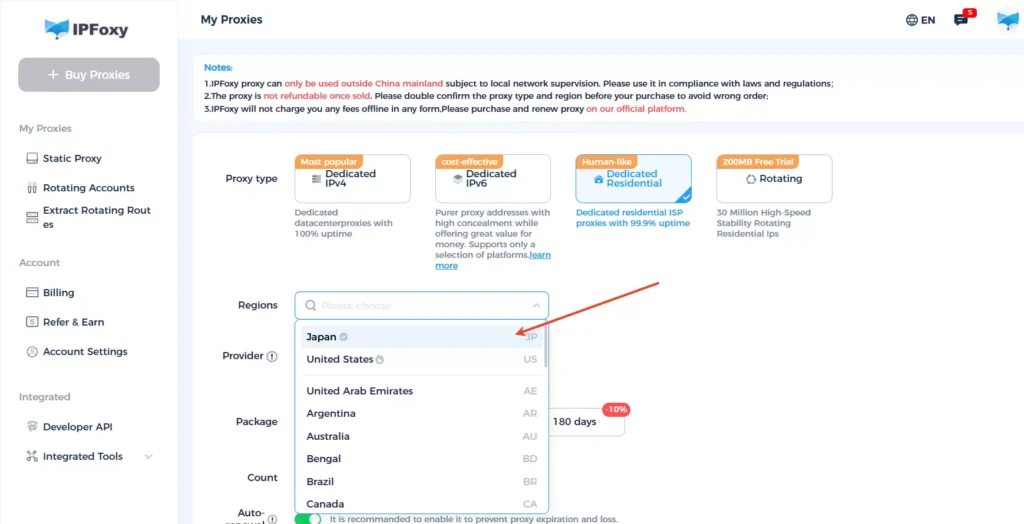
If you operate multiple accounts, proxies can be combined with multi-account tools to achieve one device, one account, one IP. Common WhatsApp isolation methods include:
- Using independent mobile devices for different accounts
- Building separate device environments through cloud phones or virtual phones
- Creating different device fingerprints using an Anti-detect browser
2、Key points for account registration and initialization
When registering a WhatsApp account, pay attention to the following:
- Use a real physical SIM card
- Avoid frequent IP changes
- Use a clean network and IP, and ensure the region code matches the phone number as closely as possible
- Do not log in to WhatsApp Web or the desktop version within the first 24 hours after registration
- Complete basic account information such as a real profile photo, nickname, and status
- Enable two-step verification in the settings to add an additional layer of account protection
- Adjust privacy settings to control who can see your last seen status and profile information to prevent privacy exposure
Days 2–4: Initial Interaction Phase
1、Passing account trust from older accounts
Within 24 hours after registration, use 2–5 older accounts to scan the new account’s QR code and save it as a contact.
Let the older accounts send the first message to the new account. The new account should wait about five minutes before replying and interact for 2–4 rounds.
2、Maintain natural browsing behavior
In addition to chatting, the account should show normal browsing activities. Each day you can browse friends’ Status updates, occasionally view contact profiles, sometimes reply to Status posts or interact with reactions, and stay online for short periods rather than remaining logged in continuously. Important practical points include:
- The first message to the new account should be sent by an older account.
- Both the new and old accounts should add each other to their phone contact lists to avoid being recognized as strangers.
- The new account should avoid sending any links or promotional content during the early days to reduce the risk of being marked as spam.
- Avoid creating any groups during the first few days to prevent the system from identifying the account as a marketing account.
Days 4–14: Social Expansion Phase
After the initial warm-up stage, the account can enter a more normal usage phase.
1、Maintain stable interactions
- Chat with 3–5 contacts each day
- Maintain around 20–30 chat messages daily
2、Gradually expand the contact network
Add 2–3 new contacts per day. Save them in your phone contacts first and then sync them to WhatsApp.
3、Participate in groups moderately
Join 1–2 groups, preferably by invitation from friends at the beginning.
Maintain low-frequency interaction in groups and avoid frequent messages, advertisements, or links.
4、Group creation
New accounts should not create large groups exceeding 50 members. It is better to start with small internal groups of 5–10 members.
Group names should remain simple and avoid words such as promotion, sale, marketing, or discount, which may easily be recognized as marketing groups.
Days 15–21: Marketing Activation Phase
After the account has been running stably for about 14 days, it will generally have the following characteristics:
- A stable login environment
- Consistent chat history
- A certain number of contacts
- Normal interaction patterns
At this stage, the account can gradually begin normal marketing activities and customer communication.
To maintain a consistent sending pace and avoid sudden spikes in activity, a WhatsApp bulk message sender tool – WA Web Sender can help streamline outreach while keeping interactions natural.
III. Frequently Asked Questions
Common reasons include sending a large number of identical messages in a short time, being reported by multiple users, logging in with unstable or shared IP addresses, or frequently changing devices or network environments. These behaviors may trigger the platform’s risk-control system.
Frequent device switching is not recommended. If a new account changes devices or IP addresses multiple times within a short period, the platform may treat it as abnormal login behavior.
There is no fixed requirement. It is recommended to maintain natural usage behavior, such as logging in several times a day for chats and browsing updates rather than staying online continuously or performing sudden bursts of activity.
Conclusion
The core of WhatsApp account warm-up is to simulate real user behavior. By building stable social relationships, maintaining natural chat interactions, and gradually expanding contacts and social circles, the account can establish a normal usage history within the system. During the warm-up period, it is important to control the pace of operations and avoid abnormal behaviors such as adding many contacts or sending bulk messages within a short time. After about two to three weeks of stable warm-up, the account’s activity level and trust score typically improve, making subsequent customer communication and marketing activities safer and more stable.

