












Many beginners encounter the same problem when posting videos on TikTok: the account has just been registered, several videos are uploaded, yet the views remain extremely low. Even with carefully produced content, it still fails to receive traffic recommendations. This often leaves new TikTok operators feeling anxious and unsure about what they are doing wrong.
This article explains the core logic behind the TikTok ranking algorithm and shows how to get your videos recommended to the right audience and overcome low view counts.
I. Core Logic of the TikTok Ranking Algorithm
The weight of a TikTok account is essentially a scoring system that evaluates “account credibility + content value.” When the algorithm determines that an account behaves like a real creator and consistently publishes quality content, the platform is more likely to provide recommendation traffic. The following are four key dimensions that influence TikTok account weight.
1.Basic profile information
TikTok evaluates whether an account looks like a normal user, for example:
- Real profile photo
- Natural username
- Complete bio
If a newly registered account immediately includes many advertising keywords, external links, or contact details, the system may identify it as a marketing account and lower the initial trust score.
2.Network environment
TikTok also checks login environment information to determine whether the account belongs to a normal user. The platform typically monitors the following factors:
- Whether the IP address is stable
- Whether login devices change frequently
- Whether there is an abnormal network environment
- Whether the account frequently logs in from different regions
Therefore, besides keeping account information authentic, it is recommended to log in with a stable and reliable network environment.
3.User behavior
TikTok places strong emphasis on behavioral data. Accounts should behave like real users while building clear interest labels so the algorithm understands the account’s niche.
- The system is more likely to push videos to users who share the same interest tags, improving content matching and recommendation accuracy.
- Account behavior should appear natural. For example, watching large numbers of videos in a short time, rapidly liking content in batches, or browsing many unrelated content categories may cause the system to classify the account as abnormal, which can affect account weight.
It is recommended to maintain natural interaction behavior and keep interest tags focused within one niche.
4.Content quality
Ultimately, TikTok distributes traffic based on content performance data. The platform mainly evaluates five key metrics:
- Completion rate
- Like rate
- Comment rate
- Share rate
- Follow rate
These metrics determine whether a video can enter a larger recommendation pool. In practice, TikTok follows a typical retention pattern known as the 40%–20%–10% rule:
- 40% of viewers continue watching after the first few seconds
- 20% watch through the middle of the video
- 10% watch the video to the end
When a video achieves this level of retention, the system is more likely to push it into larger traffic pools. Therefore, creators should pay close attention to the first three seconds of the video, overall pacing, niche consistency, and interaction prompts.
II. TikTok Account Warm-Up SOP: Build a High-Weight Account in 7 Days
Day 1: Environment setup and initial browsing
1.Preparation before TikTok registration
TikTok has strict risk control regarding account environments. Before registering an account, environment isolation should be prepared in advance. If the environment appears abnormal, the following issues may occur:
- Registration failure
- Unable to log in
- Account suspension immediately after registration
It is recommended to prepare from three aspects: device, phone, and network.
Login device:
Using an anti-detect browser, cloud phone, or an iOS device is recommended. Try to maintain one account per device and avoid logging multiple accounts on the same device frequently. Keep the device environment clean to prevent account association. If operating multiple accounts, ensure proper device isolation through physical separation or anti-detect browsers.
Registration phone number:
It is recommended to use a phone that has not been used to register a TikTok account before, preferably iOS. A new device or one that has been factory reset tends to be more stable. Location services should also be turned off, and frequent system changes or flashing should be avoided.
Network environment:
Use a stable residential IP network environment. Avoid public proxies or shared network services, as these are commonly used by many people and can easily cause bans, zero views, or traffic restrictions.
It is recommended to use a native residential proxy. Compared with regular residential IPs, it offers a higher level of authenticity. IP resources from regions such as the United States, Japan, and Southeast Asia can be obtained through IPFoxy and configured on the operating device. For higher bandwidth scenarios such as live streaming, the IPFoxy network customization feature can also optimize the connection.
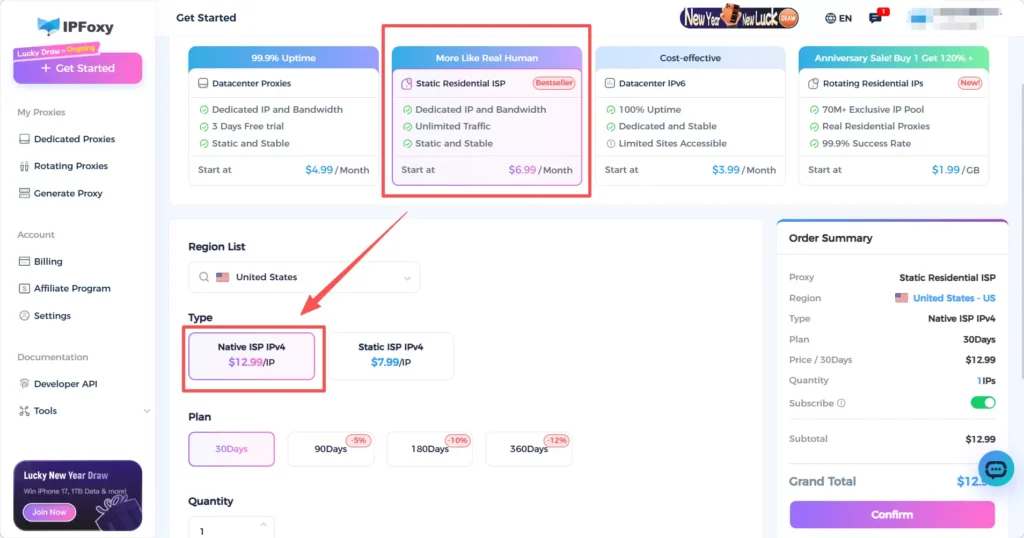
After completing the device, phone, and network configuration, proceed with TikTok account registration. This can significantly reduce the risk of the account being flagged as an abnormal environment and improve initial stability.
2.Initial browsing after registration
After registering the account, do not rush to modify the profile or publish content. First complete the environment initialization.
Suggested actions:
- Browse the For You page like a normal user and watch videos for about 30 minutes
- Try to watch interesting videos to completion
- Avoid frequent likes or comments, keeping the like ratio under 10%
- Do not actively follow accounts at this stage
Day 2: Complete profile information and vertical browsing
On the second day, gradually complete the account profile and allow the algorithm to start identifying the account’s interest direction.
- Upload a profile photo, complete the bio, and bind an email to improve account completeness
- Search niche keywords and watch videos within the same content category
At this stage, browsing behavior helps the platform gradually identify the account’s content preferences.
Day 3–5: Tag establishment stage
After basic browsing, the account enters the tag establishment stage where the algorithm identifies the content niche.
Daily suggestions:
- Watch vertical content for 60–90 minutes per day
- Search niche keywords and watch top accounts in the same category
- Interact moderately with high-quality videos (likes, saves, comments)
- Follow 5–8 accounts within the same niche each day
Through continuous browsing and interaction, the platform gradually assigns clear interest tags to the account, improving the accuracy of future recommendations.
Day 6–7: Authority accumulation and light posting
When more than 60% of the videos on the For You page belong to the target niche, it indicates that the account’s tags have been established. At this stage, start publishing content.
- Post 1–2 niche-related videos
- Recommended video length: 15–30 seconds
- Content types such as tutorials, lists, or short educational videos perform well
- Choose active user times for posting, such as 20:00–22:00
After publishing, replying to comments can help increase engagement and improve the chances of additional recommendations.
III. How to Determine Whether TikTok Account Warm-Up Is Successful
The result of account warm-up can be judged by three key indicators: views, completion rate, and engagement data.
- Views
TikTok usually provides a small initial recommendation pool to test new videos. If the account status is normal, test videos can typically reach 1,000–5,000 views. If multiple videos consistently exceed 1,000 views, it indicates that the account has established a basic weight.
- Completion rate
The average completion rate on TikTok is around 58%, while short videos under 15 seconds may reach over 70%. For new accounts, maintaining a completion rate between 40% and 60% usually indicates a healthy account status.
- Natural engagement rate
The average engagement rate on TikTok is around 2.5%–4%. If test videos start receiving natural comments, user follows, and steady growth in likes and saves, it suggests that the platform is recommending the content to interested users.
IV. Common TikTok Account Warm-Up Questions (FAQ)
Pause posting for a few days and continue warming up the account for two to three days. Watch and interact with niche content while building a clear account persona to increase authenticity. Maintain a stable network environment and then resume posting one or two quality videos per day to observe changes.
A new device or network environment may not yet be trusted by the system, so recommendations are reduced. It is recommended to first browse videos normally and keep the IP consistent, then test posting gradually until device trust improves.
This is common for new accounts. Continue warming up the account for at least one week so the system can establish trust in the account.
Conclusion
This article explains the ranking logic behind TikTok accounts and the process of warming up a new account. It describes how the platform evaluates account credibility and content value through profile information, user behavior, and content quality. It also provides a seven-day account warm-up process to help new accounts establish interest tags and build initial authority. In addition, it explains how to evaluate success using views, completion rates, and engagement metrics, and offers solutions to common issues encountered when operating new accounts.

