For many gamers, registering an account and accessing overseas stores via Steam is an effective way to get more game options or cheaper games. However, in practice, you often encounter issues like incorrect region detection, the store showing “This content is not available in your region”, mismatched payment methods, or account risk control requiring a “region change”.
This article starts from the problems encountered in registration and cross-region store access, providing a practical guide from proxy server selection to the complete operation process.
I.Scenarios Requiring Cross-Region Registration & Access on Steam
While Steam officially expects users to access the store normally in their local region, gamers do encounter situations where cross-region access is needed in real use.
1、Access games not available in your local region
Certain games may be “unavailable for purchase/not listed in the local store” due to different policies, distribution strategies, or rating systems.
Many gamers choose to access Steam stores in target countries to check store information in advance or test if they can add games to their wishlists.
2、Claim or purchase region-exclusive content
Some games offer “region-specific bundles” or free region-limited content. To claim these, gamers need to access the store page of the designated country.
3、Pre-unlock or experience pre-ordered games
A few games unlock earlier in certain regions. Cross-region access is used to check progress, add to wishlists, view prices, etc.
4、Compare game prices across regions
Many gamers want to check overseas store prices for price comparison and discount references.
Note: Most gamers’ real demand for cross-region access is not “illegal purchasing” but browsing the store and viewing content. These needs do not directly violate Steam’s terms, but a stable and usable access method is still required.
II.Are There Risks to Cross-Region Registration & Access?
1、Abnormal login environment triggering risk control
Steam detects account login environments, including IP, geographic location, and device fingerprint. An unstable environment—such as frequent IP changes, using public proxy pools, or a large discrepancy between the login location and the account’s usual region—may trigger security verification:
- Re-verification via mobile phone or email
- Restriction of some account functions
- Temporary suspension of trading or market functions
2、Account violations
Using unstable, unsafe proxy IPs to purchase games at lower prices or bypass regional restrictions is likely to be identified as a high-risk account, potentially leading to:
- Order cancellation
- Payment method restrictions
- Permanent restriction on changing account region
- Account ban
III.How to Use a Proxy Server to Access Steam Store and Complete Registration
Step 1:
Steam’s risk control system has become increasingly strict on the consistency of IP/account/payment method:
- VPNs or free shared proxy IP pools are used by many users, making them prone to being marked as “high-risk” or “abused” IPs.
- Frequent node switching, unstable login environments, and mismatched IP and payment country will trigger stricter automatic requirements.
- When changing the store region, the IP region used to register the account must be consistent with the subsequent usage environment.
Therefore, a reliable, clean, and stable proxy server environment is fundamental to successfully registering and accessing Steam cross-region.
We recommend using IPFoxy’s residential IP proxy:
- Provides clean, stable residential IPs that are less likely to be marked than free proxies.
- Stable nodes with no disconnections, ensuring smooth access to Steam pages.
- Multiple countries available, suitable for viewing store content in different regions.
- Higher line quality than public VPNs, reducing the risk of being identified as an abnormal environment.
IPFoxy’s logic is to provide an access environment closer to that of real ordinary users, helping you reduce the risk of forced verification by Steam due to “abnormal environment”.
Tip: Before using IPFoxy, it is recommended to clear browser cache and exit the Steam client without a proxy first, ensuring a clean environment for accessing the target region afterward.
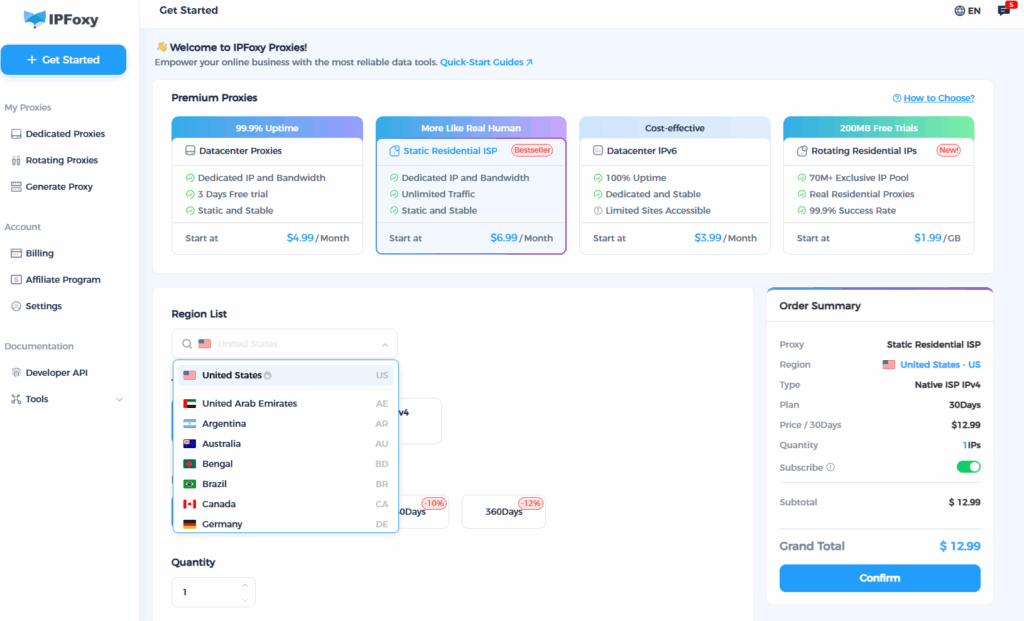
Step 2: Configure the Proxy in Browser or Client
Registration is recommended via a browser, as you need to clearly see region changes and browser proxy configuration is more flexible. The client is also usable but carries slightly higher risk.
Browser configuration methods:
- System proxy: On Windows → Settings → Network & Internet → Proxy, enter the proxy IP, port, username/password.
- Browser extension: Install an extension like Proxy SwitchyOmega, create and configure the IP in the browser, then switch to the target region to access the Steam official website.
Configuration suggestions:
- Lock one region during registration and do not switch frequently.
- After switching nodes, clear browser cache, restart the browser, and then access Steam.
- Use incognito/private mode for registration as much as possible.
Step 3: Access the Target Region’s Steam Store and Register
Connect to the target country/region node via the proxy.
Access the Steam official website and click the “Join Steam” link in the browser.
Registration email: It is recommended to use a stable email such as Gmail or Outlook.
Enter the email, check the agreement, and complete the verification code. Note: If the IP is still from the original region, Steam will automatically set the store region to your local area.
After completing registration, check if the “Country/Region of Store and Library” in the account details is the target region. You can click the “Change” button in “Settings → Country/Region of Store and Library” to switch.
Bind a mobile phone and Steam Mobile App: Improve account security and reduce the risk of future cross-region use.
Step 4: Long-Term Use & Cross-Region Purchase Suggestions
After registration, consistently log in to the client or browser using the same region node for long-term use. Frequent switching will be detected as abnormal.
Before changing regions, it is recommended to exit the Steam client → clear cache → switch proxy nodes.
The payment method must match the node’s region: For example, a Turkish region account should use a bank card or gift card issued in that region.
If you only want to “purchase games from low-priced regions”, it is recommended: Register a target region account → purchase discounted games with that account → log out and switch back to your usual account. Avoid frequent switching.
If you encounter “region change successful but still cannot find the product”, it is mostly caused by unrefreshed cache or still using the original IP. You can clear the browser cache or try switching nodes again.
Summary
Registering a Steam account and achieving cross-region store access may seem complicated, but the key lies in two points: a high-quality proxy with a stable and reliable network environment + consistent and standardized process operations. As long as you choose a clean and stable proxy service as the foundation and follow the above process from registration → verification → region switching → long-term use, you can significantly reduce the failure rate.