











For teams and creators running TikTok Shop US or managing high-value US accounts, network environment isn’t just a technical detail—it’s the absolute lifeline of your business.
Many beginners run into immediate brick walls: the infamous “0 views” bug, login anomaly alerts right after registration, or Tier-2 audit triggers as soon as a TikTok Shop goes live. In about 90% of these cases, the root cause traces back to a failed, unmasked network environment.
In this guide, we’ll dive deep into the technical traps of datacenter IPs and walk you through step-by-step how to source, test, and configure authentic US Static Residential Proxies to keep your accounts safe from risk controls.
I.The 5 Most Common IP Traps to Avoid
1. Treating Datacenter (Cloud) IPs like Residential Proxies
Many users fall into the trap of buying cheap, high-speed IPs hosted on cloud providers like AWS or DigitalOcean. However, TikTok runs immediate checks against ASN (Autonomous System Number) databases:
- Datacenter Proxies: ASN tags these explicitly as Data Center / Cloud Provider. TikTok’s logic here is simple: a real US user doesn’t stream TikToks from an AWS server rack. Once detected, your account is slapped with shadowbans (0 views) or an outright ban.
- Residential Proxies: ASN identifies these as legitimate US Telecom ISPs like Comcast, AT&T, or Verizon. The platform recognizes them as genuine home broadband connections.
Low-cost proxy providers often recycle the same pool of IPs across multiple clients. These IPs may have already been flagged due to web scraping, bot creation, or view-farming. Because TikTok’s anti-abuse system tracks and penalizes entire IP ranges based on historical behavior, using a burned IP means your account is doomed from day one.
3. Misaligned IP Location and Target Market
To target the US market, you need authentic, US-native IPs. If a provider’s GeoIP database isn’t precise—for example, the IP appears in the US, but the DNS resolves to Europe or Asia—TikTok’s system triggers an immediate alert for “Geographic & Timezone Mismatch.”
4. Confusing Broadcast IPs with Native IPs
- Broadcast IPs (Non-Native): Originally registered in another country but routed (via BGP announcement) to appear in the US. While technically tagged as US, deeper database queries expose their original registration country.
- Native IPs: The registration country matches the physical infrastructure location exactly. These IPs carry pristine database records that effortlessly pass advanced risk checks.
Native IPs provide higher authenticity, making them mandatory for platforms with strict anti-fraud rules like TikTok.
5. Using “Dynamic Residential Proxies” for Long-Term Accounts
While residential proxies beat datacenter proxies hands down, there’s a huge difference between dynamic and static Residential Proxies. Dynamic residential proxies rotate every few minutes or requests. Jumping across different cities or states within short intervals will flag TikTok’s anti-fraud system for “account hijacking” or “suspicious multi-device activity,” triggering login verification loops or instant bans.
II.How to Choose a US Static Residential IP (Testing Blueprint)
Before committing to an IP, run through these 5 core diagnostic checks using standard tools (we’ll use IPFoxy Static Native Residential Proxies as an example):
1. Location and ASN Verification
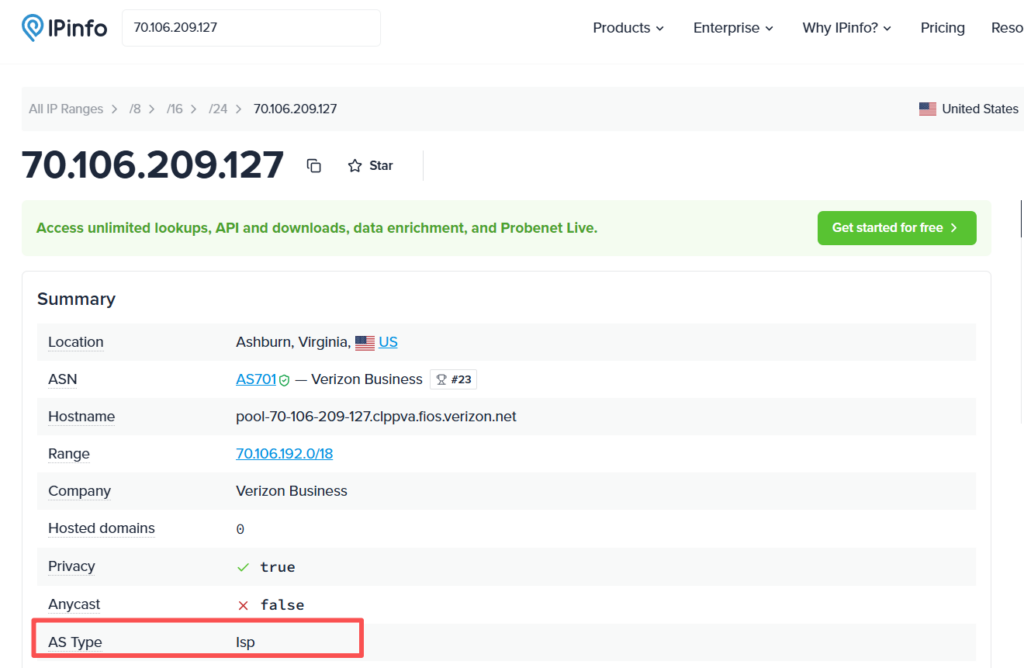
Once you acquire an IP, confirm its geolocation, ISP, and ASN match what was promised. Cross-reference results across databases like ipinfo.io or IP2Location (results can vary slightly between databases).
The ASN must belong to a tier-1 US ISP, and the Usage Type must display as ISP or Residential—never Data Center.
2. IP Reputation & Fraud Score Check
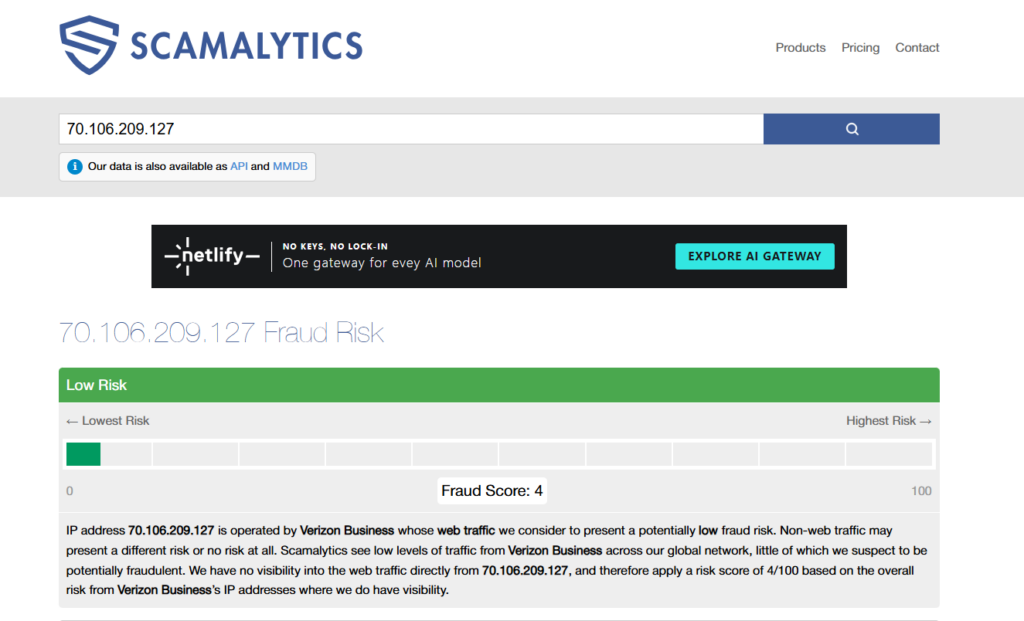
If an IP was previously abused, risk management engines retain historical penalty records. The lower the Fraud Score, the better. If an IP scores above 50, do not use it for core business/shop operations. You can evaluate this using tools like Scamalytics.
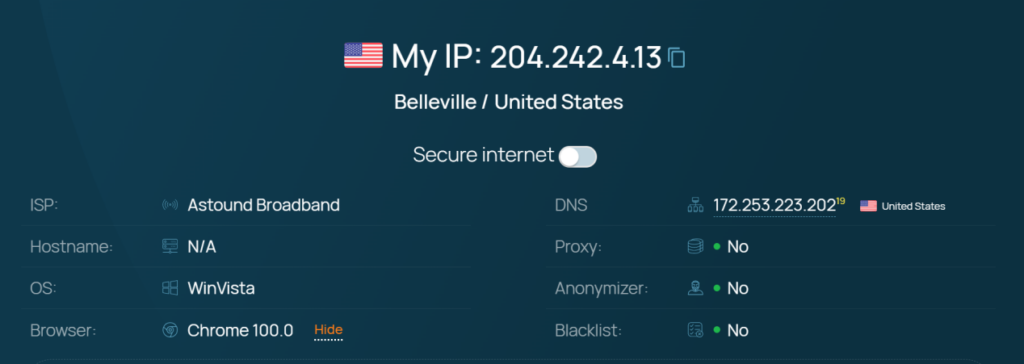
3. Proxy & Blacklist Flagging
Beyond fraud scores, verify whether the IP is flagged as a Proxy, Hosting server, or listed on spam blacklists using tools like IPQualityScore (IPQS) or Whoer.
4. WebRTC Leak Test
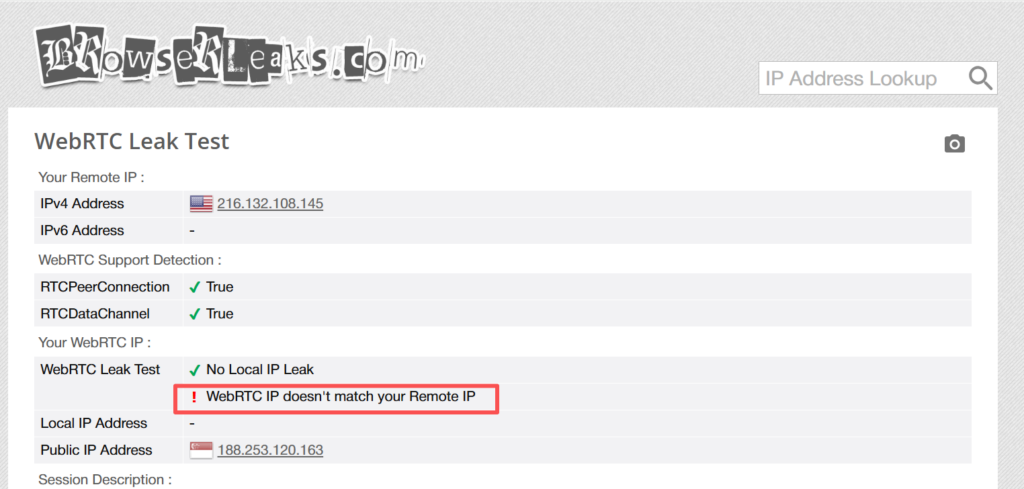
If your browser environment leaks its actual parameters, it can bypass proxy setups entirely. Incorrectly configuring an antidetect browser without syncing device parameters and timezones can leak your real location. Always run a WebRTC leak test before logging in.
5. Target Platform Stress Test
Open a fresh incognito window using the proxy and navigate to tiktok.com. Try searching for keywords or scrolling through the feed. If you are bombarded with captchas or human verification prompts, the IP has already triggered the platform’s preliminary risk filter.
III. Step-by-Step Configuration Guide
Step 1: Provisioning the IP
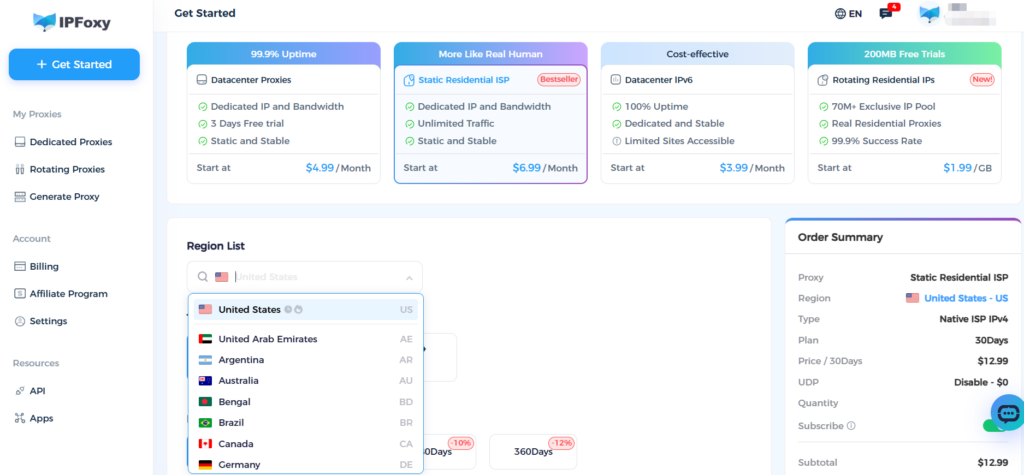
- Log into your IPFoxy Dashboard and navigate to Static Residential Proxy (ISP).
- Select United States as the target location, and choose your protocol (SOCKS5 is strongly recommended for superior stability and connection handling).
- Export and save your proxy credentials: IP / Host, Port, Username, and Password.
Pro Tip: For high-stakes operations like TikTok Shop US or scaling primary creator accounts, opt for Pro-grade Native Residential Proxies. These represent true native home broadband lines and offer higher pass-rates against strict risk controls.
Step 2: Environment Setup
Option A: Native Browser Setup (Best for single-account / lightweight use)
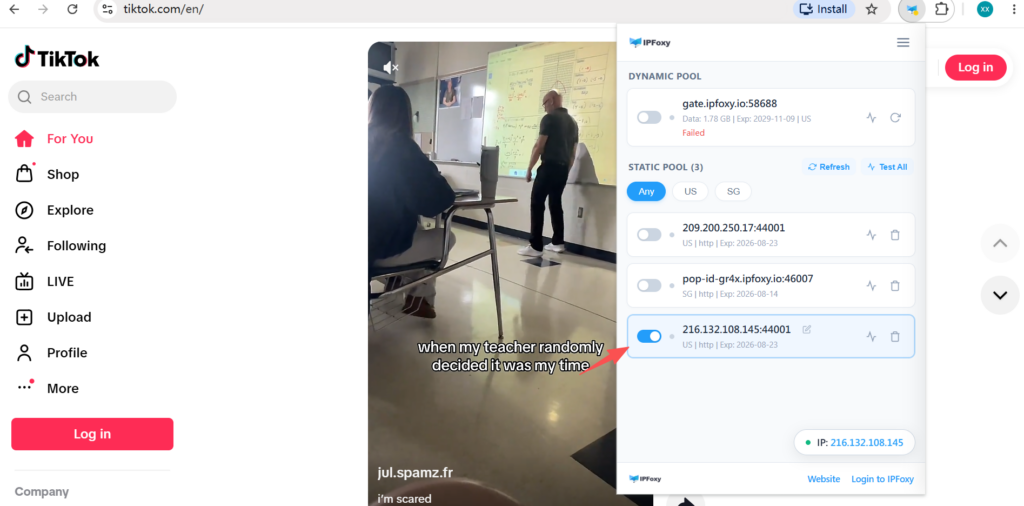
If you only need a dedicated IP inside a standard browser like Chrome, use the IPFoxy Proxy Manager extension:
- Install the IPFoxy extension from the Chrome Web Store.
- Open the extension, enter your Account Token to automatically sync your proxy list.
- Select and enable your assigned dedicated IP proxy to route traffic.
Option B: Antidetect Browser Setup (Best for multi-account / shop matrices)
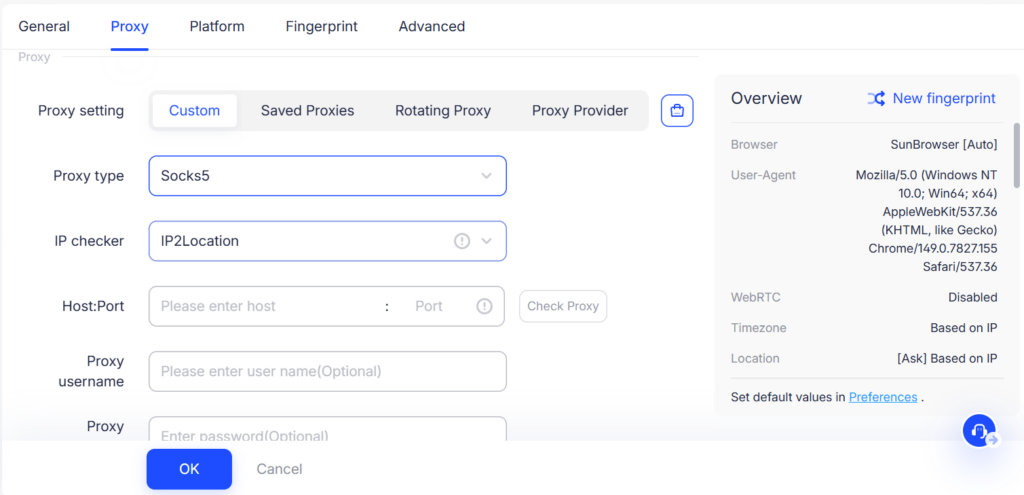
Launch an antidetect browser (e.g., AdsPower, Multilogin) and create a new profile. Set the proxy type to SOCKS5 (or HTTP), input your static residential IP credentials, and test the connection.
Crucial Spoofing Settings:
- WebRTC: Set to Replace or Disable.
- Timezone: Enable “Fill Timezone automatically based on IP”.
- Language: Lock to en-US.
Step 3: Verification & First Login
Run a connection test inside the antidetect environment. Once verified clean, proceed to TikTok.com to sign up or log in.
IV.Frequently Asked Questions (FAQ)
Q1: Can I change my static residential IP after setup?
The primary value of a static residential IP is long-term consistency. You should keep the IP identical throughout the lifecycle of core shop accounts. If you must change IPs due to an emergency, do so while the account is logged out, and ensure the replacement IP originates from the same city/region.
Q2: Why am I still getting 0 views after switching to a residential IP?
Network IP is only one piece of the puzzle. If you’re using mobile hardware, check the following:
- Did you remove the local physical SIM card?
- Is the system language forced to English (US)?
- Is system time synced with the US region?
- Is GPS location turned off?
- Are device fingerprints or Android/iOS signatures leaking?
Q3: What is the difference between Native Residential Proxies and Regular Static Residential Proxies?
Regular static Residential Proxies can sometimes be broadcasted resources reassigned from other regions via BGP. Native Residential Proxies (Pro) are physical, locally registered US home broadband connections with cleaner ASN metadata, making them ideal for high-trust environments like TikTok Shop US (TSP) registrations.
V.Summary
With TikTok US tightening its anti-abuse controls, your underlying network architecture determines your operational ceiling.
By ditching risky datacenter IPs, adopting low-fraud US Static Native Residential Proxies, and configuring them properly alongside clean browser profiles, you build an unshakeable foundation for your TikTok Shop and social media matrix.